
Ana içeriğe geç
topazlabs avatarı

Topaz Upscale Image API

topazlabs/upscale/image

Görsellerinizi güçlü yapay zekâ modelleriyle büyütün ve iyileştirin. Çözünürlüğü 4x’e kadar artırın, detayları geri getirin; fotoğraf, CGI ve metin için özel modlar ve profesyonel kalitede sonuçlar için isteğe bağlı yüz iyileştirme kullanın.

upscale
Megapiksele göre fiyatlandırılır

Model girdisi

Input

Url of the image to be upscaled

Model to use for image enhancement.

Min: 1 - Max: 4

Factor to upscale the video by (e.g. 2.0 doubles width and height)

Output format of the upscaled image.

Subject detection mode for the image enhancement.

Whether to apply face enhancement to the image.

Min: 0 - Max: 1

Creativity level for face enhancement. 0.0 means no creativity, 1.0 means maximum creativity. Ignored if face ehnancement is disabled.

Min: 0 - Max: 1

Strength of the face enhancement. 0.0 means no enhancement, 1.0 means maximum enhancement. Ignored if face ehnancement is disabled.

You need to be logged in to run this model and view results.
Log in

Model çıktısı

Output

Loading
Generated in 12.458 seconds
Logs (1 lines)

Örnek istekler

Örnekler

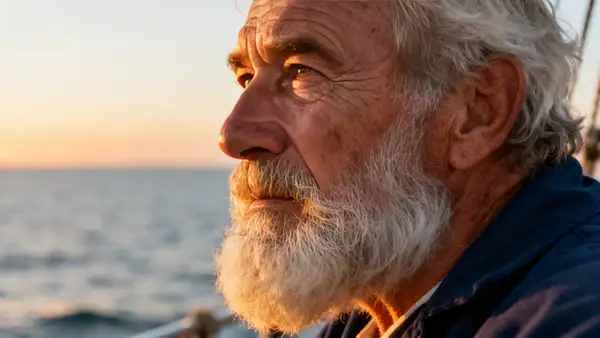
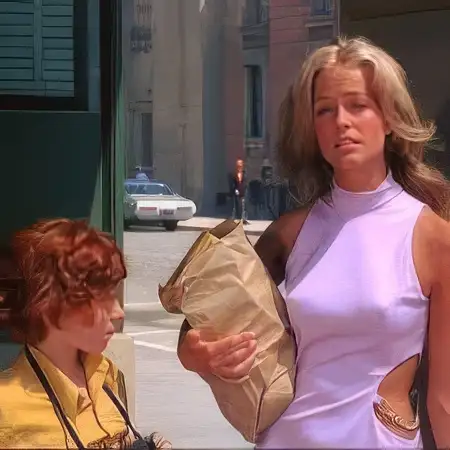
Example output 1Example output 2

Model fiyatlandırması

Fiyatlandırma

Fiyat, çıktı görselinizin megapiksel sayısına göre değişir.

24 MP’ye kadar
$0.0800
görsel megapikseli başına
yani yaklaşık $1 ile 13 megapiksel
48 MP’ye kadar
$0.1600
görsel megapikseli başına
yani yaklaşık $1 ile 6 megapiksel
96 MP’ye kadar
$0.3200
görsel megapikseli başına
yani yaklaşık $1 ile 3 megapiksel
512 MP’ye kadar
$1.3600
görsel megapikseli başına
yani yaklaşık megapiksel başına $1.36

Topaz Upscale Image API

Topaz Upscale Image is a upscaler AI model by topazlabs. On ModelRunner it runs through a REST API or via MCP from any AI assistant with pay-per-use pricing.

POST https://queue.modelrunner.run/topazlabs/upscale/image

cURL

# Submit a request to the queue. Input fields go at the top level of the
# body. The optional reserved "metadata" object holds your own flat string
# tags — stored on the request, never sent to the model; filter later with
# GET https://queue.modelrunner.run/requests?metadata=<url-encoded JSON>.
curl -X POST https://queue.modelrunner.run/topazlabs/upscale/image \
  -H "Authorization: Key $MRUN_API_KEY" \
  -H "Content-Type: application/json" \
  -d '{
    "model": "Standard V2",
    "image_url": "https://media.modelrunner.ai/kLTQQEACv0ggetjT-low-res-cinema.jpeg",
    "crop_to_fill": false,
    "output_format": "jpeg",
    "upscale_factor": 2,
    "face_enhancement": true,
    "subject_detection": "All",
    "face_enhancement_strength": 0.8,
    "face_enhancement_creativity": 0,
    "metadata": {
      "project": "my-project"
    }
  }'
# → { "request_id": "...", "status_url": "...", "response_url": "..." }

# Poll status_url until "COMPLETED", then fetch the result
curl "https://queue.modelrunner.run/topazlabs/upscale/image/requests/$REQUEST_ID/status" \
  -H "Authorization: Key $MRUN_API_KEY"
curl "https://queue.modelrunner.run/topazlabs/upscale/image/requests/$REQUEST_ID" \
  -H "Authorization: Key $MRUN_API_KEY"

JavaScript

import { modelrunner } from "@modelrunner/client";

const result = await modelrunner.subscribe("topazlabs/upscale/image", {
  input: {
    "model": "Standard V2",
    "image_url": "https://media.modelrunner.ai/kLTQQEACv0ggetjT-low-res-cinema.jpeg",
    "crop_to_fill": false,
    "output_format": "jpeg",
    "upscale_factor": 2,
    "face_enhancement": true,
    "subject_detection": "All",
    "face_enhancement_strength": 0.8,
    "face_enhancement_creativity": 0
  },
});
console.log(result);

Python

import os
import requests

headers = {"Authorization": f"Key {os.environ['MRUN_API_KEY']}"}

submitted = requests.post(
    "https://queue.modelrunner.run/topazlabs/upscale/image",
    headers=headers,
    json={
      "model": "Standard V2",
      "image_url": "https://media.modelrunner.ai/kLTQQEACv0ggetjT-low-res-cinema.jpeg",
      "crop_to_fill": false,
      "output_format": "jpeg",
      "upscale_factor": 2,
      "face_enhancement": true,
      "subject_detection": "All",
      "face_enhancement_strength": 0.8,
      "face_enhancement_creativity": 0
    },
).json()

# Poll submitted["status_url"] until "COMPLETED", then:
result = requests.get(submitted["response_url"], headers=headers).json()

Input parameters

Input parameters of Topaz Upscale Image
NameTypeRequiredDescription
image_urlstring (uri)yesUrl of the image to be upscaled
modelenumnoModel to use for image enhancement. One of: Low Resolution V2, Standard V2, CGI, High Fidelity V2, Text Refine, Recovery, Redefine, Recovery V2. Default: "Standard V2".
upscale_factornumbernoFactor to upscale the video by (e.g. 2.0 doubles width and height) Default: 2.
crop_to_fillbooleannoCrop To Fill Default: false.
output_formatenumnoOutput format of the upscaled image. One of: jpeg, png. Default: "jpeg".
subject_detectionenumnoSubject detection mode for the image enhancement. One of: All, Foreground, Background. Default: "All".
face_enhancementbooleannoWhether to apply face enhancement to the image. Default: true.
face_enhancement_creativitynumbernoCreativity level for face enhancement. 0.0 means no creativity, 1.0 means maximum creativity. Ignored if face ehnancement is disabled. Default: 0.
face_enhancement_strengthnumbernoStrength of the face enhancement. 0.0 means no enhancement, 1.0 means maximum enhancement. Ignored if face ehnancement is disabled. Default: 0.8.

Machine-readable: OpenAPI schema · llms.txt

Use Topaz Upscale Image from Claude & Cursor (MCP)

Point Claude Code, Claude Desktop, Cursor, or any MCP client at the ModelRunner MCP server and Topaz Upscale Image becomes a tool your assistant can call directly — it authorizes via OAuth (no API key in config) and runs this model with the run_model tool using the endpoint topazlabs/upscale/image.

MCP client config (Claude Desktop, Cursor)

{
  "mcpServers": {
    "modelrunner": {
      "command": "npx",
      "args": ["-y", "mcp-remote", "https://mcp.modelrunner.run/mcp"]
    }
  }
}

Claude Code

claude mcp add --transport http modelrunner https://mcp.modelrunner.run/mcp

Then ask your assistant, for example: “Run topazlabs/upscale/image on ModelRunner to generate upscaler”. MCP setup guide.

Model Detayları

Model Detayları

Görsellerinizi güçlü ve isabetli bir iyileştirmeyle bir üst seviyeye taşıyın. Bu model; fotoğraflarınızı büyütmek, restore etmek ve rötuşlamak için gelişmiş yapay zekâ kullanır, profesyonel düzeyde sonuçlar üretir. İster düşük çözünürlüklü dosyalarla, ister eski fotoğraflarla ya da dijital çizimlerle çalışın, netliği, detayı ve genel kaliteyi belirgin biçimde artırabilirsiniz.

İhtiyacınıza göre uyarlanmış, özel amaçlı iyileştirme modelleri arasından seçin: * **Standard V2 & High Fidelity V2:** Genel fotoğraf iyileştirmesi için mükemmel çok yönlü seçenekler. * **Low Resolution V2:** Çok küçük ya da sıkıştırılmış görsellerdeki detayları geri getirmek için özel olarak tasarlandı. * **CGI:** Bilgisayar üretimi ya da anime tarzı görselleri keskinleştirmek ve büyütmek için birebir. * **Text Refine:** Görsellerinizdeki metnin okunabilirliğini artırır. * **Recovery & Redefine:** Gürültülü ya da bozulmuş fotoğraflarda detayları geri getirmek ve artefaktları azaltmak için güçlü araçlar.

`upscale_factor` ile görsel çözünürlüğünü özgün boyutun 4x’ine kadar çıkarabilirsiniz. Portrelerde yüz hatlarını akıllıca yeniden kurmak için `face_enhancement` alanını etkinleştirin; doğal bir görünüm için `strength` ve `creativity` değerlerini ayarlayın. Model ayrıca `subject_detection` ile iyileştirmeyi ön plana ya da arka plana odaklamanıza izin verir, böylece nihai çıktı üzerinde hassas denetim kazanırsınız. Görselleri yüksek çözünürlüklü ekranlara ve baskıya hazırlamak isteyen fotoğrafçılar, tasarımcılar ve herkes için ideal araç.

### Örnek Kullanım Bu modeli ModelRunner JavaScript client ile çalıştırmak için şu kodu kullanın:

```javascript import { modelrunner } from "@modelrunner/client";

const result = await modelrunner.subscribe('topazlabs/upscale/image', { input: { "image_url": "https://storage.googleapis.com/falserverless/model_tests/codeformer/codeformer_poor_1.jpeg", "model": "High Fidelity V2", "upscale_factor": 4, "face_enhancement": true, "face_enhancement_strength": 0.9 } }); ```