
Ana içeriğe geç
microsoft avatarı

Florence-2 Large Object Detection API

microsoft/florence-2-large/object-detection

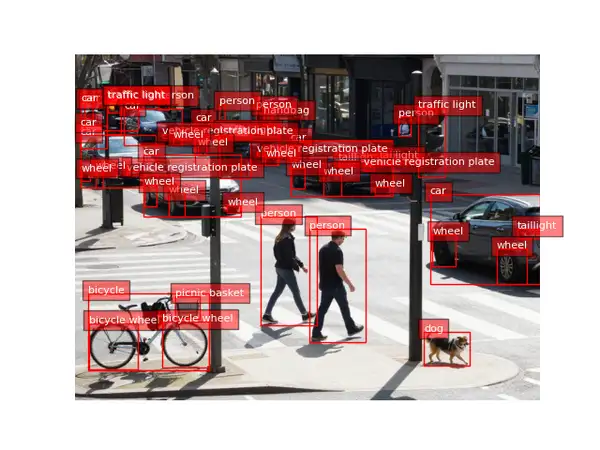
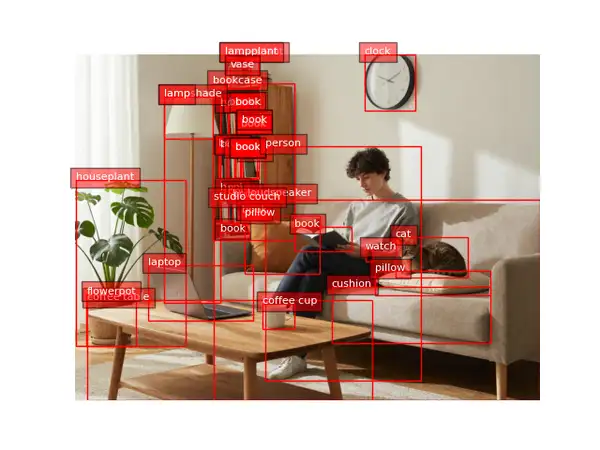
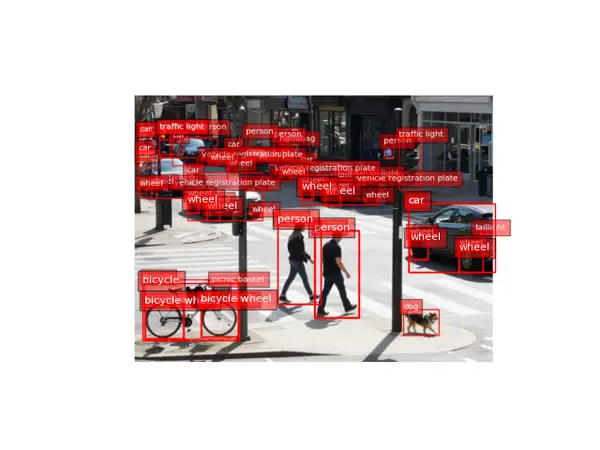
Bir fotoğraftaki tüm nesneleri tespit edip etiketleyin; üzerine bounding box’ların çizildiği işaretlenmiş bir görsel alın.

0.01

Model girdisi

Input

URL of the image to detect objects in.

You need to be logged in to run this model and view results.
Log in

Model çıktısı

Output

Loading
Generated in 4.054 seconds
Logs (1 lines)

Örnek istekler

Örnekler

Example output 1Example output 2Example output 3

Florence-2 Large Object Detection API

Florence-2 Large Object Detection is a image-to-image AI model by microsoft. On ModelRunner it runs through a REST API or via MCP from any AI assistant, at $0.01 per image.

POST https://queue.modelrunner.run/microsoft/florence-2-large/object-detection

cURL

# Submit a request to the queue. Input fields go at the top level of the
# body. The optional reserved "metadata" object holds your own flat string
# tags — stored on the request, never sent to the model; filter later with
# GET https://queue.modelrunner.run/requests?metadata=<url-encoded JSON>.
curl -X POST https://queue.modelrunner.run/microsoft/florence-2-large/object-detection \
  -H "Authorization: Key $MRUN_API_KEY" \
  -H "Content-Type: application/json" \
  -d '{
    "image_url": "https://media.modelrunner.ai/zfTdkQ5gByXOZ8Fq7K2Wa.png",
    "metadata": {
      "project": "my-project"
    }
  }'
# → { "request_id": "...", "status_url": "...", "response_url": "..." }

# Poll status_url until "COMPLETED", then fetch the result
curl "https://queue.modelrunner.run/microsoft/florence-2-large/object-detection/requests/$REQUEST_ID/status" \
  -H "Authorization: Key $MRUN_API_KEY"
curl "https://queue.modelrunner.run/microsoft/florence-2-large/object-detection/requests/$REQUEST_ID" \
  -H "Authorization: Key $MRUN_API_KEY"

JavaScript

import { modelrunner } from "@modelrunner/client";

const result = await modelrunner.subscribe("microsoft/florence-2-large/object-detection", {
  input: {
    "image_url": "https://media.modelrunner.ai/zfTdkQ5gByXOZ8Fq7K2Wa.png"
  },
});
console.log(result);

Python

import os
import requests

headers = {"Authorization": f"Key {os.environ['MRUN_API_KEY']}"}

submitted = requests.post(
    "https://queue.modelrunner.run/microsoft/florence-2-large/object-detection",
    headers=headers,
    json={
      "image_url": "https://media.modelrunner.ai/zfTdkQ5gByXOZ8Fq7K2Wa.png"
    },
).json()

# Poll submitted["status_url"] until "COMPLETED", then:
result = requests.get(submitted["response_url"], headers=headers).json()

Input parameters

Input parameters of Florence-2 Large Object Detection
NameTypeRequiredDescription
image_urlstring (uri)yesURL of the image to detect objects in.

Machine-readable: OpenAPI schema · llms.txt

Use Florence-2 Large Object Detection from Claude & Cursor (MCP)

Point Claude Code, Claude Desktop, Cursor, or any MCP client at the ModelRunner MCP server and Florence-2 Large Object Detection becomes a tool your assistant can call directly — it authorizes via OAuth (no API key in config) and runs this model with the run_model tool using the endpoint microsoft/florence-2-large/object-detection.

MCP client config (Claude Desktop, Cursor)

{
  "mcpServers": {
    "modelrunner": {
      "command": "npx",
      "args": ["-y", "mcp-remote", "https://mcp.modelrunner.run/mcp"]
    }
  }
}

Claude Code

claude mcp add --transport http modelrunner https://mcp.modelrunner.run/mcp

Then ask your assistant, for example: “Run microsoft/florence-2-large/object-detection on ModelRunner to generate image”. MCP setup guide.

Model Detayları

Model Detayları

Florence-2 Large Object Detection, bir fotoğraftaki nesneleri bulur ve aynı görseli, her tespitin etrafına etiketli bir bounding box çizilmiş olarak döndürür. Tek bir görsel URL’si verin; bulduğu her nesneyi — insanları, araçları, hayvanları ve yaygın gündelik eşyaları — işaretleyen, her kutuya bir kategori etiketi yazılmış bir görsel alırsınız. Ne prompt ne de ince ayar gerekir: bir görsel girer, işaretlenmiş bir görsel çıkar. Microsoft’un Florence-2 vision-language temel modeli üzerine kuruludur ve geniş bir open vocabulary kapsamındaki gündelik nesne kategorilerini tek geçişte tanır; bu da onu bir görselde ne olduğunu hızlıca görmenin ve doğrulamanın pratik bir yolu yapar.

## En uygun olduğu işler - İnceleme ya da QA için bir fotoğrafta tespit edilen her nesneyi etiketli kutularla işaretlemek - Bir sahnede neler olduğunun hızlı bir görsel dökümünü çıkarmak (insanlar, arabalar, hayvanlar, nesneler) - Bir veri setinde tespit kapsamının sağlamasını yapmak için önce/sonra tespit overlay’leri üretmek - Ham koordinatlardan çok çizilmiş, insanın okuyabileceği bir sonucun önemli olduğu hafif sahne anlama işleri

## Şu durumlarda başka bir model seçin - Nesne tespiti yerine görseldeki metni okumak ya da yazıya dökmek istiyorsanız — bir OCR modeli kullanın - Kutular yerine sahneyi anlatan yazılı bir açıklama istiyorsanız — bir görsel açıklama (image captioning) modeli kullanın - Yalnızca metinle adını verdiğiniz belirli bir şeyi tespit etmek istiyorsanız — bir open-vocabulary / grounding dedektörü kullanın - Nesneleri kutular yerine piksel maskeleriyle ayırmak istiyorsanız — bir görsel segmentasyon modeli kullanın

## İpuçları - Net ve makul ölçüde yüksek çözünürlüklü bir fotoğraf verin; küçük ya da büyük kısmı örtülü nesneler, piksel arttıkça daha kolay tespit edilir. - Dönen görsel, kutuların ve etiketlerin zaten çizili olduğu standart bir PNG’dir; doğrudan gösterebilir ya da orijinaliyle karşılaştırabilirsiniz. - Ayarlanacak eşik ya da prompt yoktur — aynı görsel üzerindeki her çalıştırma deterministiktir.

## Sınırlamalar - Yaygın kategorilerden oluşan sabit bir open vocabulary üzerinden tespit yapar; nadir ya da alana özgü nesneler atlanabilir veya yanlış etiketlenebilir. - Çok küçük, bulanık ya da üst üste binen nesneler birleştirilebilir ya da atlanabilir.

ModelRunner JavaScript client ile çalıştırmak için: ```js import { modelrunner } from "@modelrunner/client";

const result = await modelrunner.subscribe("microsoft/florence-2-large/object-detection", { input: { image_url: "https://media.modelrunner.ai/example-scene.png", }, }); ```