
Ana içeriğe geç
lllyasviel avatarı

IC-Light V2 API

lllyasviel/iclight/v2

Mevcut bir fotoğrafı tarif ettiğiniz ışık kurulumuna göre yeniden aydınlatın — özneyi olduğu gibi korurken ışığın yönünü, atmosferi ve arka planı değiştirin.

iyileştirme
görsel megapikseli başına 0.1

Model girdisi

Input

Describe the lighting you want — direction, color, mood — and the surrounding scene to relight the subject into (e.g. 'warm sunset light from the left, golden-hour window behind').

The source photo to relight. The subject is preserved while its lighting is re-rendered.

Additional Settings

Customize your input with more control.

Output dimensions. Leave unset to keep the input image's dimensions (recommended for compositing). Pass a preset string (e.g. 'landscape_4_3') or a custom {width, height} object to re-frame the result.

Bias the dominant light direction. 'None' lets the prompt decide; 'Left', 'Right', 'Top', or 'Bottom' push the key light to that side.

Describe what you do not want in the relit result.

Optional binary mask marking the subject to keep. When omitted, the subject is isolated automatically by background removal.

Min: 1 - Max: 50

Number of denoising steps. More steps can improve detail at the cost of speed.

Min: 0 - Max: 20

Prompt adherence strength. Higher values follow the lighting description more strongly.

Min: 0.01 - Max: 5

Real classifier-free-guidance scale. Lower values stay more faithful to the input image.

Run a high-resolution refinement pass for sharper detail (slower).

Min: 0.01 - Max: 1

Denoise strength for the initial low-resolution pass.

Min: 0.01 - Max: 1

Denoise strength for the high-res fix pass; only used when enable_hr_fix is true.

Min: 0.01 - Max: 1

Downscale factor for the high-res fix pass; only used when enable_hr_fix is true.

Random seed. The same seed, prompt, and image produce the same result.

Safety checker can only be disabled on API call

You need to be logged in to run this model and view results.
Log in

Model çıktısı

Output

Loading
Generated in 7.45 seconds
Logs (1 lines)

Örnek istekler

Örnekler

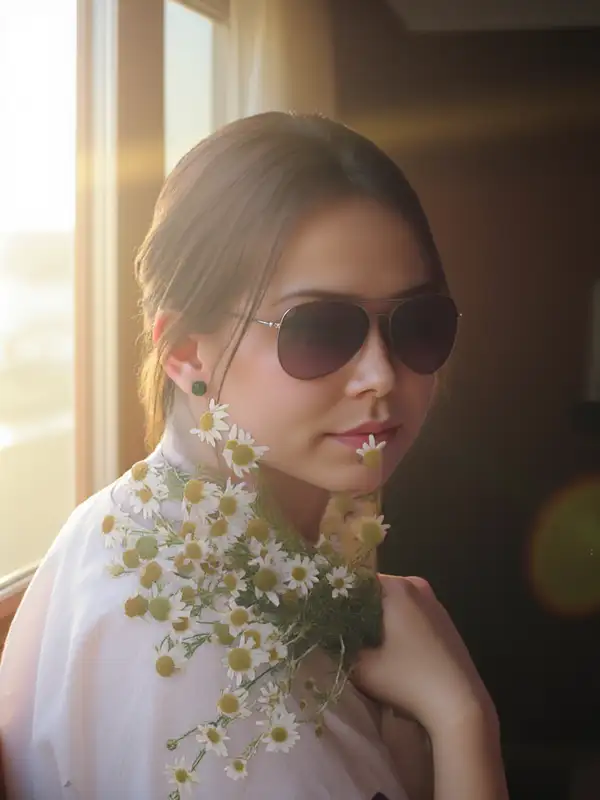
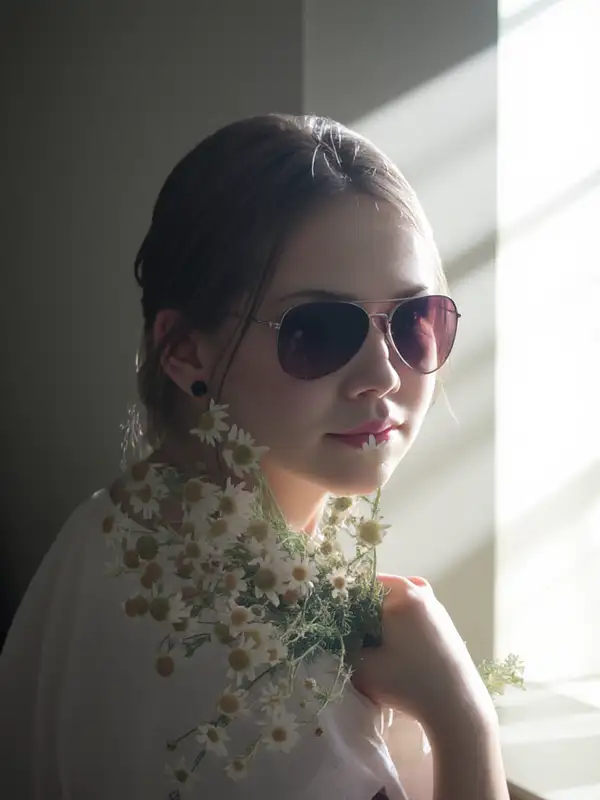
Example output 1Example output 2

IC-Light V2 API

IC-Light V2 is a image-to-image AI model by lllyasviel. On ModelRunner it runs through a REST API or via MCP from any AI assistant, at $0.1 per megapixel.

POST https://queue.modelrunner.run/lllyasviel/iclight/v2

cURL

# Submit a request to the queue. Input fields go at the top level of the
# body. The optional reserved "metadata" object holds your own flat string
# tags — stored on the request, never sent to the model; filter later with
# GET https://queue.modelrunner.run/requests?metadata=<url-encoded JSON>.
curl -X POST https://queue.modelrunner.run/lllyasviel/iclight/v2 \
  -H "Authorization: Key $MRUN_API_KEY" \
  -H "Content-Type: application/json" \
  -d '{
    "cfg": 1,
    "prompt": "bright clean studio lighting, soft shadows, neutral white background",
    "image_url": "https://media.modelrunner.ai/MvSAQVWwUHJspDow-1024",
    "hr_downscale": 0.5,
    "enable_hr_fix": false,
    "guidance_scale": 5,
    "initial_latent": "Right",
    "lowres_denoise": 0.98,
    "highres_denoise": 0.95,
    "negative_prompt": "",
    "num_inference_steps": 18,
    "enable_safety_checker": true,
    "metadata": {
      "project": "my-project"
    }
  }'
# → { "request_id": "...", "status_url": "...", "response_url": "..." }

# Poll status_url until "COMPLETED", then fetch the result
curl "https://queue.modelrunner.run/lllyasviel/iclight/v2/requests/$REQUEST_ID/status" \
  -H "Authorization: Key $MRUN_API_KEY"
curl "https://queue.modelrunner.run/lllyasviel/iclight/v2/requests/$REQUEST_ID" \
  -H "Authorization: Key $MRUN_API_KEY"

JavaScript

import { modelrunner } from "@modelrunner/client";

const result = await modelrunner.subscribe("lllyasviel/iclight/v2", {
  input: {
    "cfg": 1,
    "prompt": "bright clean studio lighting, soft shadows, neutral white background",
    "image_url": "https://media.modelrunner.ai/MvSAQVWwUHJspDow-1024",
    "hr_downscale": 0.5,
    "enable_hr_fix": false,
    "guidance_scale": 5,
    "initial_latent": "Right",
    "lowres_denoise": 0.98,
    "highres_denoise": 0.95,
    "negative_prompt": "",
    "num_inference_steps": 18,
    "enable_safety_checker": true
  },
});
console.log(result);

Python

import os
import requests

headers = {"Authorization": f"Key {os.environ['MRUN_API_KEY']}"}

submitted = requests.post(
    "https://queue.modelrunner.run/lllyasviel/iclight/v2",
    headers=headers,
    json={
      "cfg": 1,
      "prompt": "bright clean studio lighting, soft shadows, neutral white background",
      "image_url": "https://media.modelrunner.ai/MvSAQVWwUHJspDow-1024",
      "hr_downscale": 0.5,
      "enable_hr_fix": false,
      "guidance_scale": 5,
      "initial_latent": "Right",
      "lowres_denoise": 0.98,
      "highres_denoise": 0.95,
      "negative_prompt": "",
      "num_inference_steps": 18,
      "enable_safety_checker": true
    },
).json()

# Poll submitted["status_url"] until "COMPLETED", then:
result = requests.get(submitted["response_url"], headers=headers).json()

Input parameters

Input parameters of IC-Light V2
NameTypeRequiredDescription
promptstringyesDescribe the lighting you want — direction, color, mood — and the surrounding scene to relight the subject into (e.g. 'warm sunset light from the left, golden-hour window behind').
image_urlstring (uri)yesThe source photo to relight. The subject is preserved while its lighting is re-rendered.
image_sizeenumnoOutput dimensions. Leave unset to keep the input image's dimensions (recommended for compositing). Pass a preset string (e.g. 'landscape_4_3') or a custom {width, height} object to re-frame the result. One of: square_hd, square, portrait_4_3, portrait_16_9, landscape_4_3, landscape_16_9.
initial_latentenumnoBias the dominant light direction. 'None' lets the prompt decide; 'Left', 'Right', 'Top', or 'Bottom' push the key light to that side. One of: None, Left, Right, Top, Bottom. Default: "None".
negative_promptstringnoDescribe what you do not want in the relit result. Default: "".
mask_image_urlstringnoOptional binary mask marking the subject to keep. When omitted, the subject is isolated automatically by background removal.
num_inference_stepsintegernoNumber of denoising steps. More steps can improve detail at the cost of speed. Default: 28.
guidance_scalenumbernoPrompt adherence strength. Higher values follow the lighting description more strongly. Default: 5.
cfgnumbernoReal classifier-free-guidance scale. Lower values stay more faithful to the input image. Default: 1.
enable_hr_fixbooleannoRun a high-resolution refinement pass for sharper detail (slower). Default: false.
lowres_denoisenumbernoDenoise strength for the initial low-resolution pass. Default: 0.98.
highres_denoisenumbernoDenoise strength for the high-res fix pass; only used when enable_hr_fix is true. Default: 0.95.
hr_downscalenumbernoDownscale factor for the high-res fix pass; only used when enable_hr_fix is true. Default: 0.5.
seedintegernoRandom seed. The same seed, prompt, and image produce the same result.
enable_safety_checkerbooleannoIf set to true, the safety checker will be enabled. Default: true.

Machine-readable: OpenAPI schema · llms.txt

Use IC-Light V2 from Claude & Cursor (MCP)

Point Claude Code, Claude Desktop, Cursor, or any MCP client at the ModelRunner MCP server and IC-Light V2 becomes a tool your assistant can call directly — it authorizes via OAuth (no API key in config) and runs this model with the run_model tool using the endpoint lllyasviel/iclight/v2.

MCP client config (Claude Desktop, Cursor)

{
  "mcpServers": {
    "modelrunner": {
      "command": "npx",
      "args": ["-y", "mcp-remote", "https://mcp.modelrunner.run/mcp"]
    }
  }
}

Claude Code

claude mcp add --transport http modelrunner https://mcp.modelrunner.run/mcp

Then ask your assistant, for example: “Run lllyasviel/iclight/v2 on ModelRunner to generate image”. MCP setup guide.

Model Detayları

Model Detayları

IC-Light V2, verdiğiniz bir fotoğrafı tarif ettiğiniz ışık kurulumuna göre yeniden aydınlatır. Bir kaynak görsel ve ışığı anlatan kısa bir prompt verirsiniz (yön, renk, atmosfer ve çevredeki sahne); model de özneyi kimliğini, biçimini ve ayrıntılarını koruyarak o ışık altında yeniden render eder. Boyutu boş bırakırsanız çıktı, girdi görselinizin boyutlarını korur; böylece yeniden aydınlatılmış sonuç kompozit için orijinalle birebir örtüşür. Güçlü yanı düz bir renk filtresi değil, gerçekçi ve fiziksel olarak inandırıcı light wrap ve gölgelerdir.

## En uygun olduğu işler - Ürün çekimlerini yeni bir stüdyo ya da ortam ışığı kurulumuna göre yeniden aydınlatmak - Portre ışığını ayarlamak — ana ışığı yumuşatmak, sıcaklaştırmak ya da yönünü değiştirmek - Dekupe edilmiş bir özneyi, ışığı uyumlu biçimde yeni bir arka plana yerleştirmek - Özne tutarlı kalırken arka planı değiştirmek ya da yeniden tarzlamak - Bir grup katalog görselinde tutarlı bir ışık elde etmek

## Şu durumlarda başka bir model seçin - Işığı değil de öznenin içeriğini, pozunu ya da nesneleri değiştirmek istiyorsanız — bir görsel düzenleme modeli kullanın - Yeniden aydınlatılacak bir kaynak fotoğraf olmadan sıfırdan yeni bir sahne gerekiyorsa — bir text-to-image modeli kullanın - Yeniden aydınlatılmış öznenin canlandırılması gerekiyorsa — bir image-to-video modeli kullanın

## İpuçları - Işık kaynağını ve sahneyi birlikte tarif edin ("soldan gelen sıcak gün batımı ışığı, arkada altın saat ışığı alan bir pencere") — prompt hem ışığı hem de yeni arka planı belirler - Baskın ışık yönünü bir tarafa doğru çekmek için `initial_latent` kullanın: `Left`, `Right`, `Top` ya da `Bottom` (varsayılan `None` kararı prompt’a bırakır) - Girdinin boyutlarını korumak için `image_size` alanını boş bırakın; yalnızca çıktıyı bilerek yeniden çerçevelemek istediğinizde bir hazır ayar seçin - Hangi bölgenin özne sayılacağını tam olarak belirlemek için `mask_image_url` verin; maske verilmezse özne otomatik arka plan kaldırmayla ayrıştırılır

## Gelişmiş Yapılandırma - `cfg` gerçek classifier-free guidance ölçeğidir (0.01–5, varsayılan 1) — düşük değerler sonucu girdi fotoğrafına daha sadık tutar. - `guidance_scale` (0–20, varsayılan 5) yeniden aydınlatmanın metin prompt’unu ne kadar güçlü izleyeceğini belirler; daha güçlü prompt uyumu için yükseltin. - `enable_hr_fix` yüksek çözünürlüklü bir iyileştirme geçişi çalıştırır; `lowres_denoise`, `highres_denoise` ve `hr_downscale` bu geçişin ince ayarını yapar ve yalnızca geçiş açıkken etkili olur.

ModelRunner JavaScript client ile çalıştırmak için: ```js import { modelrunner } from "@modelrunner/client";

const result = await modelrunner.subscribe("lllyasviel/iclight/v2", { input: { prompt: "warm golden-hour sunlight from the left, soft window light", image_url: "https://media.modelrunner.ai/MvSAQVWwUHJspDow-1024", initial_latent: "Left", }, }); ```