Generating App Store Screenshots With AI: A Home Redesign App Case Study
The Project
Roomix is an iOS app that helps users redesign their homes using AI. You take a photo of your living room, kitchen, balcony, or garden, pick a style, and the app generates a reimagined version of the space. Under the hood, Roomix uses ModelRunner's inference queue to submit render jobs, poll for results, and stream the generated image back to the user's device.
With the app feature-complete and demo-ready, the next milestone was the App Store listing — and that meant marketing screenshots. Not raw simulator captures, but polished, on-brand promotional images: device mockups on designed backgrounds, with headlines and subheadlines that sell the app and carry the keywords it needs to rank and convert.
The Problem: Six Cohesive Marketing Shots From Six Raw Captures
We had six clean product screenshots captured from the running app (light theme, 1242 × 2688), each showing a key flow:
| # | Source screen | Feature it shows |
|---|---|---|
| 1 | Home page | App entry point / flow picker |
| 2 | Redesign interior config | Room type + style selection |
| 3 | Balcony landscape config | Outdoor / landscape redesign |
| 4 | Place product config | Virtual staging / product placement |
| 5 | Placing products to garden | Outdoor furniture placement |
| 6 | Remove selected object | Object removal / declutter |
Raw screenshots don't sell an app. App Store listings need a cohesive set — one visual language across every image: shared background, palette, typography, and layout, plus benefit-driven headlines. Designing six of these by hand in a design tool is a half-day of work. Generating them from the raw captures with AI — while keeping the set visually consistent — was the faster path, if the tooling could enforce that consistency.
Why ModelRunner Was the Right Tool
1. It's already in the stack. Roomix already calls ModelRunner for its core redesign feature. Same API key, same request/poll pattern — no new service to onboard.
2. A purpose-built wrapper already existed. Rather than prompt a raw image model and fight for layout consistency, we used the modelrunner/app-store-screenshot-composer wrapper. A wrapper packages a base model behind a simplified, task-specific schema — here: screenshot, headline, subheadline, device, layout, brand_color, background_style, and crucially style_reference. It composes a real app capture into a device mockup on a designed background, sized to exact App Store device dimensions.
3. The wrapper encodes the right workflow. Its own description spells out how to build a consistent set: generate screenshot #1 with no style reference (the "hero" / anchor), then pass that hero's output as the style_reference for every remaining screenshot — always the same anchor, never chaining each to the previous. This is domain knowledge baked into the tool, not something we had to rediscover by trial and error.
4. MCP made it a native tool call. ModelRunner's MCP server let Claude Code call create_upload_url, run_model, and wait_for_request directly. Local files were streamed to storage out-of-band via presigned PUT URLs (curl -T) — the image bytes never passed through the model as tokens.
5. Model choice was explicit. The wrapper runs on a default base model but accepts a base_model override. We pinned openai/gpt-image-2/edit for its strong text rendering and faithful UI redraw.
The Pipeline — Anchor First, Then Style-Reference the Rest
The pipeline was a deliberate two-phase fan-out, dictated by the anchor-then-style-reference pattern.
Phase 0 — Upload (parallel ×6)
  local .png → create_upload_url → curl -T to presigned PUT → file_url

Phase 1 — Hero (sequential, 1 image)
  home-page.png + headline → run_model (gpt-image-2/edit, NO style_reference)
                           → wait_for_request → hero output URL  ← the anchor

Phase 2 — Remaining set (parallel ×5)
  each screenshot + headline + style_reference=hero
                           → run_model → wait_for_request → output URL
                           → curl -o <path>.png
Phase 1 is a hard barrier: the other five depend on the hero's output URL, so they cannot start until it lands. Once it did, all five ran concurrently — total wall-clock for the dependent set was the slowest single render (~2 min), not the sum.
Naming the inputs meaningfully
The wrapper uses the uploaded file's name as a hint about what the screen shows. Generic names like IMG_0042.png carry no signal. So each upload was named after its screen — home-page.png, redesign-interior-config.png, balcony-landscape-config.png, place-product-config.png, placing-products-garden.png, remove-object-page.png — giving the model context for styling and headline relevance.
Writing ASO-Aware Copy That Earns Its Keywords
The captions were written as a coordinated set so they tell one story and spread high-value keywords across the listing without repetition. App Store screenshot text doesn't directly rank in search (only the app name, subtitle, and 100-char keyword field do) — but it drives conversion, and mirroring the ranked keywords keeps the whole listing coherent to both Apple and browsers.
| # | Headline | Subheadline | Keywords carried |
|---|---|---|---|
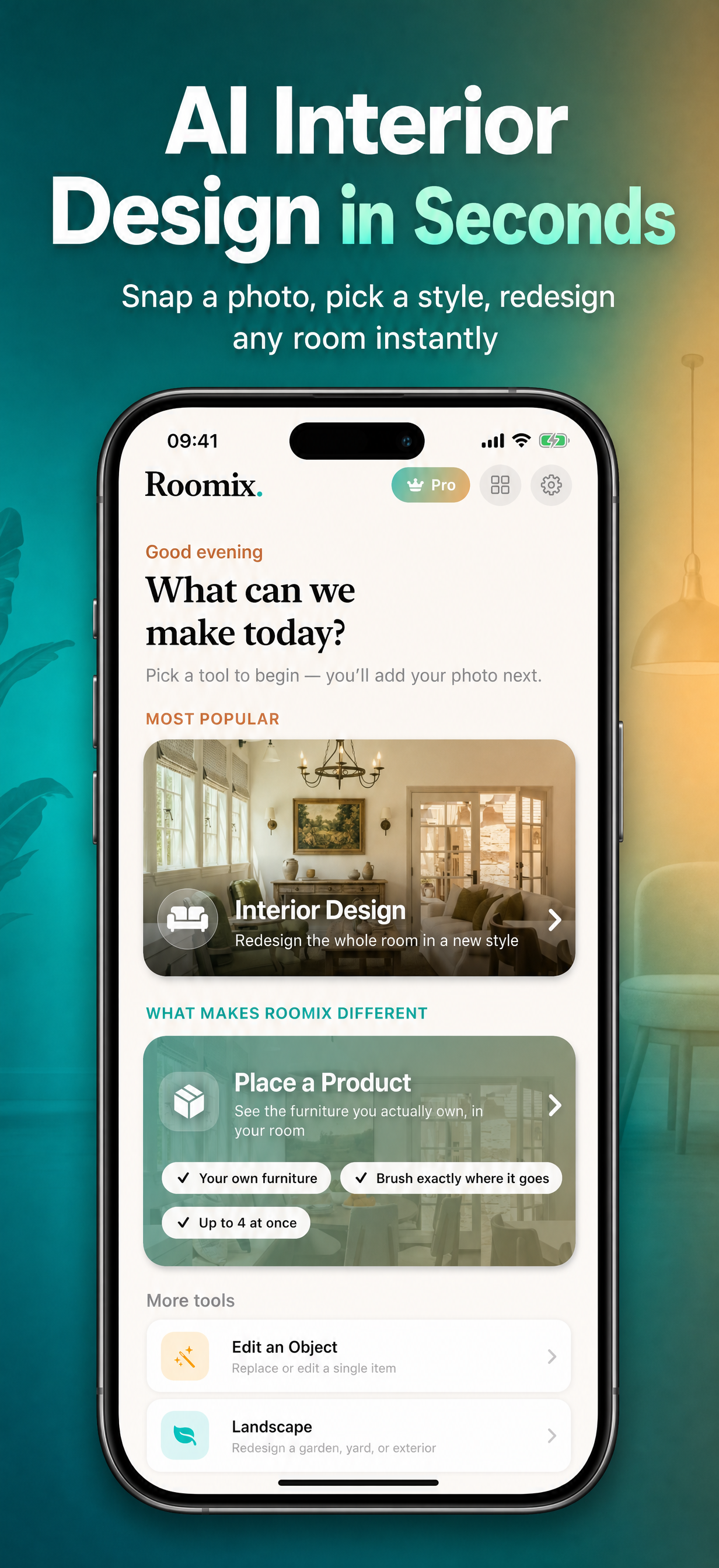
| 1 | AI Interior Design in Seconds | Snap a photo, pick a style, redesign any room instantly | ai interior design, room, redesign, instant |
| 2 | Redesign Any Room, Any Style | Modern, Bohemian, Coastal & more — photorealistic results | redesign, room, style names, photorealistic |
| 3 | Landscape & Garden Design | Reimagine balconies, patios & backyards with AI | landscape design, garden design, balcony, patio, backyard |
| 4 | See Furniture Before You Buy | AI virtual staging drops real products into your space | virtual staging, furniture, product |
| 5 | Design Your Dream Garden | Add outdoor furniture & décor in a tap | garden, outdoor furniture, décor |
| 6 | Remove Clutter Instantly | Erase any object, reveal your space's true potential | remove object, erase, declutter |
Every headline leads with a searchable noun-phrase that also lands as a benefit. Each screen was tagged with application_details describing what that specific flow does, so the model could ground its styling and accents in context.
Shared Style Parameters (the Cohesion Lever)
To enforce the cohesive look, every render used the same controls:
device: iphone_6_5→ 1232×2688 (iPhone 6.5", portrait) /ipad_13→ 2048×2720 (iPad 13", portrait)layout: text_topbrand_color: #0E9F94(the Roomix teal, pulled straight fromRoomixTheme.swift)background_style: gradient_vibrantvariants: 1(one billed output per screen)style_reference: <hero output>(screens #2–6 only)
Note on device enum:
iphone_6_9is the schema default but not listed in the enum — passing it explicitly causes a 400. Useiphone_6_5(1242×2688 target) for the 6.5" iPhone portrait slot, which the wrapper outputs at 1232×2688.
Results
- 6 cohesive marketing screenshots generated per device — iPhone and iPad sets both complete.
- Consistent visual identity across all 12 images: shared teal gradient, a two-tone headline treatment (dark phrase + teal keyword), device frames, and matching corner line-art accents — achieved purely via the anchor +
style_referencepattern, no manual design. - Keyword-loaded copy spanning the home-design keyword cluster: AI interior design, room redesign, interior styles, landscape/garden design, virtual staging, furniture, product placement, object removal.
- Output dimensions: iPhone 1232×2688 (target 1242×2688, within 10px); iPad 2048×2720 (target 2048×2732, within 12px). Both pass App Store Connect's dimension validation.
- Total cost: ~$1.66 for the final 12-image set (iPhone hero $0.151 + 5×iPhone $0.151 + iPad hero $0 + 5×iPad at ~$0.151 each).
iPhone set (click to enlarge)
iPad set (click to enlarge)
The Bigger Picture — ModelRunner as Workflow Infrastructure
This task extends a pattern established earlier when we populated the app's iOS asset library with 29 AI-generated images: ModelRunner as infrastructure inside a developer workflow, not just a backend for user-facing features. First it generated 29 demo images for the simulator; here it produced the marketing collateral for the store listing.
The wrapper layer is the new lesson. By using app-store-screenshot-composer instead of a raw image model, the workflow itself — anchor first, style-reference the rest — was encoded in the tool. The AI agent didn't have to know how to keep six screenshots visually consistent; it just had to follow the wrapper's contract. That's the trajectory: from "ModelRunner powers our renders" → "ModelRunner populates our test data" → "ModelRunner produces our store assets," each step requiring almost no new integration because it's all the same API, the same MCP tools, the same request/poll pattern.
Roomix is built with SwiftUI and SwiftData, targeting iOS 17.0+. The screenshot generation workflow described here was authored and executed by Claude Code using the ModelRunner MCP server and the modelrunner/app-store-screenshot-composer wrapper.
Appendix: Request IDs and output URLs (final runs)
All screenshots generated via modelrunner/app-store-screenshot-composer on openai/gpt-image-2/edit. Screenshot #1 is the hero (no style reference); #2–6 used #1's output as style_reference.
iPhone — iphone_6_5 — 1232×2688 px
| # | Screen | Request ID | Output URL |
|---|---|---|---|
| 1 | Hero / Home | VWXxychFlTWdqhArIDFoP | https://media.modelrunner.ai/fkliHuJtWLyj2vW7V2DKH.png |
| 2 | Redesign interior | jdmsGNTI7NTHLTr8fEIuw | https://media.modelrunner.ai/41u9ifxUpl3jBQfgIXHP7.png |
| 3 | Landscape & garden | biPn9wjkyrj98VWzpCJbb | https://media.modelrunner.ai/jBymV90Fplip3geqsNjwK.png |
| 4 | Furniture / staging | Z3BJXmSCAoSUJoKDyU7QA | https://media.modelrunner.ai/5J2qIbb7x2CUT7dMdT03f.png |
| 5 | Dream garden | CyGAM6BzZz9qoJ2ltbGyZ | https://media.modelrunner.ai/J2yvt4khkvirLtmUbo8XJ.png |
| 6 | Remove clutter | H7e8p3vOKm4Uk9zimyd4V | https://media.modelrunner.ai/nu2kb207EAAXq1DFkro6X.png |
iPad — ipad_13 — 2048×2720 px
| # | Screen | Request ID | Output URL |
|---|---|---|---|
| 1 | Hero / Home | 0cLJwUinNboc7CDybxNVU | https://media.modelrunner.ai/qWedsGbaCQQXnuquOf5p8.png |
| 2 | Redesign interior | XAGUow1uHiRTaRxEpcNoq | https://media.modelrunner.ai/zwrlfeMw4vIu7zcuRFe5S.png |
| 3 | Landscape & garden | mC31rHSndlc155Y16dvJR | https://media.modelrunner.ai/8ITZxB163q9fZxdUpgV4j.png |
| 4 | Furniture / staging | 4Pjna9Hlo55KzIsHIPvCu | https://media.modelrunner.ai/awK27YXTL0jIJbmcQp5cS.png |
| 5 | Dream garden | RP4YyFPYm5J7Py3nH8087 | https://media.modelrunner.ai/YbkWsz4dcFDclgoXklK2P.png |
| 6 | Remove clutter | g6RQvnxoGfqu1SlraKxm8 | https://media.modelrunner.ai/bmPq5j8lwpRc97QCL299V.png |
Source uploads (presigned PUT — reusable across runs)
Keep reading
- Generating a Vertical Video Ad With AI: Keyframe Anchoring14 min read
Generate a vertical video ad with AI for an iOS app: keyframe anchoring lets an image model own product identity and a video model own only the motion.
- Generating Demo Assets for an iOS App With AI: A Home Redesign App Case Study8 min read
Claude Code has no image generation on its own — connect the ModelRunner MCP and it calls image models as native tools. A real 29-image iOS batch shows how.
- Higgsfield Alternative for MCP Users: 100+ Models via One Server8 min read
Higgsfield's MCP server is locked to its own credits and roster. ModelRunner's MCP gives your AI assistant 100+ models across providers, pay-per-use.