How do you keep a product looking consistent in an AI-generated video?
Use keyframe anchoring. Draw every frame first with an image-editing model, chaining each frame off the previous one so they stay aligned. Then hand a first-last-frame video model one job: fill in the motion between two frames you already approved. It never invents the product, because it is never asked to draw the product.
What is first-last-frame-to-video?
It is a Veo 3.1 endpoint that generates motion between a pinned start frame and a pinned end frame. Plain image-to-video has no end-frame control. This endpoint returns a fixed 8-second clip and has no duration parameter.
How much does it cost to generate a short AI video ad?
This 15-second spot came to about $30.11: nine Veo clips at $3.20 each ($28.80), eight keyframes at roughly $0.10 each ($1.21), and one Lyria music track ($0.10). Because every clip is a fixed 8 seconds, you know the price before the first render.
Why does chaining image edits shift the colour, and how do you fix it?
Each edit drains a little green, so the late frames drift pink. Telling the model to preserve white balance does nothing. The fix is arithmetic: measure the same surface in every frame and scale each colour channel back to a reference frame before assembly.
Generate App Store marketing screenshots with AI for a home redesign iOS app, device mockups and ASO-aware headlines included, in one Claude Code session.
Claude Code has no image generation on its own — connect the ModelRunner MCP and it calls image models as native tools. A real 29-image iOS batch shows how.
Higgsfield's MCP server is locked to its own credits and roster. ModelRunner's MCP gives your AI assistant 100+ models across providers, pay-per-use.
Generating a vertical video ad with AI usually fails in one of two ways. Either the product drifts into something the store doesn't actually sell, or the camera refuses to stay put and the room hallucinates around it.
Both failures come from the same mistake. Text-to-video hands a single model two jobs at once — invent what is on screen, and move it. Models are good at the second and reliably bad at the first.
Keyframe anchoring pulls those jobs apart. An image model draws every frame. Then a video model does nothing but fill in the motion between two frames you have already approved. It never invents the product, because it is never asked to draw the product.
What follows is a real ad built that way: a 15-second, 9:16 spot for paid social, for Roomix, a home redesign iOS app. It was made end to end on ModelRunner using only Google models.
The finished 15-second vertical video ad — 1080×1920, generated entirely from Google models on ModelRunner.
The Project: A Video Ad for a Home Redesign App
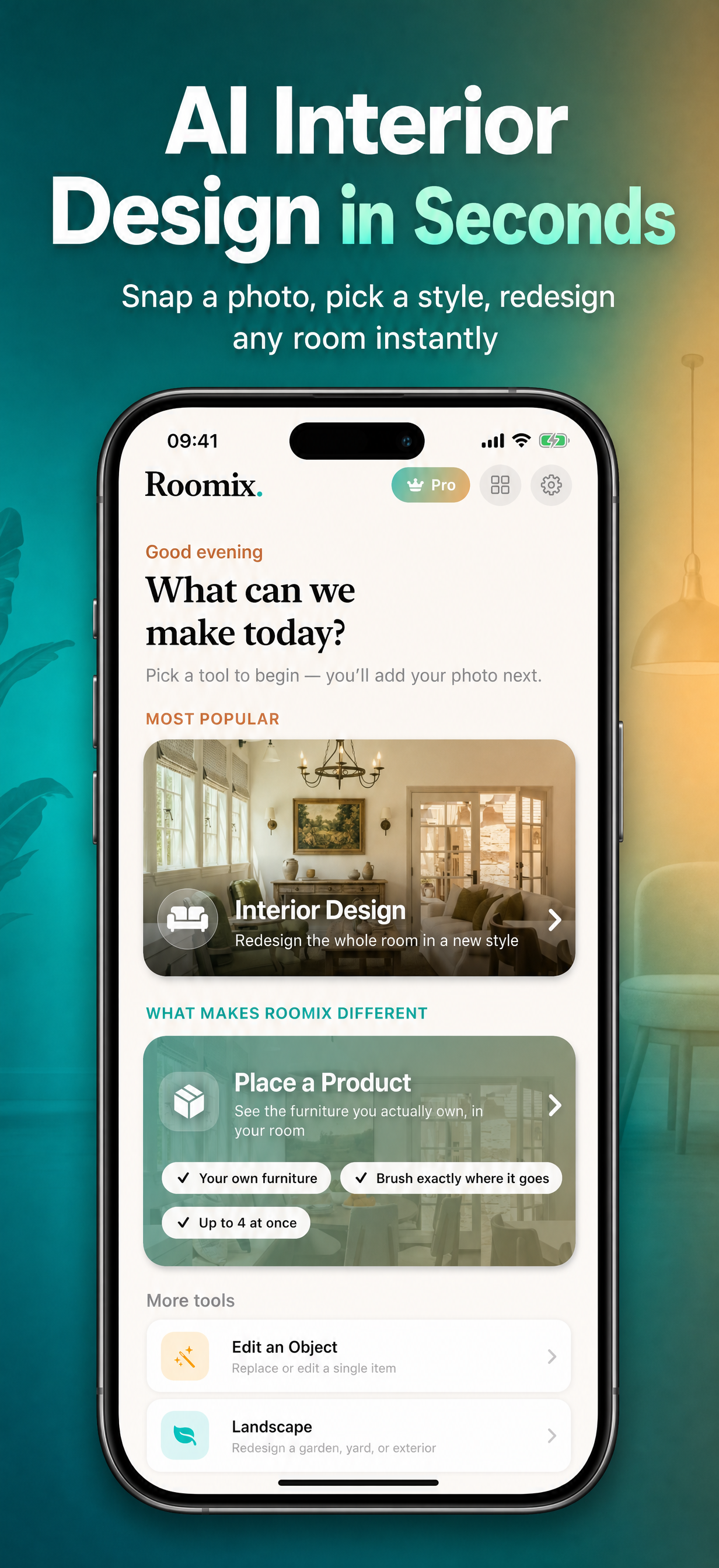
Roomix runs its core redesign feature on ModelRunner. Its next marketing milestone was paid social, which meant a vertical video ad.
Seven ad variants already existed, A through G. None of them actually moved. Each was a set of static AI stills animated in a browser and stitched together with ffmpeg — the motion was CSS. They look clean, but nothing in them is really moving.
Variant H is the first ad where the motion itself is generated, made under a hard brief: ModelRunner only, Google models only.
The Problem: Keep the Product Real, Keep the Room Still
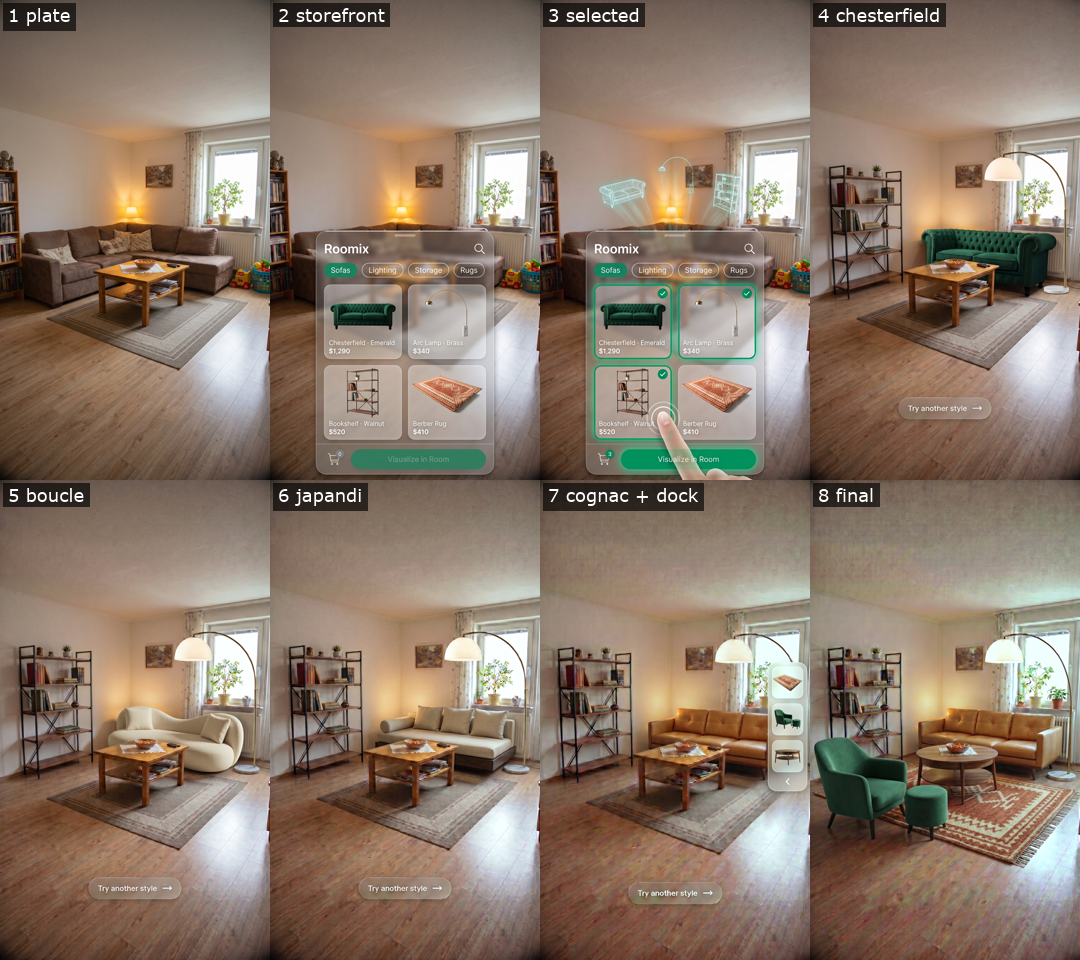
The concept was an AR-style shopping demo. A frosted-glass store panel slides up over a real living room. A finger taps three real, purchasable products. The app materializes them into the space. A swipe carousel flips the sofa through several styles, and a drag-and-drop finale finishes the room.
The raw material was one ordinary photo — a family living room with a brown corner sofa in evening light — plus a catalogue of couches and products shot flat on seamless backgrounds.
That asks a video model for the two things it is worst at:
The product has to be the real product. The emerald Chesterfield in the ad has to be the Chesterfield from the catalogue, not a green sofa the model invented. An ad showing furniture the store doesn't sell is worse than no ad.
The room has to hold still. The whole gag is that the UI and the furniture move while the room stays nailed down. Any camera drift and the shot reads as a hallucination rather than a product demo.
Ask a text-to-video model for "a sofa swaps for another sofa" and you get a dissolve between two sofas it made up. The earlier variants dodged this by refusing generated motion altogether, animating stills in a browser timeline captured with Puppeteer. This run bet on a different fix: split the job so each model only does what it is good at.
Why ModelRunner: The Whole Google Stack on One Endpoint
1. It's already in the stack. Roomix calls ModelRunner for its core redesign feature, and its App Store screenshots and 15-language localization went through it too. Same API key, same MCP tools, same request/poll pattern. No new service to onboard.
2. Every Google model the ad needs is on one endpoint. The brief said "Google models only," and the whole chain is here: google/nano-banana-2/edit for stills, google/veo-3.1/* for motion, google/lyria2 for music. One catalogue call (list_models search=google) surfaced them all — no separate Vertex AI project, no three sets of credentials.
3. Veo 3.1 exposes the endpoint that makes this possible. Of the Veo variants, first-last-frame-to-video is the one that matters: you pin a start frame and an end frame, and it generates the motion between them. That single capability turns "hope the model draws the right sofa" into "the model may only draw the path between two frames I already control."
4. MCP made it all native tool calls. Claude Code drove the run through run_model, wait_for_request / get_request, and create_upload_url. Finished keyframes were streamed to storage through a presigned upload (curl -T), so the image bytes never passed through the model as tokens.
Keyframe Anchoring: One Model Draws, the Other Moves
This is the whole idea, and it generalizes well past ads. Two models, two jobs:
Nano Banana 2 (image editing) decides what is in the frame. It holds a product's identity well and does not do motion.
Veo 3.1 (video) decides how the frame gets from A to B. It does motion well and holds identity badly.
So draw every keyframe first, then let Veo interpolate between pairs of them and do nothing else:
1. Keyframes — google/nano-banana-2/edit — 8 images, one after another photo → K00 → K01 → K02 → K04 → K05 → K06 → K07b → K08 Each edit starts from the previous keyframe, not from the original photo.2. Colour fix — local Undo the colour drift (below), resize to exactly 1080×1920, upload.3. Motion — google/veo-3.1/first-last-frame-to-video — 7 clips, in parallel Hand it two neighbouring keyframes; it generates the 8 seconds between them.4. Music — google/lyria2 — 1 track5. Assembly — local ffmpeg Trim to the action, retime to the beat, add the closing text, mix the audio.
Here is why it works. K04 (Chesterfield) and K05 (bouclé) are the identical room, differing only in the sofa. So Veo's job on that clip is never "invent a bouclé sofa." It is "slide this solid object out while that one slides in." That's why the swipe reads as one real piece of furniture passing another, instead of a crossfade.
The chaining is not optional. Each keyframe is edited from the previous keyframe rather than from the source photo. Renders line up with whatever image you hand them, so eight independent edits of the original photo would each land a few pixels off, and the locked-room illusion would collapse. Chaining keeps every frame registered against the last.
Chaining the Edits Also Shifts the Colour
Chaining buys alignment. It costs colour. Here is the same patch of floorboard, measured across the chain:
Keyframe
Red
Green
Blue
K00 plate
129
102
81
K04 chesterfield
136
106
89
K06 japandi
137
101
86
K07b cognac
143
101
86
K08 final
143
94
78
Green drains away edit by edit while red climbs, so the late frames drift pink. Each step moves only about two points and is invisible inside any one clip — but by the end of the chain, the hero beauty frame is the ugliest shot in the film.
You cannot prompt your way out of this. Telling Nano Banana "preserve the exact white balance, do not push toward pink or magenta" changed nothing; green still landed at 93. The fix is arithmetic, not generative. Measure the same physical surface in every keyframe, then scale each colour channel back to a reference frame — here K04's 136, 106, 89 — before uploading. Repeated edits also leave faint colour blotches, cleaned up with a denoise pass tuned to how many edits each frame had been through.
Every Clip Costs $3.20, However Long the Action Is
first-last-frame-to-video always returns exactly 8 seconds. There is no duration parameter. At $0.40 per output second that is $3.20 a clip, so a 1.3-second sofa swipe costs the same as an 8-second one.
The discipline that follows: prompt for slow, deliberate motion, then speed the clip up locally to land on the beat. To find where the action actually sits, each clip was scanned for how much the picture changed every half second:
== C7 — how much the picture changes, per half-second
  t= 0.0s   0.06
  t= 1.5s   1.51 ####
  t= 2.5s   4.73 ##############   ← the drag-and-drop
  t= 5.0s   1.61 ####
  t= 6.5s   0.12                  ← nothing happening
Two clips pause in the middle — the glass panel arrives, waits, then the cards populate — so their two live windows were spliced together and the dead beat dropped rather than sped through. A build script and manifest record every trim window, speed-up, and request ID, so recutting the timing later costs nothing more on Veo.
Nine clips bought fifteen seconds. That arithmetic was knowable before the first render.
Three Traps That Cost Re-Renders
Veo scales a "fingertip" to whatever is near it. With the app's UI on screen it drew a correctly sized finger, and the tap and drag beats worked first time. In a bare wide shot with nothing to touch, it scaled the hand to the room and swept a giant photorealistic arm across the frame. Two swipe clips were re-rendered (+$6.40) with no hand at all — the sofas now ride an invisible carousel rail, which is closer to the intended motion anyway. The negative prompt: hand, finger, arm, skin, giant hand.
Never ask a video model to draw the closing text. Told to morph letters across 8 seconds, it garbles them. The final keyframe was regenerated clean and the text laid over it afterwards in ffmpeg.
Veo drifts slightly from the frame you pinned it to. Cutting from the last clip back to the source keyframe popped — the coffee table jumped a few pixels. The end hold freezes the clip's own last frame instead. Verify the pin; don't assume it.
Audio: Veo's Own Sound Effects, Under a Lyria Bed
Veo generates sound along with each clip — glass taps, the shatter, fabric whooshes. Those survive the speed-up with their pitch intact and sit under the Lyria music bed, which is instrumental lo-fi house at 118 bpm.
Both arrive too quiet. The raw mix measured −25.8 LUFS — a measure of perceived loudness — against the −14 LUFS social platforms expect. It was also lopsided: the shatter peaks hard while the music sits far below it. Turning everything up doesn't work, because the loud peak hits the ceiling long before the quiet music gets anywhere near loud enough; that attempt landed at −15.8. Compressing first, to lift the quiet bed toward the loud peaks, and normalising after, hits −14 LUFS cleanly.
Results: A 15-Second Google-Only Video Ad for $30.11
Every generated pixel and every note is Google. Nano Banana 2 drew the eight keyframes, Veo 3.1 made all the motion and sound effects, Lyria 2 wrote the music. ffmpeg only cut, retimed, and mixed.
The products stayed real. The Chesterfield, the bouclé, the Japandi platform, the cognac mid-century sofa, the brass arc lamp, the walnut bookshelf, the terracotta Berber rug, the green velvet armchair and the round walnut table are all the supplied catalogue items, recognisable frame to frame.
The room never moves. Bookshelf, coffee table, rug, lamp and window are pixel-stable across all four sofa states — which is the entire reason the swipe carousel reads as physical.
Total cost ~$30.11 — keyframes $1.21 (12 charged Nano Banana runs at ~$0.101 each), Veo $28.80 (9 clips × $3.20; 7 kept, 2 re-rendered for the giant-hand bug), Lyria $0.10.
Fully reproducible from the request IDs in the appendix below.
The Bigger Picture: Split the Job Where the Models Split
This is the latest step in one trajectory. ModelRunner first powered Roomix's core renders, then filled the app's test asset library with AI-generated images, then produced its App Store marketing screenshots, then localized those assets into 15 languages. Now it generates the ad creative, motion and sound included. Every step reused the same API key and the same MCP tools; only the prompt, the model, and the destination changed.
The lesson from this run is about where to cut a task in half. The obvious framing — "generate a video of a sofa being swapped" — hands a video model a job it is bad at (product identity) bundled with a job it is good at (motion), and you get a plausible dissolve of furniture nobody sells.
Split it so the image model owns what is in the frame and the video model owns only the path between two frames you already approved, and a hallucination risk becomes an interpolation problem. That applies well past ads. Any time you need a video model to stay on-brand, give it fewer degrees of freedom, not a better prompt.
FAQ
How do you keep a product looking consistent in an AI-generated video?
Use keyframe anchoring. Draw every frame first with an image-editing model, chaining each frame off the previous one so they stay aligned. Then hand a first-last-frame video model one job: fill in the motion between two frames you already approved. It never invents the product, because it is never asked to draw the product.
What is first-last-frame-to-video?
It is a Veo 3.1 endpoint that generates motion between a pinned start frame and a pinned end frame. Plain image-to-video has no end-frame control. This endpoint returns a fixed 8-second clip and has no duration parameter.
How much does it cost to generate a short AI video ad?
This 15-second spot came to about $30.11: nine Veo clips at $3.20 each ($28.80), eight keyframes at roughly $0.10 each ($1.21), and one Lyria music track ($0.10). Because every clip is a fixed 8 seconds, you know the price before the first render.
Why does chaining image edits shift the colour, and how do you fix it?
Each edit drains a little green, so the late frames drift pink. Telling the model to preserve white balance does nothing. The fix is arithmetic: measure the same surface in every frame and scale each colour channel back to a reference frame before assembly.
Roomix is built with SwiftUI and SwiftData, targeting iOS 17.0+. The ad described here was authored and executed by Claude Code using the ModelRunner MCP server with google/nano-banana-2/edit, google/veo-3.1/first-last-frame-to-video, and google/lyria2.
Discarded keyframes: IFq3h2ZuNOwRfShsqik6g (UI panel too opaque — sofa invisible behind the glass), kmFr1b2rIweOXGtJ9FFrn (grew a second bookshelf instead of replacing the first), m6hDPGT1b2YycdRQF8p5t (CTA baked in — pulled so Veo couldn't morph the letters). One run, cVPJiVRhL2jN88ovAPyaf, hit an upstream Google 502 and was not billed; a verbatim retry succeeded.
Motion — google/veo-3.1/first-last-frame-to-video (8 s fixed, $3.20/clip, 1080p, 9:16)
Discarded clips (the giant-hand bug): S0ahwVOfurQ8BARrtVqTR (C4 v1) and Ea88QtPEQmuM3gOPBTRGb (C6 v1). Both were prompted for a "fingertip swipe" in a wide shot; both rendered an oversized arm, and C6 v1 additionally blew the side dock up into a white column. Re-prompted with no hand and an explicit negative prompt.
Music — google/lyria2
qYXx0iO399lDm0EmX6eHW · seed 715 · https://media.modelrunner.ai/tuAMtXlcPxZAIuQn7gsTM.wav — ~32.8 s of instrumental lo-fi house at 118 bpm; the first 15 s are used, mixed at 0.58 gain against the SFX at 0.85 (so the bed sits ~3.3 dB under), with a 0.6 s fade-out.
Veo inputs (graded keyframes, uploaded once via presigned PUT)
Veo:aspect_ratio: "9:16" · resolution: "1080p" · fixed 8 s output, no duration param on this endpoint.
Nano Banana:image_size: "9_16_2k" · multi-image input via images: [previous_keyframe, ...product_refs] · prompt-level white-balance instructions are ignored — correct colour in post.
Post (ffmpeg): per-channel gain to K04's floor balance (136,106,89) → hqdn3d chroma denoise (luma_spatial=0, chroma strength scaled to how many edit passes each frame accumulated) → crop/scale to exact 1080×1920 → setpts retime with a pitch-preserving atempo chain on audio → acompressor → two-pass loudnorm → −14 LUFS.
Closing text (ffmpeg drawtext): two quirks. Use SFNS.ttf directly and fake bold with borderw=2:bordercolor=white — the fontconfig pattern font='Helvetica Neue:style=Bold' collides with :, which is ffmpeg's own option separator.
Audio levels: raw mix −25.8 LUFS with a large crest factor (the shatter peaks while the bed sits far below). loudnorm in linear=true mode clamps gain against the true-peak ceiling and undershoots at −15.8; inserting acompressor to lift the bed before normalising reaches the −14 LUFS target.