



Ana içeriğe geç
stability-ai avatarı

Stable Diffusion 3.5 Medium API

stability-ai/stable-diffusion-v3.5-medium

Prompt uyumu ve tipografi için ayarlanmış, hızlı ve düşük maliyetli 2.5B parametreli bir modelle metin prompt’undan yüksek kaliteli görseller üretin.

görsel megapikseli başına 0.02

Model girdisi

Input

The text prompt describing the image to generate.

The size of the generated image. Choose a preset (e.g. 'square_hd', 'portrait_16_9') or pass a custom {width, height} object.

Min: 1 - Max: 50

The number of inference steps to perform. More steps can improve detail at the cost of speed.

Additional Settings

Customize your input with more control.

Min: 0 - Max: 20

The CFG (Classifier Free Guidance) scale. Higher values increase adherence to the prompt.

Describe what you do NOT want to appear in the image.

The same seed and the same prompt given to the same version of the model will output the same image every time.

The format of the generated image.

Safety checker can only be disabled on API call

Automatically resize incompatible custom dimensions to the nearest supported size.

You need to be logged in to run this model and view results.
Log in

Model çıktısı

Output

Generated image output
Generated in 2.264 seconds
Logs (1 lines)

Örnek istekler

Örnekler

Example output 1Example output 2Example output 3Example output 4

Stable Diffusion 3.5 Medium API

Stable Diffusion 3.5 Medium is a text-to-image AI model by stability-ai. On ModelRunner it runs through a REST API or via MCP from any AI assistant, at $0.02 per megapixel.

POST https://queue.modelrunner.run/stability-ai/stable-diffusion-v3.5-medium

cURL

# Submit a request to the queue. Input fields go at the top level of the
# body. The optional reserved "metadata" object holds your own flat string
# tags — stored on the request, never sent to the model; filter later with
# GET https://queue.modelrunner.run/requests?metadata=<url-encoded JSON>.
curl -X POST https://queue.modelrunner.run/stability-ai/stable-diffusion-v3.5-medium \
  -H "Authorization: Key $MRUN_API_KEY" \
  -H "Content-Type: application/json" \
  -d '{
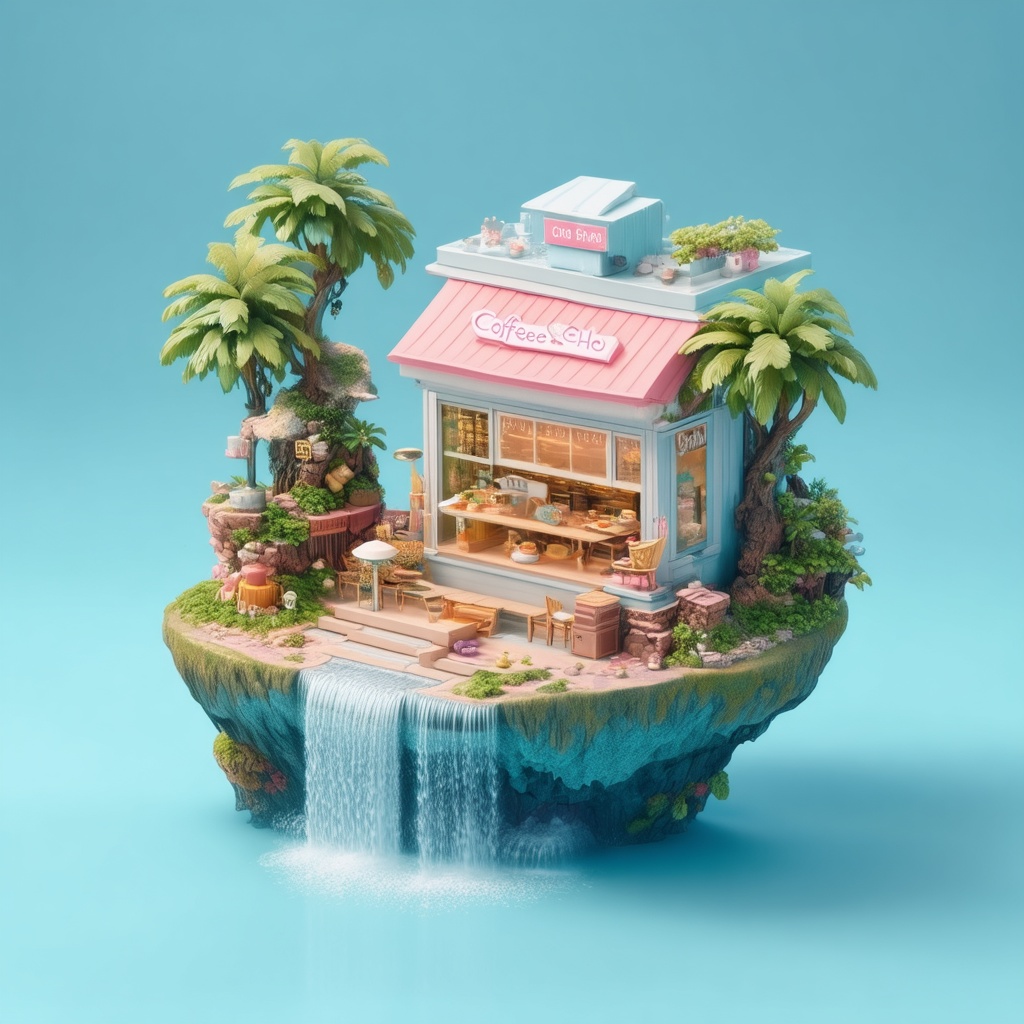
    "prompt": "an isometric 3D render of a tiny floating island coffee shop, pastel color palette, miniature waterfalls spilling off…",
    "auto_fix": true,
    "image_size": "square_hd",
    "output_format": "jpeg",
    "guidance_scale": 4.5,
    "negative_prompt": "",
    "num_inference_steps": 40,
    "enable_safety_checker": true,
    "metadata": {
      "project": "my-project"
    }
  }'
# → { "request_id": "...", "status_url": "...", "response_url": "..." }

# Poll status_url until "COMPLETED", then fetch the result
curl "https://queue.modelrunner.run/stability-ai/stable-diffusion-v3.5-medium/requests/$REQUEST_ID/status" \
  -H "Authorization: Key $MRUN_API_KEY"
curl "https://queue.modelrunner.run/stability-ai/stable-diffusion-v3.5-medium/requests/$REQUEST_ID" \
  -H "Authorization: Key $MRUN_API_KEY"

JavaScript

import { modelrunner } from "@modelrunner/client";

const result = await modelrunner.subscribe("stability-ai/stable-diffusion-v3.5-medium", {
  input: {
    "prompt": "an isometric 3D render of a tiny floating island coffee shop, pastel color palette, miniature waterfalls spilling off…",
    "auto_fix": true,
    "image_size": "square_hd",
    "output_format": "jpeg",
    "guidance_scale": 4.5,
    "negative_prompt": "",
    "num_inference_steps": 40,
    "enable_safety_checker": true
  },
});
console.log(result);

Python

import os
import requests

headers = {"Authorization": f"Key {os.environ['MRUN_API_KEY']}"}

submitted = requests.post(
    "https://queue.modelrunner.run/stability-ai/stable-diffusion-v3.5-medium",
    headers=headers,
    json={
      "prompt": "an isometric 3D render of a tiny floating island coffee shop, pastel color palette, miniature waterfalls spilling off…",
      "auto_fix": true,
      "image_size": "square_hd",
      "output_format": "jpeg",
      "guidance_scale": 4.5,
      "negative_prompt": "",
      "num_inference_steps": 40,
      "enable_safety_checker": true
    },
).json()

# Poll submitted["status_url"] until "COMPLETED", then:
result = requests.get(submitted["response_url"], headers=headers).json()

Input parameters

Input parameters of Stable Diffusion 3.5 Medium
NameTypeRequiredDescription
promptstringyesThe text prompt describing the image to generate.
image_sizeenumnoThe size of the generated image. Choose a preset (e.g. 'square_hd', 'portrait_16_9') or pass a custom {width, height} object. One of: square_hd, square, portrait_4_3, portrait_16_9, landscape_4_3, landscape_16_9. Default: "landscape_4_3".
num_inference_stepsintegernoThe number of inference steps to perform. More steps can improve detail at the cost of speed. Default: 40.
guidance_scalenumbernoThe CFG (Classifier Free Guidance) scale. Higher values increase adherence to the prompt. Default: 4.5.
negative_promptstringnoDescribe what you do NOT want to appear in the image. Default: "".
seedintegernoThe same seed and the same prompt given to the same version of the model will output the same image every time.
output_formatenumnoThe format of the generated image. One of: jpeg, png. Default: "jpeg".
enable_safety_checkerbooleannoIf set to true, the safety checker will be enabled. Default: true.
auto_fixbooleannoAutomatically resize incompatible custom dimensions to the nearest supported size. Default: true.

Machine-readable: OpenAPI schema · llms.txt

Use Stable Diffusion 3.5 Medium from Claude & Cursor (MCP)

Point Claude Code, Claude Desktop, Cursor, or any MCP client at the ModelRunner MCP server and Stable Diffusion 3.5 Medium becomes a tool your assistant can call directly — it authorizes via OAuth (no API key in config) and runs this model with the run_model tool using the endpoint stability-ai/stable-diffusion-v3.5-medium.

MCP client config (Claude Desktop, Cursor)

{
  "mcpServers": {
    "modelrunner": {
      "command": "npx",
      "args": ["-y", "mcp-remote", "https://mcp.modelrunner.run/mcp"]
    }
  }
}

Claude Code

claude mcp add --transport http modelrunner https://mcp.modelrunner.run/mcp

Then ask your assistant, for example: “Run stability-ai/stable-diffusion-v3.5-medium on ModelRunner to generate image”. MCP setup guide.

Model Detayları

Model Detayları

Stable Diffusion 3.5 Medium, bir metin prompt’unu yüksek kaliteli bir görsele dönüştürür. Stability AI’ın verimli, 2.5 milyar parametreli Multimodal Diffusion Transformer (MMDiT-X) modelidir ve 8B Large modelin daha küçük, daha hızlı kardeşidir. Standart tüketici donanımında iyi çalışacak şekilde ayarlanmıştır; bunu yaparken güçlü prompt anlama yeteneğini, doğru tipografiyi ve fotogerçekçilikten illüstrasyona uzanan çeşitli görsel stilleri korur. Betimleyici bir prompt verin ve bir görsel boyutu seçin; model tek bir görsel döndürür. Öne çıkan güçlü yanları hız ve megapiksel başına düşük fiyatla gelen maliyet verimliliğidir; bu da onu yüksek hacimli ya da bütçeye duyarlı text-to-image işleri için güçlü bir varsayılan seçenek yapar.

## En uygun olduğu işler - Metin açıklamasından büyük ölçekte hızlı ve düşük maliyetli görsel üretimi - Ayrıntılı bir prompt’tan fotogerçekçi sahneler ve portreler - Görsel içinde okunaklı metin, tabela ve tipografi basmak - Pek çok farklı estetikte konsept çizim, illüstrasyon ve stilize render’lar - Bir prompt’tan pazarlama görselleri, ürün mockup’ları ve sosyal medya görselleri

## Şu durumlarda başka bir model seçin - En yüksek sadakat ya da en karmaşık çok özneli prompt’larda uyum gerekiyorsa — 8 milyar parametreli Stable Diffusion 3.5 Large kullanın - Sıfırdan üretmek yerine mevcut bir görseli düzenlemek, yeniden tarzlamak ya da inpaint etmek istiyorsanız — bir görsel düzenleme modeli kullanın - Mevcut bir görseli büyütmek ya da ona detay eklemek gerekiyorsa — bir upscaling modeli kullanın - Video ya da animasyon gerekiyorsa — bir text-to-video modeli kullanın

## İpuçları - Özne, mekân, ışık ve stil konusunda net olun; SD 3.5 Medium ayrıntılı prompt’ların karşılığını verir - Prompt’a daha sıkı uyum için `guidance_scale` değerini (varsayılan 4.5) 5-7 aralığına doğru yükseltin; daha fazla yaratıcı serbestlik için düşürün - İstenmeyen öğeleri dışarıda bırakmak için `negative_prompt` kullanın (ör. "blurry, extra fingers, watermark") - `image_size` alanına bir hazır ayar ("square_hd", "portrait_16_9", "landscape_4_3", …) verin ya da özel bir `{ width, height }` nesnesi geçin - Özel `{ width, height }` boyutlarının hata vermek yerine desteklenen en yakın boyuta yuvarlanması için `auto_fix` seçeneğini açık bırakın (varsayılan)

ModelRunner JavaScript client ile çalıştırmak için: ```js import { modelrunner } from "@modelrunner/client";

const result = await modelrunner.subscribe("stability-ai/stable-diffusion-v3.5-medium", { input: { prompt: "a serene mountain lake at golden hour, mist over the water, photorealistic", image_size: "landscape_4_3", num_inference_steps: 40, guidance_scale: 4.5, }, }); ```