
Ana içeriğe geç
qwen avatarı

Qwen-Image-Edit API

qwen/qwen-image-edit

Mevcut bir görseli metin talimatıyla düzenleyin — yeniden renklendirin, yeniden tarzlayın, arka planı değiştirin, öğe ekleyip çıkarın; görsel içine İngilizce ve Çince metni doğru ve okunaklı yazar.

düzenleme
görsel megapikseli başına 0.03

Model girdisi

Input

The edit instruction describing the change to apply to the input image. To edit text in the image, quote the exact replacement words.

The URL of the image to edit.

The size of the edited image. Leave unset to preserve the input image's dimensions, or use a preset string (e.g. 'landscape_16_9') or a custom {width, height} object.

Additional Settings

Customize your input with more control.

Min: 2 - Max: 50

The number of inference steps to perform. More steps can improve detail at the cost of speed.

Min: 0 - Max: 20

The CFG (Classifier Free Guidance) scale. Higher values increase adherence to the prompt.

The same seed and the same prompt given to the same version of the model will output the same image every time.

Safety checker can only be disabled on API call

The format of the edited image.

The negative prompt to use. Use it to address details that you don't want in the image.

Acceleration level for image editing. Options: 'none', 'regular', 'high'. Higher acceleration increases speed.

Min: 1 - Max: 4

The number of images to generate. Each generated image is billed.

You need to be logged in to run this model and view results.
Log in

Model çıktısı

Output

Loading
Generated in 4.999 seconds
Logs (1 lines)

Örnek istekler

Örnekler

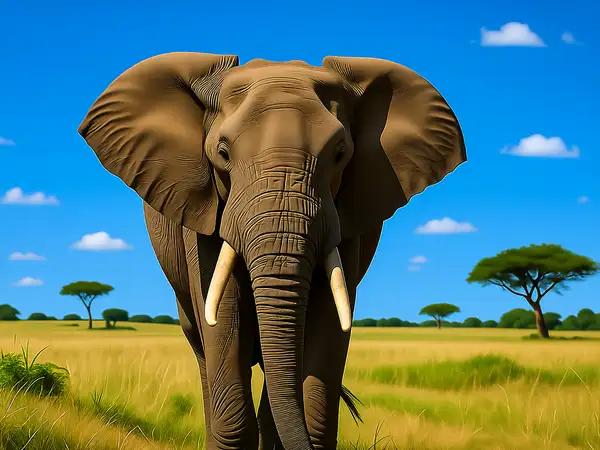
Example output 1

Qwen-Image-Edit API

Qwen-Image-Edit is a image-to-image AI model by qwen. On ModelRunner it runs through a REST API or via MCP from any AI assistant, at $0.03 per megapixel.

POST https://queue.modelrunner.run/qwen/qwen-image-edit

cURL

# Submit a request to the queue. Input fields go at the top level of the
# body. The optional reserved "metadata" object holds your own flat string
# tags — stored on the request, never sent to the model; filter later with
# GET https://queue.modelrunner.run/requests?metadata=<url-encoded JSON>.
curl -X POST https://queue.modelrunner.run/qwen/qwen-image-edit \
  -H "Authorization: Key $MRUN_API_KEY" \
  -H "Content-Type: application/json" \
  -d '{
    "prompt": "Change the background to a sunny blue sky",
    "image_url": "https://media.modelrunner.ai/LnlaKNApm4j6wf6BxxcuZ.png",
    "image_size": "landscape_4_3",
    "num_images": 1,
    "acceleration": "regular",
    "output_format": "png",
    "guidance_scale": 4,
    "negative_prompt": " ",
    "num_inference_steps": 30,
    "enable_safety_checker": true,
    "metadata": {
      "project": "my-project"
    }
  }'
# → { "request_id": "...", "status_url": "...", "response_url": "..." }

# Poll status_url until "COMPLETED", then fetch the result
curl "https://queue.modelrunner.run/qwen/qwen-image-edit/requests/$REQUEST_ID/status" \
  -H "Authorization: Key $MRUN_API_KEY"
curl "https://queue.modelrunner.run/qwen/qwen-image-edit/requests/$REQUEST_ID" \
  -H "Authorization: Key $MRUN_API_KEY"

JavaScript

import { modelrunner } from "@modelrunner/client";

const result = await modelrunner.subscribe("qwen/qwen-image-edit", {
  input: {
    "prompt": "Change the background to a sunny blue sky",
    "image_url": "https://media.modelrunner.ai/LnlaKNApm4j6wf6BxxcuZ.png",
    "image_size": "landscape_4_3",
    "num_images": 1,
    "acceleration": "regular",
    "output_format": "png",
    "guidance_scale": 4,
    "negative_prompt": " ",
    "num_inference_steps": 30,
    "enable_safety_checker": true
  },
});
console.log(result);

Python

import os
import requests

headers = {"Authorization": f"Key {os.environ['MRUN_API_KEY']}"}

submitted = requests.post(
    "https://queue.modelrunner.run/qwen/qwen-image-edit",
    headers=headers,
    json={
      "prompt": "Change the background to a sunny blue sky",
      "image_url": "https://media.modelrunner.ai/LnlaKNApm4j6wf6BxxcuZ.png",
      "image_size": "landscape_4_3",
      "num_images": 1,
      "acceleration": "regular",
      "output_format": "png",
      "guidance_scale": 4,
      "negative_prompt": " ",
      "num_inference_steps": 30,
      "enable_safety_checker": true
    },
).json()

# Poll submitted["status_url"] until "COMPLETED", then:
result = requests.get(submitted["response_url"], headers=headers).json()

Input parameters

Input parameters of Qwen-Image-Edit
NameTypeRequiredDescription
promptstringyesThe edit instruction describing the change to apply to the input image. To edit text in the image, quote the exact replacement words.
image_urlstring (uri)yesThe URL of the image to edit.
image_sizeenumnoThe size of the edited image. Leave unset to preserve the input image's dimensions, or use a preset string (e.g. 'landscape_16_9') or a custom {width, height} object. One of: square_hd, square, portrait_4_3, portrait_16_9, landscape_4_3, landscape_16_9.
num_inference_stepsintegernoThe number of inference steps to perform. More steps can improve detail at the cost of speed. Default: 30.
guidance_scalenumbernoThe CFG (Classifier Free Guidance) scale. Higher values increase adherence to the prompt. Default: 4.
seedintegernoThe same seed and the same prompt given to the same version of the model will output the same image every time.
enable_safety_checkerbooleannoIf set to true, the safety checker will be enabled. Default: true.
output_formatenumnoThe format of the edited image. One of: jpeg, png. Default: "png".
negative_promptstringnoThe negative prompt to use. Use it to address details that you don't want in the image. Default: " ".
accelerationenumnoAcceleration level for image editing. Options: 'none', 'regular', 'high'. Higher acceleration increases speed. One of: none, regular, high. Default: "regular".
num_imagesintegernoThe number of images to generate. Each generated image is billed. Default: 1.

Machine-readable: OpenAPI schema · llms.txt

Use Qwen-Image-Edit from Claude & Cursor (MCP)

Point Claude Code, Claude Desktop, Cursor, or any MCP client at the ModelRunner MCP server and Qwen-Image-Edit becomes a tool your assistant can call directly — it authorizes via OAuth (no API key in config) and runs this model with the run_model tool using the endpoint qwen/qwen-image-edit.

MCP client config (Claude Desktop, Cursor)

{
  "mcpServers": {
    "modelrunner": {
      "command": "npx",
      "args": ["-y", "mcp-remote", "https://mcp.modelrunner.run/mcp"]
    }
  }
}

Claude Code

claude mcp add --transport http modelrunner https://mcp.modelrunner.run/mcp

Then ask your assistant, for example: “Run qwen/qwen-image-edit on ModelRunner to generate image”. MCP setup guide.

Model Detayları

Model Detayları

Qwen-Image-Edit, bir kaynak görseli ve düz bir dille yazılmış talimatı alır, o görselin düzenlenmiş halini döndürür. İstediğiniz değişikliği tarif edin — bir nesneyi yeniden renklendirin, arka planı değiştirin, sahneyi yeniden tarzlayın, bir öğe ekleyin ya da çıkarın veya görseldeki metni yeniden yazın — model düzenlemeyi görselin geri kalanını koruyarak uygular. Öne çıkan gücü Qwen-Image ailesinden gelir: İngilizce ve Çince metni doğrudan görselin içinde doğru ve okunaklı biçimde düzenler ve basar; böylece tabelalar, etiketler ve yazılar düzenlemeden sonra da doğru kalır.

## En uygun olduğu işler - Bir fotoğrafı ya da grafiği talimatla düzenlemek — renkleri, malzemeleri, arka planları, ışığı ya da stili değiştirmek - Mevcut bir görsele nesne, kişi ya da öğe eklemek veya görselden çıkarmak - Çince dahil, görselin içindeki asıl metni düzenlemek ya da düzeltmek (tabelalar, posterler, ambalajlar, menüler) - Özneyi ve yerleşimi tanınır tutarak bir sahneyi yeniden tarzlamak (ör. fotoğraftan illüstrasyona)

## Şu durumlarda başka bir model seçin - Kaynak görsel olmadan bir metin prompt’undan sıfırdan yeni bir görsel üretmek istiyorsanız — text-to-image için Qwen-Image modelini kullanın - Elle çizilmiş bir maske bölgesiyle sınırlı, piksel hassasiyetinde yerel düzenlemeler gerekiyorsa — özel bir inpainting modeli kullanın - Görselinizden video ya da animasyon istiyorsanız — bir image-to-video modeli kullanın

## İpuçları - Talimatı emir kipinde, doğrudan bir düzenleme olarak yazın ("arabayı kırmızı yap", "arka planı güneşli bir gökyüzüyle değiştir") ve geri kalanın bozulmaması için yalnızca değişmesi gereken şeyi belirtin - Görseldeki kelimeleri düzenlemek için yeni metnin tam halini prompt’ta tırnak içinde yazın - Girdinin özgün boyutlarını korumak için `image_size` alanını boş bırakın; çıktıyı yeniden çerçevelemek için bir hazır ayar (ör. `landscape_4_3`) ya da özel bir `{ width, height }` nesnesi verin - Tek çağrıda birkaç düzenleme varyasyonu almak için `num_images` kullanın (1-4)

## Sınırlamalar - Tek bir prompt’a sığdırılmış yoğun, çok adımlı talimatlarda istenen değişikliğin yalnızca bir kısmı uygulanabilir - Çok küçük metinler ya da yoğun, çok satırlı pasajlar düzenlemeden sonra yine de glif hatalarına yol açabilir

ModelRunner JavaScript client ile çalıştırmak için: ```js import { modelrunner } from "@modelrunner/client";

const result = await modelrunner.subscribe("qwen/qwen-image-edit", { input: { prompt: "change the background to a sunny blue sky", image_url: "https://media.modelrunner.ai/example-input.jpg", num_images: 1, }, }); ```