
Ana içeriğe geç
ideogram avatarı

Ideogram V4 Image-to-Image API

ideogram/ideogram-v4/image-to-image

Bir referans görseli metin prompt’uyla dönüştürün — yeniden tarzlayın, düzenleyin ya da yeniden yorumlayın; logo, poster ve tabelalar için görsel içindeki metin doğru ve okunaklı basılır.

düzenleme
görsel megapikseli başına 0.06

Model girdisi

Input

URL of the input image to transform. The output keeps the composition of this image, reinterpreted according to the prompt.

The text prompt describing how to transform the image. Put any words you want rendered inside the image in quotes.

The size of the generated image. Use 'auto' to match the input image, a preset string (e.g. 'landscape_16_9'), or a custom {width, height} object.

Min: 0 - Max: 1

How much to transform the input image, from 0 to 1. Higher values follow the prompt more and drift further from the reference; lower values stay closer to the input.

Additional Settings

Customize your input with more control.

Magic Prompt: automatically enriches the prompt before generation. None uses the prompt as written; Large applies the most enrichment for the highest-quality result.

The speed/quality/cost tradeoff. TURBO is fastest and cheapest, BALANCED is the default, QUALITY is best but slowest and most expensive. Affects both speed and cost.

The acceleration level to use.

The same seed and the same prompt given to the same version of the model will output the same image every time.

Safety checker can only be disabled on API call

The format of the generated image.

Min: 1 - Max: 4

The number of images to generate. Each generated image is billed.

You need to be logged in to run this model and view results.
Log in

Model çıktısı

Output

Loading
Generated in 13.679 seconds
Logs (1 lines)

Örnek istekler

Örnekler

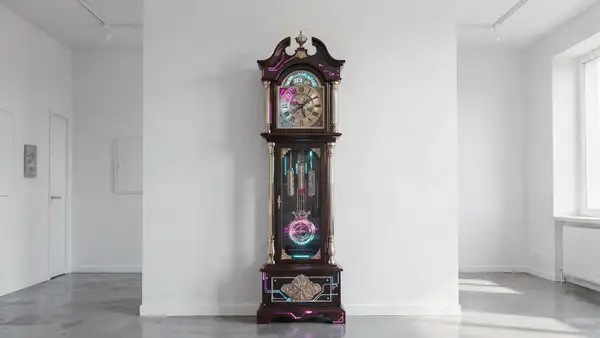
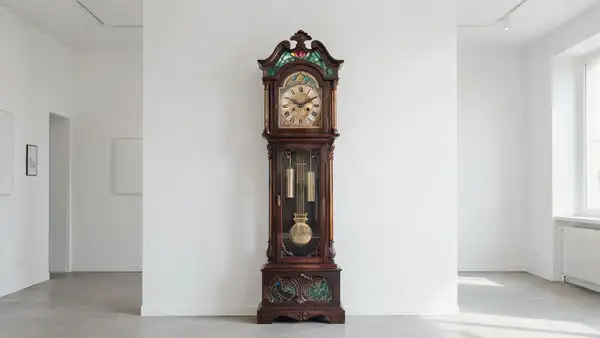
Example output 1Example output 2

Ideogram V4 Image-to-Image API

Ideogram V4 Image-to-Image is a image-to-image AI model by ideogram. On ModelRunner it runs through a REST API or via MCP from any AI assistant, at $0.06 per megapixel.

POST https://queue.modelrunner.run/ideogram/ideogram-v4/image-to-image

cURL

# Submit a request to the queue. Input fields go at the top level of the
# body. The optional reserved "metadata" object holds your own flat string
# tags — stored on the request, never sent to the model; filter later with
# GET https://queue.modelrunner.run/requests?metadata=<url-encoded JSON>.
curl -X POST https://queue.modelrunner.run/ideogram/ideogram-v4/image-to-image \
  -H "Authorization: Key $MRUN_API_KEY" \
  -H "Content-Type: application/json" \
  -d '{
    "prompt": "Transform the scene into a neon-lit cyberpunk shrine: the antique clock rebuilt from chrome, glass and glowing hologr…",
    "strength": 0.7,
    "image_url": "https://media.modelrunner.ai/nDaJs47xN2swuGDYlMDS4.jpeg",
    "image_size": "auto",
    "num_images": 1,
    "acceleration": "none",
    "output_format": "jpeg",
    "expansion_model": "Medium",
    "rendering_speed": "BALANCED",
    "enable_safety_checker": true,
    "metadata": {
      "project": "my-project"
    }
  }'
# → { "request_id": "...", "status_url": "...", "response_url": "..." }

# Poll status_url until "COMPLETED", then fetch the result
curl "https://queue.modelrunner.run/ideogram/ideogram-v4/image-to-image/requests/$REQUEST_ID/status" \
  -H "Authorization: Key $MRUN_API_KEY"
curl "https://queue.modelrunner.run/ideogram/ideogram-v4/image-to-image/requests/$REQUEST_ID" \
  -H "Authorization: Key $MRUN_API_KEY"

JavaScript

import { modelrunner } from "@modelrunner/client";

const result = await modelrunner.subscribe("ideogram/ideogram-v4/image-to-image", {
  input: {
    "prompt": "Transform the scene into a neon-lit cyberpunk shrine: the antique clock rebuilt from chrome, glass and glowing hologr…",
    "strength": 0.7,
    "image_url": "https://media.modelrunner.ai/nDaJs47xN2swuGDYlMDS4.jpeg",
    "image_size": "auto",
    "num_images": 1,
    "acceleration": "none",
    "output_format": "jpeg",
    "expansion_model": "Medium",
    "rendering_speed": "BALANCED",
    "enable_safety_checker": true
  },
});
console.log(result);

Python

import os
import requests

headers = {"Authorization": f"Key {os.environ['MRUN_API_KEY']}"}

submitted = requests.post(
    "https://queue.modelrunner.run/ideogram/ideogram-v4/image-to-image",
    headers=headers,
    json={
      "prompt": "Transform the scene into a neon-lit cyberpunk shrine: the antique clock rebuilt from chrome, glass and glowing hologr…",
      "strength": 0.7,
      "image_url": "https://media.modelrunner.ai/nDaJs47xN2swuGDYlMDS4.jpeg",
      "image_size": "auto",
      "num_images": 1,
      "acceleration": "none",
      "output_format": "jpeg",
      "expansion_model": "Medium",
      "rendering_speed": "BALANCED",
      "enable_safety_checker": true
    },
).json()

# Poll submitted["status_url"] until "COMPLETED", then:
result = requests.get(submitted["response_url"], headers=headers).json()

Input parameters

Input parameters of Ideogram V4 Image-to-Image
NameTypeRequiredDescription
image_urlstring (uri)yesURL of the input image to transform. The output keeps the composition of this image, reinterpreted according to the prompt.
promptstringyesThe text prompt describing how to transform the image. Put any words you want rendered inside the image in quotes.
image_sizeenumnoThe size of the generated image. Use 'auto' to match the input image, a preset string (e.g. 'landscape_16_9'), or a custom {width, height} object. One of: auto, square_hd, square, portrait_4_3, portrait_16_9, landscape_4_3, landscape_16_9. Default: "auto".
strengthnumbernoHow much to transform the input image, from 0 to 1. Higher values follow the prompt more and drift further from the reference; lower values stay closer to the input. Default: 0.8.
expansion_modelenumnoMagic Prompt: automatically enriches the prompt before generation. None uses the prompt as written; Large applies the most enrichment for the highest-quality result. One of: None, Medium, Large. Default: "Medium".
rendering_speedenumnoThe speed/quality/cost tradeoff. TURBO is fastest and cheapest, BALANCED is the default, QUALITY is best but slowest and most expensive. Affects both speed and cost. One of: TURBO, BALANCED, QUALITY. Default: "BALANCED".
accelerationenumnoThe acceleration level to use. One of: none, low, regular, high. Default: "none".
seedintegernoThe same seed and the same prompt given to the same version of the model will output the same image every time.
enable_safety_checkerbooleannoIf set to true, the safety checker will be enabled. Default: true.
output_formatenumnoThe format of the generated image. One of: jpeg, png. Default: "jpeg".
num_imagesintegernoThe number of images to generate. Each generated image is billed. Default: 1.

Machine-readable: OpenAPI schema · llms.txt

Use Ideogram V4 Image-to-Image from Claude & Cursor (MCP)

Point Claude Code, Claude Desktop, Cursor, or any MCP client at the ModelRunner MCP server and Ideogram V4 Image-to-Image becomes a tool your assistant can call directly — it authorizes via OAuth (no API key in config) and runs this model with the run_model tool using the endpoint ideogram/ideogram-v4/image-to-image.

MCP client config (Claude Desktop, Cursor)

{
  "mcpServers": {
    "modelrunner": {
      "command": "npx",
      "args": ["-y", "mcp-remote", "https://mcp.modelrunner.run/mcp"]
    }
  }
}

Claude Code

claude mcp add --transport http modelrunner https://mcp.modelrunner.run/mcp

Then ask your assistant, for example: “Run ideogram/ideogram-v4/image-to-image on ModelRunner to generate image”. MCP setup guide.

Model Detayları

Model Detayları

Ideogram V4 Image-to-Image, bir referans görsel ve bir metin prompt’u alır; özgün görseli yeniden tarzlayan, düzenleyen ya da yeniden yorumlayan ama kompozisyonunu tanınır biçimde koruyan yeni bir görsel üretir. Bir fotoğraf, eskiz ya da bitmiş bir tasarımla birlikte değişikliği tarif eden bir prompt verin — yeni bir sanat stili, farklı bir atmosfer, düzeltilmiş bir ifade — model de yeniden işlenmiş bir sürüm döndürür. Ideogram V4 ailesinin ortak ve en belirgin gücü, görsel içine doğru ve okunaklı metin basmasıdır: yeniden tasarlanmış bir poster, bir ürün etiketi ya da gerçek kelimeler içeren bir tabela isteyin; yazım ve tipografi tutarlı kalır.

## En uygun olduğu işler - Bir fotoğrafı yeniden tarzlamak ya da rengini değiştirmek (ör. sıradan bir çekimi suluboya ya da vintage poster görünümüne çevirmek) - Bir görselin yerleşimini koruyarak atmosferini ya da mekânını değiştirmek - Görsele metin eklemek ya da görseldeki metni düzeltmek — menüler, kapaklar, reklamlar, ambalajlar, tabelalar - Kaba bir eskizi ya da taslak tasarımı bitmiş bir pazarlama görseline yaklaştırmak

## Şu durumlarda başka bir model seçin - Kaynak görsel olmadan metin prompt’undan görsel üretmek istiyorsanız — text-to-image varyantını kullanın: `ideogram/ideogram-v4` - Yalnızca maskelenmiş bir bölgeyi değiştirip geri kalanına dokunmamanız gerekiyorsa — bir generative fill / inpainting modeli kullanın

## İpuçları - Görselin içine basılmasını istediğiniz kelimeleri prompt’ta tırnak içine alın; ör. üzerinde `"GRAND OPENING"` yazan bir tabela. - `strength` ayarı, referansa sadakat ile prompt’un etkisi arasında denge kurar: düşük değerler (ör. `0.3`) hafif bir yeniden tarzlama için özgün kompozisyona yakın kalır; yüksek değerler (`1.0` değerine doğru) prompt’u daha agresif izler ve girdiden daha çok uzaklaşır. Varsayılan `0.8` civarında başlayın, sonuç fazla saparsa düşürün. - En temiz sonuç için net, yüksek çözünürlüklü bir referans görsel verin.

## Gelişmiş Yapılandırma

### strength Girdi görselinin ne kadar dönüştürüleceğini `0` ile `1` arasında belirler (varsayılan `0.8`). Yüksek değerler prompt’u izler ve referanstan daha çok uzaklaşır; düşük değerler özgün kompozisyonu ve detayı korur. İnce bir yeniden tarzlama için düşürün, prompt’un baskın olması gerektiğinde yükseltin.

### rendering_speed Hız, kalite ve maliyet arasındaki dengeyi belirler: `TURBO` (en hızlı, en ucuz), `BALANCED` (varsayılan), `QUALITY` (en iyi ama en yavaş ve en pahalı). Hem üretim süresini hem de görsel başına maliyeti etkiler — taslaklar için `TURBO`, nihai hero görselleri için `QUALITY` seçin.

### expansion_model Ideogram’ın "Magic Prompt" özelliğidir; üretimden önce prompt’unuzu ek betimleyici ayrıntılarla zenginleştirir. Seçenekler: `None`, `Medium` (varsayılan) ve `Large` — `Large` en fazla zenginleştirmeyi uygular, `None` prompt’unuzu tam olarak yazdığınız gibi kullanır. Kısa ve seyrek prompt’lar için daha büyük bir değer, prompt’a harfiyen uyulmasını istediğinizde `None` kullanın.

ModelRunner JavaScript client ile çalıştırmak için: ```js import { modelrunner } from "@modelrunner/client";

const result = await modelrunner.subscribe("ideogram/ideogram-v4/image-to-image", { input: { image_url: "https://media.modelrunner.ai/example-input.jpg", prompt: "restyle this as a vintage travel poster that reads \"VISIT MARS\"", strength: 0.7, rendering_speed: "QUALITY", }, }); ```