
Ana içeriğe geç
bria avatarı

Bria Background Replace API

bria/background/replace

Fotoğraftaki ön plan öznesini koruyup metin prompt’undan yepyeni bir arka plan üretin (ya da bir referans görseli örnek alın) — çıktılar ticari kullanım için güvenli.

düzenleme
0.04

Model girdisi

Input

The source photo whose foreground subject is preserved while a new background is generated around it. The output keeps the input's dimensions.

Describes the new background to generate behind the subject (e.g. 'a sunlit modern living room'). Provide either a non-empty prompt OR a ref_image_url reference image — not both.

Optional reference image whose background style and colors the model matches instead of using a text prompt. Provide either ref_image_url OR a prompt — not both.

Additional Settings

Customize your input with more control.

Describes what to avoid in the generated background.

Whether to automatically refine the background prompt for better results.

Trade some quality for faster generation. Turn off for maximum quality.

Seed for reproducible generation. Leave unset for a random result.

Min: 1 - Max: 4

The number of images to generate. Each generated image is billed.

You need to be logged in to run this model and view results.
Log in

Model çıktısı

Output

Loading
Generated in 18.476 seconds
Logs (1 lines)

Örnek istekler

Örnekler

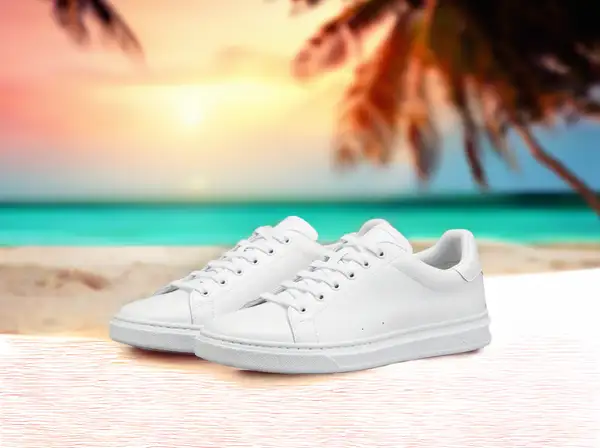
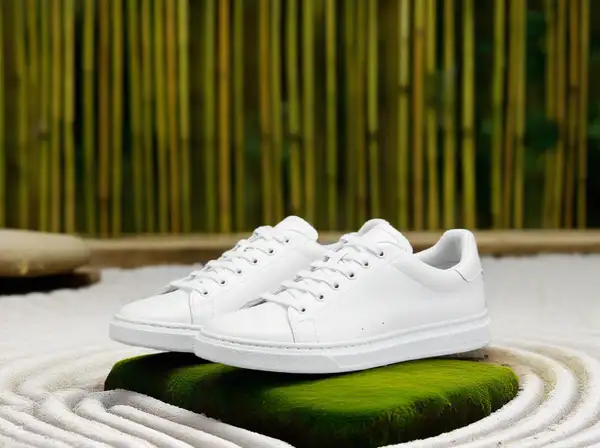
Example output 1Example output 2

Bria Background Replace API

Bria Background Replace is a image-to-image AI model by bria. On ModelRunner it runs through a REST API or via MCP from any AI assistant, at $0.04 per image.

POST https://queue.modelrunner.run/bria/background/replace

cURL

# Submit a request to the queue. Input fields go at the top level of the
# body. The optional reserved "metadata" object holds your own flat string
# tags — stored on the request, never sent to the model; filter later with
# GET https://queue.modelrunner.run/requests?metadata=<url-encoded JSON>.
curl -X POST https://queue.modelrunner.run/bria/background/replace \
  -H "Authorization: Key $MRUN_API_KEY" \
  -H "Content-Type: application/json" \
  -d '{
    "fast": true,
    "prompt": "in a minimalist Japanese zen garden with raked white gravel, moss-covered stones, and bamboo fencing at dusk",
    "image_url": "https://media.modelrunner.ai/x1BPEnb19Mdlyq94vWiOa.png",
    "ref_image_url": "",
    "refine_prompt": true,
    "negative_prompt": "",
    "metadata": {
      "project": "my-project"
    }
  }'
# → { "request_id": "...", "status_url": "...", "response_url": "..." }

# Poll status_url until "COMPLETED", then fetch the result
curl "https://queue.modelrunner.run/bria/background/replace/requests/$REQUEST_ID/status" \
  -H "Authorization: Key $MRUN_API_KEY"
curl "https://queue.modelrunner.run/bria/background/replace/requests/$REQUEST_ID" \
  -H "Authorization: Key $MRUN_API_KEY"

JavaScript

import { modelrunner } from "@modelrunner/client";

const result = await modelrunner.subscribe("bria/background/replace", {
  input: {
    "fast": true,
    "prompt": "in a minimalist Japanese zen garden with raked white gravel, moss-covered stones, and bamboo fencing at dusk",
    "image_url": "https://media.modelrunner.ai/x1BPEnb19Mdlyq94vWiOa.png",
    "ref_image_url": "",
    "refine_prompt": true,
    "negative_prompt": ""
  },
});
console.log(result);

Python

import os
import requests

headers = {"Authorization": f"Key {os.environ['MRUN_API_KEY']}"}

submitted = requests.post(
    "https://queue.modelrunner.run/bria/background/replace",
    headers=headers,
    json={
      "fast": true,
      "prompt": "in a minimalist Japanese zen garden with raked white gravel, moss-covered stones, and bamboo fencing at dusk",
      "image_url": "https://media.modelrunner.ai/x1BPEnb19Mdlyq94vWiOa.png",
      "ref_image_url": "",
      "refine_prompt": true,
      "negative_prompt": ""
    },
).json()

# Poll submitted["status_url"] until "COMPLETED", then:
result = requests.get(submitted["response_url"], headers=headers).json()

Input parameters

Input parameters of Bria Background Replace
NameTypeRequiredDescription
image_urlstring (uri)yesThe source photo whose foreground subject is preserved while a new background is generated around it. The output keeps the input's dimensions.
promptstringnoDescribes the new background to generate behind the subject (e.g. 'a sunlit modern living room'). Provide either a non-empty prompt OR a ref_image_url reference image — not both.
ref_image_urlstring (uri)noOptional reference image whose background style and colors the model matches instead of using a text prompt. Provide either ref_image_url OR a prompt — not both. Default: "".
negative_promptstringnoDescribes what to avoid in the generated background. Default: "".
refine_promptbooleannoWhether to automatically refine the background prompt for better results. Default: true.
fastbooleannoTrade some quality for faster generation. Turn off for maximum quality. Default: true.
seedintegernoSeed for reproducible generation. Leave unset for a random result.
num_imagesintegernoThe number of images to generate. Each generated image is billed. Default: 1.

Machine-readable: OpenAPI schema · llms.txt

Use Bria Background Replace from Claude & Cursor (MCP)

Point Claude Code, Claude Desktop, Cursor, or any MCP client at the ModelRunner MCP server and Bria Background Replace becomes a tool your assistant can call directly — it authorizes via OAuth (no API key in config) and runs this model with the run_model tool using the endpoint bria/background/replace.

MCP client config (Claude Desktop, Cursor)

{
  "mcpServers": {
    "modelrunner": {
      "command": "npx",
      "args": ["-y", "mcp-remote", "https://mcp.modelrunner.run/mcp"]
    }
  }
}

Claude Code

claude mcp add --transport http modelrunner https://mcp.modelrunner.run/mcp

Then ask your assistant, for example: “Run bria/background/replace on ModelRunner to generate image”. MCP setup guide.

Model Detayları

Model Detayları

Bria Background Replace, bir fotoğrafın ana öznesini olduğu gibi korur ve çevresine yepyeni bir arka plan üretir. Kaynak görseli ve öznenin arkasında görmek istediğiniz sahneyi tarif eden bir `prompt` verirsiniz — "güneş alan modern bir oturma odası", "altın saatte kumlu bir plaj", "sade bir stüdyo fonu" — ve ön planı korunmuş, arka planı yeni üretilmiş, aynı boyutlarda birleştirilmiş bir görsel alırsınız. Prompt yerine, arka plan stilini ve renklerini modelin yakalayacağı bir `ref_image_url` referans görseli de verebilirsiniz. Bria modelleri yalnızca tamamen lisanslı ticari verilerle eğitildiği için çıktılar ticari kullanımda güvenli ve risksizdir.

Birincil girdi, `prompt` ile birlikte `image_url` alanıdır (özne fotoğrafı). Boş olmayan bir `prompt` YA DA bir `ref_image_url` verilmelidir, ikisi birden değil: yeni bir arka planı sözcüklerle tarif etmek için `prompt`, mevcut bir referans arka plana uymak için `ref_image_url` kullanın. Çıktı, özgün öznenin korunduğu ve yeni arka planın üretildiği tek bir görseldir.

## En uygun olduğu işler - Yeniden çekim yapmadan bir ürünü, kişiyi ya da nesneyi yeni bir sahneye yerleştirmek - E-ticaret ve kataloglar için markaya uygun stüdyo, lifestyle ya da mekân fonları üretmek - Özneyi piksel hassasiyetinde koruyarak kalabalık ya da markaya uymayan bir arka planı, tarif ettiğiniz sade bir arka planla değiştirmek - Çok sayıda ürün çekiminde bir referans görselin arka plan stilini yakalamak

## Şu durumlarda başka bir model seçin - Yeni bir arka plan yerine arka planı tamamen kaldırıp saydam PNG kesit almak istiyorsanız — bir arka plan kaldırma modeli kullanın - Arkadaki sahneyi değiştirmek yerine özneyi yeni ışığa uyacak şekilde yeniden aydınlatmak istiyorsanız — bir yeniden aydınlatma modeli kullanın - Tüm arka planı değiştirmek yerine görselin içinde maskelenmiş belirli bir bölgeyi doldurmak ya da düzenlemek istiyorsanız — bir generative fill / inpainting modeli kullanın - Kaynak fotoğraf olmadan, bir metin prompt’undan yepyeni bir görsel gerekiyorsa — bir text-to-image modeli kullanın

## İpuçları - Arka planı `prompt` içinde somut biçimde tarif edin (mekân, ışık, günün saati, malzemeler); özne otomatik olarak korunur, bu yüzden özneyi değil sahneyi tarif edin - `prompt` YA DA `ref_image_url` verin, asla ikisini birden değil — yalnızca `image_url` göndermek reddedilir - Çıktı girdinin boyutlarını korur; belirli bir çözünürlük gerekiyorsa kaynak görseli göndermeden önce boyutlandırıp kırpın - İyi bir hız/kalite dengesi için `refine_prompt` ve `fast` alanlarını varsayılan değerlerinde bırakın; en yüksek kaliteyi istiyorsanız `fast` seçeneğini kapatın

ModelRunner JavaScript client ile çalıştırmak için: ```js import { modelrunner } from "@modelrunner/client";

const result = await modelrunner.subscribe("bria/background/replace", { input: { image_url: "https://media.modelrunner.ai/example-subject.png", prompt: "a sunlit modern living room with hardwood floors and a large window", }, }); ```