
bria avatar

Bria Background Replace API

bria/background/replace

Keep the foreground subject of a photo and generate a brand-new background from a text prompt (or match a reference image), with commercially safe outputs.

edit
0.04

Model Input

Input

The source photo whose foreground subject is preserved while a new background is generated around it. The output keeps the input's dimensions.

Describes the new background to generate behind the subject (e.g. 'a sunlit modern living room'). Provide either a non-empty prompt OR a ref_image_url reference image — not both.

Optional reference image whose background style and colors the model matches instead of using a text prompt. Provide either ref_image_url OR a prompt — not both.

Additional Settings

Customize your input with more control.

Describes what to avoid in the generated background.

Whether to automatically refine the background prompt for better results.

Trade some quality for faster generation. Turn off for maximum quality.

Seed for reproducible generation. Leave unset for a random result.

Min: 1 - Max: 4

The number of images to generate. Each generated image is billed.

You need to be logged in to run this model and view results.
Log in

Model Output

Output

Loading
Generated in 18.476 seconds
Logs (1 lines)

Model Example Requests

Examples

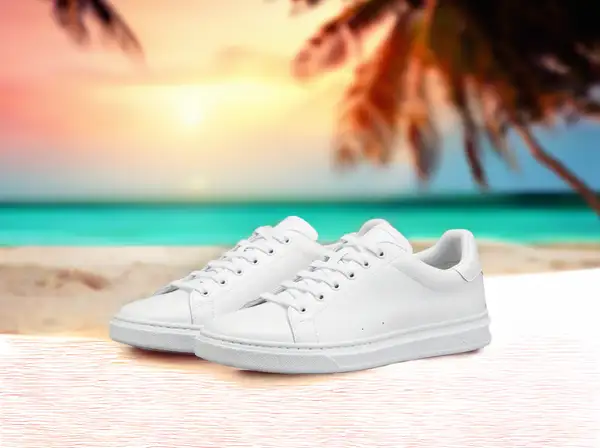
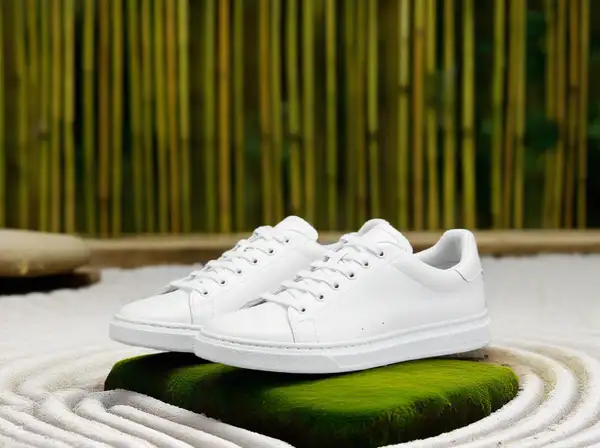
Example output 1Example output 2

Bria Background Replace API

Bria Background Replace is a image-to-image AI model by bria. On ModelRunner it runs through a REST API or via MCP from any AI assistant, at $0.04 per image.

POST https://queue.modelrunner.run/bria/background/replace

cURL

# Submit a request to the queue. Input fields go at the top level of the
# body. The optional reserved "metadata" object holds your own flat string
# tags — stored on the request, never sent to the model; filter later with
# GET https://queue.modelrunner.run/requests?metadata=<url-encoded JSON>.
curl -X POST https://queue.modelrunner.run/bria/background/replace \
  -H "Authorization: Key $MRUN_API_KEY" \
  -H "Content-Type: application/json" \
  -d '{
    "fast": true,
    "prompt": "in a minimalist Japanese zen garden with raked white gravel, moss-covered stones, and bamboo fencing at dusk",
    "image_url": "https://media.modelrunner.ai/x1BPEnb19Mdlyq94vWiOa.png",
    "ref_image_url": "",
    "refine_prompt": true,
    "negative_prompt": "",
    "metadata": {
      "project": "my-project"
    }
  }'
# → { "request_id": "...", "status_url": "...", "response_url": "..." }

# Poll status_url until "COMPLETED", then fetch the result
curl "https://queue.modelrunner.run/bria/background/replace/requests/$REQUEST_ID/status" \
  -H "Authorization: Key $MRUN_API_KEY"
curl "https://queue.modelrunner.run/bria/background/replace/requests/$REQUEST_ID" \
  -H "Authorization: Key $MRUN_API_KEY"

JavaScript

import { modelrunner } from "@modelrunner/client";

const result = await modelrunner.subscribe("bria/background/replace", {
  input: {
    "fast": true,
    "prompt": "in a minimalist Japanese zen garden with raked white gravel, moss-covered stones, and bamboo fencing at dusk",
    "image_url": "https://media.modelrunner.ai/x1BPEnb19Mdlyq94vWiOa.png",
    "ref_image_url": "",
    "refine_prompt": true,
    "negative_prompt": ""
  },
});
console.log(result);

Python

import os
import requests

headers = {"Authorization": f"Key {os.environ['MRUN_API_KEY']}"}

submitted = requests.post(
    "https://queue.modelrunner.run/bria/background/replace",
    headers=headers,
    json={
      "fast": true,
      "prompt": "in a minimalist Japanese zen garden with raked white gravel, moss-covered stones, and bamboo fencing at dusk",
      "image_url": "https://media.modelrunner.ai/x1BPEnb19Mdlyq94vWiOa.png",
      "ref_image_url": "",
      "refine_prompt": true,
      "negative_prompt": ""
    },
).json()

# Poll submitted["status_url"] until "COMPLETED", then:
result = requests.get(submitted["response_url"], headers=headers).json()

Input parameters

NameTypeRequiredDescription
image_urlstring (uri)yesThe source photo whose foreground subject is preserved while a new background is generated around it. The output keeps the input's dimensions.
promptstringnoDescribes the new background to generate behind the subject (e.g. 'a sunlit modern living room'). Provide either a non-empty prompt OR a ref_image_url reference image — not both.
ref_image_urlstring (uri)noOptional reference image whose background style and colors the model matches instead of using a text prompt. Provide either ref_image_url OR a prompt — not both. Default: "".
negative_promptstringnoDescribes what to avoid in the generated background. Default: "".
refine_promptbooleannoWhether to automatically refine the background prompt for better results. Default: true.
fastbooleannoTrade some quality for faster generation. Turn off for maximum quality. Default: true.
seedintegernoSeed for reproducible generation. Leave unset for a random result.
num_imagesintegernoThe number of images to generate. Each generated image is billed. Default: 1.

Machine-readable: OpenAPI schema · llms.txt

Use Bria Background Replace from Claude & Cursor (MCP)

Point Claude Code, Claude Desktop, Cursor, or any MCP client at the ModelRunner MCP server and Bria Background Replace becomes a tool your assistant can call directly — it authorizes via OAuth (no API key in config) and runs this model with the run_model tool using the endpoint bria/background/replace.

MCP client config (Claude Desktop, Cursor)

{
  "mcpServers": {
    "modelrunner": {
      "command": "npx",
      "args": ["-y", "mcp-remote", "https://mcp.modelrunner.run/mcp"]
    }
  }
}

Claude Code

claude mcp add --transport http modelrunner https://mcp.modelrunner.run/mcp

Then ask your assistant, for example: “Run bria/background/replace on ModelRunner to generate image”. MCP setup guide.

Model Details

Model Details

Bria Background Replace keeps the main subject of a photo exactly as it is and generates a brand-new background around it. You pass the source image plus a `prompt` describing the scene you want behind the subject — "a sunlit modern living room", "a sandy beach at golden hour", "a clean studio backdrop" — and get back a composited image at the same dimensions, with the foreground preserved and a freshly generated background. Instead of a prompt you can supply a `ref_image_url` reference image whose background style and colors the model matches. Because Bria models are trained exclusively on fully licensed commercial data, the outputs are safe and risk-free for commercial use.

The primary input is `image_url` (the subject photo) together with `prompt`. Either a non-empty `prompt` OR a `ref_image_url` must be provided — not both: use `prompt` to describe a new background in words, or `ref_image_url` to match an existing reference background. The output is a single image with the original subject kept and the new background generated.

## Best for - Dropping a product, person, or object into a new scene without re-shooting - Generating on-brand studio, lifestyle, or environment backdrops for e-commerce and catalogs - Swapping a busy or off-brand background for a clean, described one while keeping the subject pixel-accurate - Matching the background style of a reference image across many product shots

## Choose another model when - You want to remove the background entirely and get a transparent-PNG cutout rather than a new background — use a background-removal model - You want to relight the subject to match new lighting rather than replace the scene behind it — use a relighting model - You want to fill or edit a specific masked region inside the image rather than swap the whole background — use a generative-fill / inpainting model - You need a brand-new image from a text prompt with no source photo — use a text-to-image model

## Tips - Describe the background concretely in `prompt` (setting, lighting, time of day, materials); the subject is preserved automatically, so describe the scene, not the subject - Provide EITHER `prompt` OR `ref_image_url`, never both — sending only `image_url` is rejected - The output keeps the input's dimensions, so size and crop your source before sending if you need a specific resolution - Leave `refine_prompt` and `fast` at their defaults for a good speed/quality balance; turn `fast` off if you want maximum quality

To run via the ModelRunner JavaScript client: ```js import { modelrunner } from "@modelrunner/client";

const result = await modelrunner.subscribe("bria/background/replace", { input: { image_url: "https://media.modelrunner.ai/example-subject.png", prompt: "a sunlit modern living room with hardwood floors and a large window", }, }); ```