

Ana içeriğe geç
black-forest-labs avatarı

FLUX.1 Kontext [max] API

black-forest-labs/flux-kontext/max

Mevcut bir görseli metin talimatıyla düzenleyin — nesneleri, tarzı, arka planı ya da metni değiştirin — ailenin en yüksek sadakatiyle, en üst düzey prompt uyumu, en güçlü tipografi ve tutarlılık ve ticari kullanım haklarıyla.

düzenleme
0.08

Model girdisi

Input

The edit instruction. Describe the change to apply to the source image (e.g. 'put a donut next to the flour') and name anything that should stay the same.

The source image to edit. Unmentioned regions are kept consistent while the described change is applied.

Additional Settings

Customize your input with more control.

Min: 1 - Max: 20

How strongly the result follows the edit instruction. Raise for stronger adherence; lower if the edit looks over-applied.

Min: 1 - Max: 4

The number of edited image variations to generate. Each generated image is billed separately.

Force the output aspect ratio. Leave unset to match the source image's aspect ratio.

Content-moderation strictness from '1' (strictest) to '6' (most permissive).

The format of the generated image.

Whether to automatically enhance the prompt for potentially better results.

Random seed. The same seed, prompt, and image produce the same result.

You need to be logged in to run this model and view results.
Log in

Model çıktısı

Output

Loading
Generated in 11.506 seconds
Logs (1 lines)

Örnek istekler

Örnekler

Example output 1Example output 2Example output 3

FLUX.1 Kontext [max] API

FLUX.1 Kontext [max] is a image-to-image AI model by black-forest-labs. On ModelRunner it runs through a REST API or via MCP from any AI assistant, at $0.08 per image.

POST https://queue.modelrunner.run/black-forest-labs/flux-kontext/max

cURL

# Submit a request to the queue. Input fields go at the top level of the
# body. The optional reserved "metadata" object holds your own flat string
# tags — stored on the request, never sent to the model; filter later with
# GET https://queue.modelrunner.run/requests?metadata=<url-encoded JSON>.
curl -X POST https://queue.modelrunner.run/black-forest-labs/flux-kontext/max \
  -H "Authorization: Key $MRUN_API_KEY" \
  -H "Content-Type: application/json" \
  -d '{
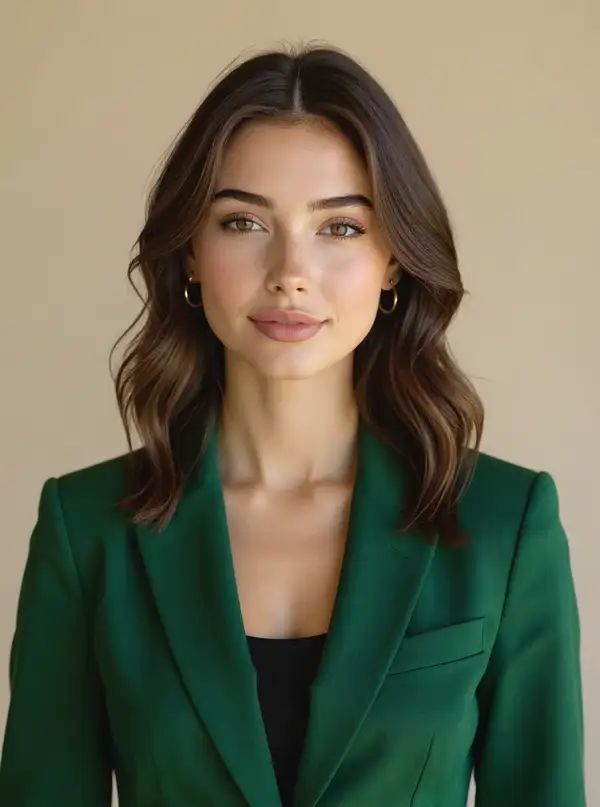
    "prompt": "Change the woman\u0027s t-shirt to a deep emerald-green blazer and add small gold hoop earrings, keeping her face, hairsty…",
    "image_url": "https://media.modelrunner.ai/PTQ8gW2giuiaAsMbx5hrB.jpeg",
    "num_images": 1,
    "output_format": "jpeg",
    "enhance_prompt": false,
    "guidance_scale": 3.5,
    "safety_tolerance": "2",
    "metadata": {
      "project": "my-project"
    }
  }'
# → { "request_id": "...", "status_url": "...", "response_url": "..." }

# Poll status_url until "COMPLETED", then fetch the result
curl "https://queue.modelrunner.run/black-forest-labs/flux-kontext/max/requests/$REQUEST_ID/status" \
  -H "Authorization: Key $MRUN_API_KEY"
curl "https://queue.modelrunner.run/black-forest-labs/flux-kontext/max/requests/$REQUEST_ID" \
  -H "Authorization: Key $MRUN_API_KEY"

JavaScript

import { modelrunner } from "@modelrunner/client";

const result = await modelrunner.subscribe("black-forest-labs/flux-kontext/max", {
  input: {
    "prompt": "Change the woman's t-shirt to a deep emerald-green blazer and add small gold hoop earrings, keeping her face, hairsty…",
    "image_url": "https://media.modelrunner.ai/PTQ8gW2giuiaAsMbx5hrB.jpeg",
    "num_images": 1,
    "output_format": "jpeg",
    "enhance_prompt": false,
    "guidance_scale": 3.5,
    "safety_tolerance": "2"
  },
});
console.log(result);

Python

import os
import requests

headers = {"Authorization": f"Key {os.environ['MRUN_API_KEY']}"}

submitted = requests.post(
    "https://queue.modelrunner.run/black-forest-labs/flux-kontext/max",
    headers=headers,
    json={
      "prompt": "Change the woman's t-shirt to a deep emerald-green blazer and add small gold hoop earrings, keeping her face, hairsty…",
      "image_url": "https://media.modelrunner.ai/PTQ8gW2giuiaAsMbx5hrB.jpeg",
      "num_images": 1,
      "output_format": "jpeg",
      "enhance_prompt": false,
      "guidance_scale": 3.5,
      "safety_tolerance": "2"
    },
).json()

# Poll submitted["status_url"] until "COMPLETED", then:
result = requests.get(submitted["response_url"], headers=headers).json()

Input parameters

Input parameters of FLUX.1 Kontext [max]
NameTypeRequiredDescription
promptstringyesThe edit instruction. Describe the change to apply to the source image (e.g. 'put a donut next to the flour') and name anything that should stay the same.
image_urlstring (uri)yesThe source image to edit. Unmentioned regions are kept consistent while the described change is applied.
guidance_scalenumbernoHow strongly the result follows the edit instruction. Raise for stronger adherence; lower if the edit looks over-applied. Default: 3.5.
num_imagesintegernoThe number of edited image variations to generate. Each generated image is billed separately. Default: 1.
aspect_ratioenumnoForce the output aspect ratio. Leave unset to match the source image's aspect ratio. One of: 21:9, 16:9, 4:3, 3:2, 1:1, 2:3, 3:4, 9:16, 9:21.
safety_toleranceenumnoContent-moderation strictness from '1' (strictest) to '6' (most permissive). One of: 1, 2, 3, 4, 5, 6. Default: "2".
output_formatenumnoThe format of the generated image. One of: jpeg, png. Default: "jpeg".
enhance_promptbooleannoWhether to automatically enhance the prompt for potentially better results. Default: false.
seedintegernoRandom seed. The same seed, prompt, and image produce the same result.

Machine-readable: OpenAPI schema · llms.txt

Use FLUX.1 Kontext [max] from Claude & Cursor (MCP)

Point Claude Code, Claude Desktop, Cursor, or any MCP client at the ModelRunner MCP server and FLUX.1 Kontext [max] becomes a tool your assistant can call directly — it authorizes via OAuth (no API key in config) and runs this model with the run_model tool using the endpoint black-forest-labs/flux-kontext/max.

MCP client config (Claude Desktop, Cursor)

{
  "mcpServers": {
    "modelrunner": {
      "command": "npx",
      "args": ["-y", "mcp-remote", "https://mcp.modelrunner.run/mcp"]
    }
  }
}

Claude Code

claude mcp add --transport http modelrunner https://mcp.modelrunner.run/mcp

Then ask your assistant, for example: “Run black-forest-labs/flux-kontext/max on ModelRunner to generate image”. MCP setup guide.

Model Detayları

Model Detayları

FLUX.1 Kontext [max], verdiğiniz bir görseli düz bir dille yazılmış talimatı izleyerek düzenler. Bir kaynak fotoğraf ve değişikliği tarif eden bir prompt verirsiniz — bir nesneyi değiştirin, sahneyi yeniden tarzlayın, arka planı değiştirin, metni değiştirin ya da rengi ayarlayın — ve model, bahsetmediğiniz her şeyi tutarlı tutarak görseli o düzenlemeyle yeniden üretir. Black Forest Labs Kontext düzenleme ailesinin en üst kademesidir: en yüksek sadakatli, en yüksek performanslı kapalı ağırlıklı model; ailedeki en güçlü prompt uyumu, en temiz tipografi ve en iyi karakter ve sahne tutarlılığı — karmaşık düzenlemeler ve premium ticari işler için ayarlanmış, ticari kullanım hakları dahil. Dokunulmayan bölgeler — yüzler, ürünler, kompozisyon — yeniden üretilmek yerine sabit kalır; böylece zorlu ve yinelemeli düzenlemeler, alt kademelerin kayacağı yerde temiz biçimde birikir.

## En uygun olduğu işler - Prompt uyumunun ve temiz tipografinin kusursuz olması gereken yüksek sadakatli, premium ticari ve pazarlama düzenlemeleri (okunaklı metin ve tabela düzenleyin ya da ekleyin) - Alt kademelerin zorlandığı karmaşık talimat düzenlemeleri — "ahşap zemini beyaz mermer yap", "gece olsun", "soldaki kişiyi kaldır" - Öznenin kimliğini ve pozunu en yüksek tutarlılıkla koruyarak bir sahneyi yeniden tarzlamak ya da yeniden aydınlatmak - Ön planı yeniden üretmeden arka planları değiştirmek ya da yeniden tarzlamak - Tutarlılığın ve detayın turlar boyunca korunması gereken zorlu, çok adımlı düzenlemeler

## Şu durumlarda başka bir model seçin - Aynı düzenlemeyi daha düşük maliyetle istiyorsanız — yarı fiyata standart kalite kademesi olan FLUX.1 Kontext [pro] kullanın - Açık ağırlık ve en düşük maliyet istiyorsanız ve biraz sadakatten ödün verebiliyorsanız — FLUX.1 Kontext [dev] kullanın - Kaynak fotoğrafınız yoksa ve yalnızca prompt’tan görsel üretmek istiyorsanız — bir text-to-image modeli kullanın - Düzenlenmiş sonucun canlandırılmasını ya da hareket etmesini istiyorsanız — bir image-to-video modeli kullanın - Yalnızca tek bir bölgenin hassas maskeli inpaint’i gerekiyorsa — özel bir inpainting modeli kullanın

## İpuçları - Değişikliği kesin biçimde tarif edin ve neyin aynı kalması gerektiğini söyleyin — Kontext bahsedilmeyen bölgeleri tutarlı tutar, dolayısıyla özgül talimatlar görselin daha azını değiştirir - Kaynak görselin en-boy oranına uymak için `aspect_ratio` alanını boş bırakın (hizalı önce/sonra karşılaştırması için önerilir); yalnızca çıktıyı bilerek yeniden çerçevelemek istediğinizde ayarlayın - Talimata daha güçlü uyum için `guidance_scale` değerini aralığın üst ucuna doğru yükseltin; düzenleme aşırı uygulanmış görünüyorsa düşürün

## Gelişmiş Yapılandırma - `guidance_scale` (1–20, varsayılan 3.5) sonucun talimatı ne kadar güçlü izleyeceğini belirler; daha güçlü düzenleme için yükseltin, düzenleme aşırı uygulanmış görünüyorsa düşürün. - `aspect_ratio` (varsayılan olarak boş) çıktının en-boy oranını zorlar — `21:9`, `16:9`, `4:3`, `3:2`, `1:1`, `2:3`, `3:4`, `9:16`, `9:21` değerlerinden biri. Girdi görselinin oranına uymak için boş bırakın. - `safety_tolerance` (`1`–`6`, varsayılan `2`) içerik denetimi sıkılığını ayarlar: `1` en sıkı, `6` en serbest. - `num_images` (1–4, varsayılan 1) kaç düzenlenmiş varyasyon üretileceğini belirler; üretilen her görsel ayrı faturalandırılır. - `output_format` `jpeg` (varsayılan) ya da `png` seçer. - `enhance_prompt` (varsayılan false) potansiyel olarak daha iyi sonuçlar için talimatınızı otomatik genişletir.

ModelRunner JavaScript client ile çalıştırmak için: ```js import { modelrunner } from "@modelrunner/client";

const result = await modelrunner.subscribe("black-forest-labs/flux-kontext/max", { input: { prompt: "Change the wooden floor to white marble.", image_url: "https://media.modelrunner.ai/OnB0a9tFqLGcUP53RQ46n.png", guidance_scale: 3.5, output_format: "jpeg", }, }); ```