
Ana içeriğe geç
alibaba avatarı

Happy Horse 1.1 Image to Video API

alibaba/happy-horse/v1.1/image-to-video

Durağan bir fotoğrafı 720P ya da 1080P’de 3-15 saniyelik bir videoya dönüştürün; ses görüntüyle birlikte üretilir, çıktının kare biçimi doğrudan görselinizden alınır.

Çözünürlüğe göre fiyatlandırılır

Model girdisi

Input

The photo to animate. It becomes the opening frame, and the finished clip takes its frame shape from this image, so upload it already cropped to the proportions you want. JPEG, JPG, PNG or WEBP; at least 300 px on each side, aspect ratio between 1:2.5 and 2.5:1, up to 20 MB.

Optional. Describe what happens next - the movement, the camera, any spoken line, and the sound you want. The scene is already fixed by the image, so describe the action rather than re-describing the picture. Any language, up to 5000 characters (2500 for Chinese). Leave it empty to let the model animate the image on its own.

Output video resolution. 720P bills at $0.14 per second of finished video; 1080P (default) bills at $0.18 per second.

Min: 3 - Max: 15

Length of the generated video in whole seconds (3-15). Cost scales directly with this value.

Additional Settings

Customize your input with more control.

Min: 0 - Max: 2147483647

Random seed for reproducible results. Omit for a different clip each run.

You need to be logged in to run this model and view results.
Log in

Model çıktısı

Output

Loading
Generated in 102.078 seconds
Logs (1 lines)

Örnek istekler

Örnekler

Example output 1

Model fiyatlandırması

Fiyatlandırma

Fiyat, çıktı videonuzun hedef çözünürlüğüne göre değişir.

720P
$0.14
çıktı videosunun saniyesi başına
yani yaklaşık $1 ile 7 saniye
1080P
$0.18
çıktı videosunun saniyesi başına
yani yaklaşık $1 ile 6 saniye

Happy Horse 1.1 Image to Video API

Happy Horse 1.1 Image to Video is a image-to-video AI model by alibaba. On ModelRunner it runs through a REST API or via MCP from any AI assistant, at $0.18 per second of video.

POST https://queue.modelrunner.run/alibaba/happy-horse/v1.1/image-to-video

cURL

# Submit a request to the queue. Input fields go at the top level of the
# body. The optional reserved "metadata" object holds your own flat string
# tags — stored on the request, never sent to the model; filter later with
# GET https://queue.modelrunner.run/requests?metadata=<url-encoded JSON>.
curl -X POST https://queue.modelrunner.run/alibaba/happy-horse/v1.1/image-to-video \
  -H "Authorization: Key $MRUN_API_KEY" \
  -H "Content-Type: application/json" \
  -d '{
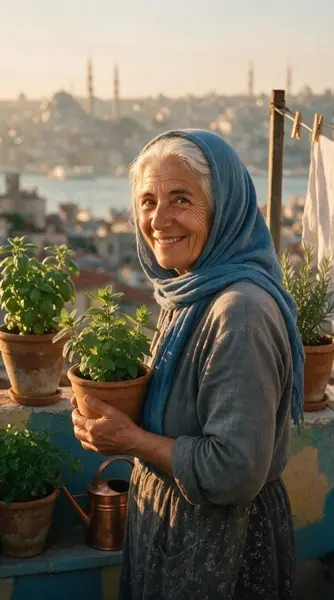
    "prompt": "She lifts the pot of mint to her face and breathes in, then looks to camera and says \u0027gel, çay hazır\u0027 — a warm smile …",
    "duration": 5,
    "resolution": "1080P",
    "start_image_url": "https://media.modelrunner.ai/un2tpPpD15tTkv1AHosEm.jpeg",
    "metadata": {
      "project": "my-project"
    }
  }'
# → { "request_id": "...", "status_url": "...", "response_url": "..." }

# Poll status_url until "COMPLETED", then fetch the result
curl "https://queue.modelrunner.run/alibaba/happy-horse/v1.1/image-to-video/requests/$REQUEST_ID/status" \
  -H "Authorization: Key $MRUN_API_KEY"
curl "https://queue.modelrunner.run/alibaba/happy-horse/v1.1/image-to-video/requests/$REQUEST_ID" \
  -H "Authorization: Key $MRUN_API_KEY"

JavaScript

import { modelrunner } from "@modelrunner/client";

const result = await modelrunner.subscribe("alibaba/happy-horse/v1.1/image-to-video", {
  input: {
    "prompt": "She lifts the pot of mint to her face and breathes in, then looks to camera and says 'gel, çay hazır' — a warm smile …",
    "duration": 5,
    "resolution": "1080P",
    "start_image_url": "https://media.modelrunner.ai/un2tpPpD15tTkv1AHosEm.jpeg"
  },
});
console.log(result);

Python

import os
import requests

headers = {"Authorization": f"Key {os.environ['MRUN_API_KEY']}"}

submitted = requests.post(
    "https://queue.modelrunner.run/alibaba/happy-horse/v1.1/image-to-video",
    headers=headers,
    json={
      "prompt": "She lifts the pot of mint to her face and breathes in, then looks to camera and says 'gel, çay hazır' — a warm smile …",
      "duration": 5,
      "resolution": "1080P",
      "start_image_url": "https://media.modelrunner.ai/un2tpPpD15tTkv1AHosEm.jpeg"
    },
).json()

# Poll submitted["status_url"] until "COMPLETED", then:
result = requests.get(submitted["response_url"], headers=headers).json()

Input parameters

Input parameters of Happy Horse 1.1 Image to Video
NameTypeRequiredDescription
start_image_urlstring (uri)yesThe photo to animate. It becomes the opening frame, and the finished clip takes its frame shape from this image, so upload it already cropped to the proportions you want. JPEG, JPG, PNG or WEBP; at least 300 px on each side, aspect ratio between 1:2.5 and 2.5:1, up to 20 MB.
promptstringnoOptional. Describe what happens next - the movement, the camera, any spoken line, and the sound you want. The scene is already fixed by the image, so describe the action rather than re-describing the picture. Any language, up to 5000 characters (2500 for Chinese). Leave it empty to let the model animate the image on its own.
resolutionenumnoOutput video resolution. 720P bills at $0.14 per second of finished video; 1080P (default) bills at $0.18 per second. One of: 720P, 1080P. Default: "1080P".
durationintegernoLength of the generated video in whole seconds (3-15). Cost scales directly with this value. Default: 5.
seedintegernoRandom seed for reproducible results. Omit for a different clip each run.

Machine-readable: OpenAPI schema · llms.txt

Use Happy Horse 1.1 Image to Video from Claude & Cursor (MCP)

Point Claude Code, Claude Desktop, Cursor, or any MCP client at the ModelRunner MCP server and Happy Horse 1.1 Image to Video becomes a tool your assistant can call directly — it authorizes via OAuth (no API key in config) and runs this model with the run_model tool using the endpoint alibaba/happy-horse/v1.1/image-to-video.

MCP client config (Claude Desktop, Cursor)

{
  "mcpServers": {
    "modelrunner": {
      "command": "npx",
      "args": ["-y", "mcp-remote", "https://mcp.modelrunner.run/mcp"]
    }
  }
}

Claude Code

claude mcp add --transport http modelrunner https://mcp.modelrunner.run/mcp

Then ask your assistant, for example: “Run alibaba/happy-horse/v1.1/image-to-video on ModelRunner to generate video”. MCP setup guide.

Model Detayları

Model Detayları

Happy Horse 1.1 Image to Video, verdiğiniz bir fotoğrafı canlandırır: görsel ilk kare olur, isteğe bağlı bir prompt da sonrasında ne olacağını anlatır. En-boy oranı seçmezsiniz: klip kare biçimini yüklediğiniz görselden alır; dikey bir fotoğraf dikey, geniş ekran bir görsel de geniş olarak döner. Klipler 720P ya da 1080P’de 3 ile 15 saniye arasında sürer; prompt istediğinde konuşma diyalogları da dahil olmak üzere ses, görüntüyle birlikte tek seferde üretilir. Yalnızca bir görsel gönderirseniz hareketi kendisi belirler.

## En uygun olduğu işler - Gerçek bir fotoğrafı — bir portre, bir ürün çekimi, bir manzara — özneyi ve mekânı verdiğiniz gibi koruyarak canlandırmak - Kaynak kare biçiminin bozulmadan korunması gereken, telefon fotoğraflarından dikey klipler - Ayrı bir ses aşaması olmadan sesi bitmiş halde gelmesi gereken kısa sosyal medya ve reklam klipleri - Bir illüstrasyonu, afişi ya da konsept çizimi kısa bir animasyona dönüştürmek

## Şu durumlarda başka bir model seçin - Başlangıç fotoğrafınız yoksa ve sahnenin tamamı yazılı bir tariften gelecekse — `alibaba/happy-horse/v1.1/text-to-video` gibi bir text-to-video modeli kullanın - Son kareyi de sabitlemeniz gerekiyorsa — `wan-video/wan/v2.7/image-to-video` hem bir başlangıç hem de bir bitiş görseli kabul eder - Performansı yönlendirecek bir ses kaydınız varsa — `wan-video/wan/v2.7/image-to-video/audio-driven` lip-sync’i ve hareketi o klibe göre zamanlar - Çıktının en-boy oranını kendiniz belirlemeniz ya da kesin olarak sessiz bir klip almanız gerekiyorsa — bu varyantta ikisi de ayarlanamaz

## İpuçları - Prompt’u karenin zaten gösterdiğine değil, sonrasında olacaklara ayırın — sözle hâlâ değiştirebileceğiniz şeyler hareket, kamera ve sestir - Söylenecek replikleri doğrudan prompt’a yazın — en fazla 5000 karakter, Çince için 2500 - Kaynak görseli yüklemeden önce istediğiniz oranlarda kırpın — çıktının biçimi üzerindeki tek kontrolünüz budur

## Sınırlamalar - Tam olarak bir girdi görseli kabul edilir: JPEG, JPG, PNG ya da WEBP; en az 300x300 px, en-boy oranı 1:2.5 ile 2.5:1 arasında, 20 MB altı - Çıktının oranları kaynak görseli yakından izler, ancak onunla birebir aynı olacağı garanti edilmez - `duration` yalnızca tam saniye alır, 3 ile 15 arası; daha uzun her şey ayrı çekimler olarak render edilmelidir

ModelRunner JavaScript client ile çalıştırmak için: ```js import { modelrunner } from "@modelrunner/client";

const result = await modelrunner.subscribe("alibaba/happy-horse/v1.1/image-to-video", { input: { start_image_url: "https://media.modelrunner.ai/un2tpPpD15tTkv1AHosEm.jpeg", prompt: "She lifts the pot of mint to her face, breathes in, then looks to camera and says 'come in, the tea is ready' as gulls call over the rooftops", resolution: "1080P", duration: 5, }, }); ```