
kuaishou avatar

Kling 2.5 Turbo Pro Text-to-Video API

kuaishou/kling-video/v2.5-turbo/text-to-video

Generate a short, cinematic video from a text prompt with smooth, fluid motion and strong prompt adherence.

0.07 per second of output video

Model Input

Input

Text description of the video to generate.

Length of the generated video in seconds.

The aspect ratio of the generated video frame.

Describe content to avoid in the generated video.

Min: 0 - Max: 1

How strongly the video follows the prompt. Higher values increase prompt adherence; lower values allow more creative motion.

You need to be logged in to run this model and view results.
Log in

Model Output

Output

Loading
Generated in 76.468 seconds
Logs (1 lines)

Model Example Requests

Examples

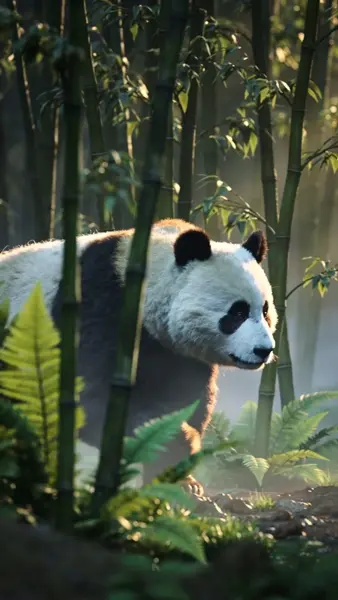
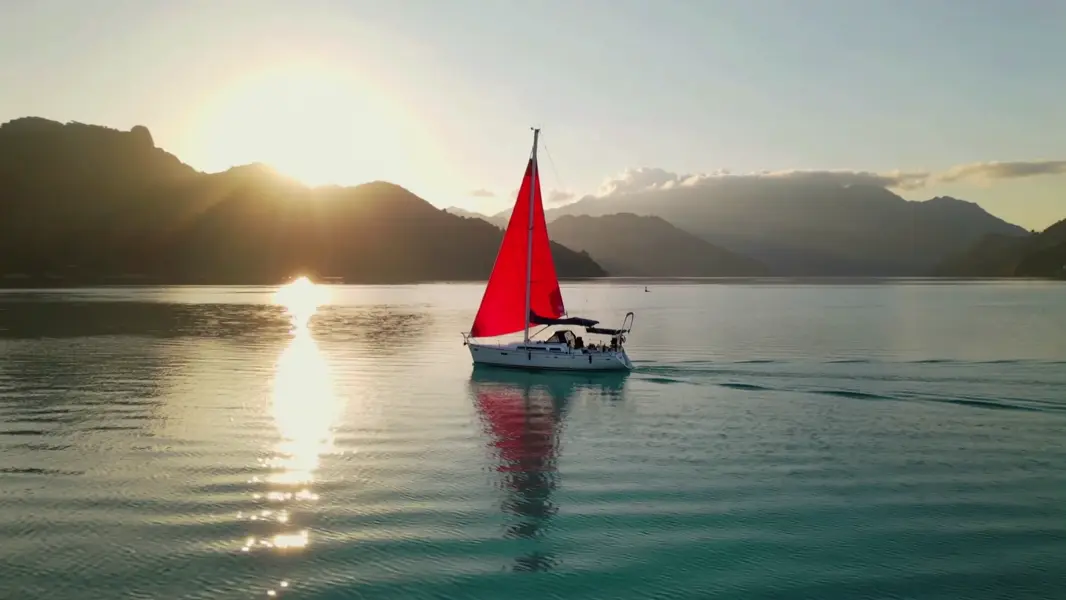
Example output 1Example output 2

Kling 2.5 Turbo Pro Text-to-Video API

Kling 2.5 Turbo Pro Text-to-Video is a text-to-video AI model by kuaishou. On ModelRunner it runs through a REST API or via MCP from any AI assistant, at $0.07 per second of video.

POST https://queue.modelrunner.run/kuaishou/kling-video/v2.5-turbo/text-to-video

cURL

# Submit a request to the queue. Input fields go at the top level of the
# body. The optional reserved "metadata" object holds your own flat string
# tags — stored on the request, never sent to the model; filter later with
# GET https://queue.modelrunner.run/requests?metadata=<url-encoded JSON>.
curl -X POST https://queue.modelrunner.run/kuaishou/kling-video/v2.5-turbo/text-to-video \
  -H "Authorization: Key $MRUN_API_KEY" \
  -H "Content-Type: application/json" \
  -d '{
    "prompt": "A lone red sailboat glides across a calm turquoise bay at sunrise, the camera slowly tracking alongside as light glin…",
    "duration": "5",
    "cfg_scale": 0.5,
    "aspect_ratio": "16:9",
    "negative_prompt": "blur, distort, and low quality",
    "metadata": {
      "project": "my-project"
    }
  }'
# → { "request_id": "...", "status_url": "...", "response_url": "..." }

# Poll status_url until "COMPLETED", then fetch the result
curl "https://queue.modelrunner.run/kuaishou/kling-video/v2.5-turbo/text-to-video/requests/$REQUEST_ID/status" \
  -H "Authorization: Key $MRUN_API_KEY"
curl "https://queue.modelrunner.run/kuaishou/kling-video/v2.5-turbo/text-to-video/requests/$REQUEST_ID" \
  -H "Authorization: Key $MRUN_API_KEY"

JavaScript

import { modelrunner } from "@modelrunner/client";

const result = await modelrunner.subscribe("kuaishou/kling-video/v2.5-turbo/text-to-video", {
  input: {
    "prompt": "A lone red sailboat glides across a calm turquoise bay at sunrise, the camera slowly tracking alongside as light glin…",
    "duration": "5",
    "cfg_scale": 0.5,
    "aspect_ratio": "16:9",
    "negative_prompt": "blur, distort, and low quality"
  },
});
console.log(result);

Python

import os
import requests

headers = {"Authorization": f"Key {os.environ['MRUN_API_KEY']}"}

submitted = requests.post(
    "https://queue.modelrunner.run/kuaishou/kling-video/v2.5-turbo/text-to-video",
    headers=headers,
    json={
      "prompt": "A lone red sailboat glides across a calm turquoise bay at sunrise, the camera slowly tracking alongside as light glin…",
      "duration": "5",
      "cfg_scale": 0.5,
      "aspect_ratio": "16:9",
      "negative_prompt": "blur, distort, and low quality"
    },
).json()

# Poll submitted["status_url"] until "COMPLETED", then:
result = requests.get(submitted["response_url"], headers=headers).json()

Input parameters

NameTypeRequiredDescription
promptstringyesText description of the video to generate.
durationenumnoLength of the generated video in seconds. Default: "5".
aspect_ratioenumnoThe aspect ratio of the generated video frame. Default: "16:9".
negative_promptstringnoDescribe content to avoid in the generated video. Default: "blur, distort, and low quality".
cfg_scalenumbernoHow strongly the video follows the prompt. Higher values increase prompt adherence; lower values allow more creative motion. Default: 0.5.

Machine-readable: OpenAPI schema · llms.txt

Use Kling 2.5 Turbo Pro Text-to-Video from Claude & Cursor (MCP)

Point Claude Code, Claude Desktop, Cursor, or any MCP client at the ModelRunner MCP server and Kling 2.5 Turbo Pro Text-to-Video becomes a tool your assistant can call directly — it authorizes via OAuth (no API key in config) and runs this model with the run_model tool using the endpoint kuaishou/kling-video/v2.5-turbo/text-to-video.

MCP client config (Claude Desktop, Cursor)

{
  "mcpServers": {
    "modelrunner": {
      "command": "npx",
      "args": ["-y", "mcp-remote", "https://mcp.modelrunner.run/mcp"]
    }
  }
}

Claude Code

claude mcp add --transport http modelrunner https://mcp.modelrunner.run/mcp

Then ask your assistant, for example: “Run kuaishou/kling-video/v2.5-turbo/text-to-video on ModelRunner to generate video”. MCP setup guide.

Model Details

Model Details

Kling 2.5 Turbo Pro turns a written prompt into a short, cinematic clip with fluid, natural motion and strong adherence to what you describe. It is tuned for fast, high-quality text-to-video where the action, subject, and scene in your prompt show up clearly on screen. Choose a 5-second or 10-second clip and a 16:9, 9:16, or 1:1 aspect ratio to match landscape, vertical, or square delivery.

## Best for - Turning a single descriptive prompt into a polished establishing or hero shot - Social-ready vertical (9:16) clips and square (1:1) loops from text alone - Cinematic landscape (16:9) b-roll with camera motion and atmospheric detail - Quick concepting and storyboarding where you iterate on a prompt to dial in the action

## Choose another model when - You want to animate an existing photo or starting frame rather than generate from text alone — use an image-to-video model - You need a single still image, not motion — use a text-to-image model - You need clips longer than 10 seconds or fine frame-by-frame timeline control — use a dedicated long-form video tool

## Tips - Describe the subject, the action, and the setting in one coherent sentence; concrete motion verbs ("slowly pans", "rushes forward") translate well to on-screen movement - Use `negative_prompt` to suppress recurring artifacts such as blur, warping, or low-quality texture - Raise `cfg_scale` toward 1 for tighter prompt adherence, lower it toward 0 for looser, more creative motion (default 0.5 is a balanced starting point) - Match `aspect_ratio` to where the clip will run — 9:16 for stories/reels, 16:9 for landscape, 1:1 for feed loops

To run via the ModelRunner JavaScript client: ```js import { modelrunner } from "@modelrunner/client";

const result = await modelrunner.subscribe("kuaishou/kling-video/v2.5-turbo/text-to-video", { input: { prompt: "A serene mountain lake reflecting clouds at golden hour, gentle ripples on the water", duration: "5", aspect_ratio: "16:9", }, }); ```