
bria avatar

Bria Background Remove API

bria/background/remove

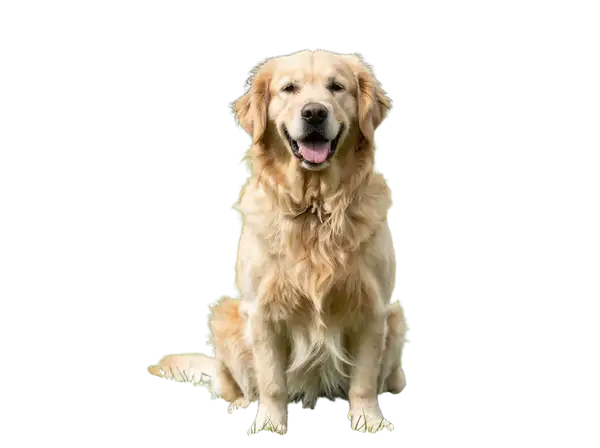
Remove the background from an image and return a transparent-PNG cutout of the subject, trained on fully licensed commercial data.

remove background
0.018

Model Input

Input

The source image to remove the background from. The subject is preserved and the background is replaced with transparency; the output keeps the input's dimensions.

You need to be logged in to run this model and view results.
Log in

Model Output

Output

Loading
Generated in 3.339 seconds
Logs (1 lines)

Model Example Requests

Examples

Example output 1Example output 2Example output 3

Bria Background Remove API

Bria Background Remove is a image-to-image AI model by bria. On ModelRunner it runs through a REST API or via MCP from any AI assistant, at $0.018 per image.

POST https://queue.modelrunner.run/bria/background/remove

cURL

# Submit a request to the queue. Input fields go at the top level of the
# body. The optional reserved "metadata" object holds your own flat string
# tags — stored on the request, never sent to the model; filter later with
# GET https://queue.modelrunner.run/requests?metadata=<url-encoded JSON>.
curl -X POST https://queue.modelrunner.run/bria/background/remove \
  -H "Authorization: Key $MRUN_API_KEY" \
  -H "Content-Type: application/json" \
  -d '{
    "image_url": "https://media.modelrunner.ai/wzDz8NRit7y6jaXj-golden-retriever-park.png",
    "metadata": {
      "project": "my-project"
    }
  }'
# → { "request_id": "...", "status_url": "...", "response_url": "..." }

# Poll status_url until "COMPLETED", then fetch the result
curl "https://queue.modelrunner.run/bria/background/remove/requests/$REQUEST_ID/status" \
  -H "Authorization: Key $MRUN_API_KEY"
curl "https://queue.modelrunner.run/bria/background/remove/requests/$REQUEST_ID" \
  -H "Authorization: Key $MRUN_API_KEY"

JavaScript

import { modelrunner } from "@modelrunner/client";

const result = await modelrunner.subscribe("bria/background/remove", {
  input: {
    "image_url": "https://media.modelrunner.ai/wzDz8NRit7y6jaXj-golden-retriever-park.png"
  },
});
console.log(result);

Python

import os
import requests

headers = {"Authorization": f"Key {os.environ['MRUN_API_KEY']}"}

submitted = requests.post(
    "https://queue.modelrunner.run/bria/background/remove",
    headers=headers,
    json={
      "image_url": "https://media.modelrunner.ai/wzDz8NRit7y6jaXj-golden-retriever-park.png"
    },
).json()

# Poll submitted["status_url"] until "COMPLETED", then:
result = requests.get(submitted["response_url"], headers=headers).json()

Input parameters

NameTypeRequiredDescription
image_urlstring (uri)yesThe source image to remove the background from. The subject is preserved and the background is replaced with transparency; the output keeps the input's dimensions.

Machine-readable: OpenAPI schema · llms.txt

Use Bria Background Remove from Claude & Cursor (MCP)

Point Claude Code, Claude Desktop, Cursor, or any MCP client at the ModelRunner MCP server and Bria Background Remove becomes a tool your assistant can call directly — it authorizes via OAuth (no API key in config) and runs this model with the run_model tool using the endpoint bria/background/remove.

MCP client config (Claude Desktop, Cursor)

{
  "mcpServers": {
    "modelrunner": {
      "command": "npx",
      "args": ["-y", "mcp-remote", "https://mcp.modelrunner.run/mcp"]
    }
  }
}

Claude Code

claude mcp add --transport http modelrunner https://mcp.modelrunner.run/mcp

Then ask your assistant, for example: “Run bria/background/remove on ModelRunner to generate image”. MCP setup guide.

Model Details

Model Details

Bria Background Remove (RMBG 2.0) isolates the main subject of a photo and strips everything behind it, returning a transparent PNG where the original background is replaced by an alpha channel. You pass a single `image_url` and get back a clean cutout at the same dimensions as the input — no prompt, mask, or settings to tune. Its strength is precise edge handling on hair, fur, and fine detail, and because Bria models are trained exclusively on fully licensed commercial data, the outputs are safe and risk-free for commercial use.\n\nThe only input is `image_url` (JPEG, PNG, WebP, GIF, or AVIF). The output is a PNG with the subject preserved and the background made transparent, ready to composite onto a new background, drop into a layout, or place on a solid color.\n\n## Best for\n- Cutting a product, person, or object out of its background for e-commerce or catalog images\n- Producing transparent-PNG assets for design, layout, and compositing work\n- Preparing subjects to drop onto a new background or solid color\n- Batch-cleaning photos where you need consistent, commercially cleared cutouts\n\n## Choose another model when\n- You want to replace or generate a new background rather than remove it — use a generative-fill or background-replacement model\n- You need to expand or outpaint the image onto a larger canvas — use an image-expansion model\n- You want to recolor, restyle, or edit the subject's pixels rather than mask out the background — use an image-editing model\n- You need a brand-new image from a text prompt with no source photo — use a text-to-image model\n\n## Tips\n- Supply a clear photo with a well-defined subject and reasonable subject/background contrast for the cleanest edges\n- The output keeps the input's dimensions, so size and crop your source before sending if you need a specific resolution\n- Save or composite the result as PNG (or another alpha-capable format) — flattening to JPEG discards the transparency\n\nTo run via the ModelRunner JavaScript client:\n```js\nimport { modelrunner } from \"@modelrunner/client\";\n\nconst result = await modelrunner.subscribe(\"bria/background/remove\", {\n input: {\n image_url: \"https://media.modelrunner.ai/example-subject.png\",\n },\n});\n```