
Ana içeriğe geç
wan-video avatarı

Wan 2.7 Image to Video (Audio Driven) API

wan-video/wan/v2.7/image-to-video/audio-driven

Durağan bir fotoğrafı kendi ses klibinizle canlandırın: ses, lip-sync ve hareket zamanlaması için kullanılır; sonuç, sesle eş zamanlı oynayan 720P ya da 1080P’de 2-15 saniyelik bir videodur.

Çözünürlüğe göre fiyatlandırılır

Model girdisi

Input

The opening frame the video animates from. For lip-sync, pick a frame where the subject's face and mouth are clearly visible and unobscured. JPEG, JPG, PNG (alpha channel not supported), BMP or WEBP; width and height each between 240 and 8000 px, aspect ratio between 1:8 and 8:1, up to 20 MB. The finished clip takes its frame shape from this image.

The audio clip that drives the performance: the model uses it as the source for lip-sync and action timing, and it is the sound heard in the finished clip. WAV or MP3, 2-30 seconds, up to 15 MB. Audio longer than the requested duration is truncated to the first duration seconds; audio shorter than the requested duration leaves the rest of the clip silent, so match the two for sound throughout.

Optional description of the motion and camera movement. The scene is already fixed by the start image and the mouth movement and action timing come from the driving audio, so use the prompt for gesture, framing and camera. Chinese and English are supported.

Optional closing frame. Supply it to pin where the clip ends while the driving audio times everything in between; it cannot be used on its own, without a start frame. Same formats and size limits as the start frame, and it should share the start frame's aspect ratio.

Output video resolution. 720P bills at $0.10 per second of finished video; 1080P (default) bills at $0.15 per second.

Min: 2 - Max: 15

Length of the generated video in seconds (2-15). This is the output length, and the only length that is billed - the driving audio clip's own length never changes it.

Additional Settings

Customize your input with more control.

Describe content to avoid in the generated video.

When enabled, an LLM rewrites and enriches your prompt before generation, which suits short prompts but adds some processing time. Disable to follow your exact wording.

Min: 0 - Max: 2147483647

Random seed for reproducible results. Omit for a random seed each run.

You need to be logged in to run this model and view results.
Log in

Model çıktısı

Output

Loading
Generated in 30.144 seconds
Logs (1 lines)

Örnek istekler

Örnekler

Example output 1

Model fiyatlandırması

Fiyatlandırma

Fiyat, çıktı videonuzun hedef çözünürlüğüne göre değişir.

720P
$0.1
çıktı videosunun saniyesi başına
yani yaklaşık $1 ile 10 saniye
1080P
$0.15
çıktı videosunun saniyesi başına
yani yaklaşık $1 ile 7 saniye

Wan 2.7 Image to Video (Audio Driven) API

Wan 2.7 Image to Video (Audio Driven) is a image-to-video AI model by wan-video. On ModelRunner it runs through a REST API or via MCP from any AI assistant, at $0.15 per second of video.

POST https://queue.modelrunner.run/wan-video/wan/v2.7/image-to-video/audio-driven

cURL

# Submit a request to the queue. Input fields go at the top level of the
# body. The optional reserved "metadata" object holds your own flat string
# tags — stored on the request, never sent to the model; filter later with
# GET https://queue.modelrunner.run/requests?metadata=<url-encoded JSON>.
curl -X POST https://queue.modelrunner.run/wan-video/wan/v2.7/image-to-video/audio-driven \
  -H "Authorization: Key $MRUN_API_KEY" \
  -H "Content-Type: application/json" \
  -d '{
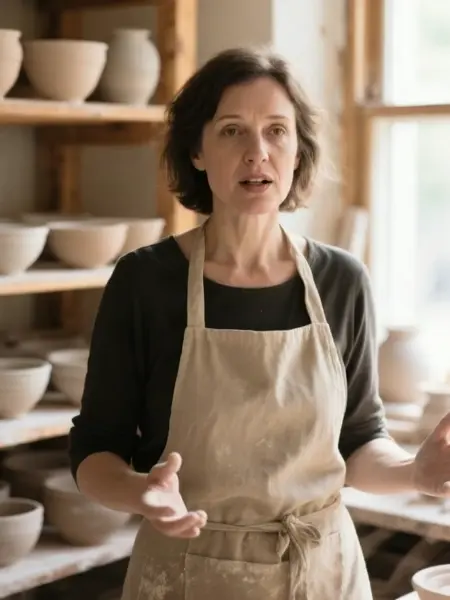
    "prompt": "The ceramicist speaks warmly to the camera, her hands moving gently as she talks, dust motes drifting in the window l…",
    "duration": 5,
    "resolution": "720P",
    "start_image_url": "https://media.modelrunner.ai/wCzkJnfwOMO3G6fEXkPCg.png",
    "driving_audio_url": "https://media.modelrunner.ai/N1Mq2Pphb4vCQkhIWg8HZ.mp3",
    "enable_prompt_expansion": true,
    "metadata": {
      "project": "my-project"
    }
  }'
# → { "request_id": "...", "status_url": "...", "response_url": "..." }

# Poll status_url until "COMPLETED", then fetch the result
curl "https://queue.modelrunner.run/wan-video/wan/v2.7/image-to-video/audio-driven/requests/$REQUEST_ID/status" \
  -H "Authorization: Key $MRUN_API_KEY"
curl "https://queue.modelrunner.run/wan-video/wan/v2.7/image-to-video/audio-driven/requests/$REQUEST_ID" \
  -H "Authorization: Key $MRUN_API_KEY"

JavaScript

import { modelrunner } from "@modelrunner/client";

const result = await modelrunner.subscribe("wan-video/wan/v2.7/image-to-video/audio-driven", {
  input: {
    "prompt": "The ceramicist speaks warmly to the camera, her hands moving gently as she talks, dust motes drifting in the window l…",
    "duration": 5,
    "resolution": "720P",
    "start_image_url": "https://media.modelrunner.ai/wCzkJnfwOMO3G6fEXkPCg.png",
    "driving_audio_url": "https://media.modelrunner.ai/N1Mq2Pphb4vCQkhIWg8HZ.mp3",
    "enable_prompt_expansion": true
  },
});
console.log(result);

Python

import os
import requests

headers = {"Authorization": f"Key {os.environ['MRUN_API_KEY']}"}

submitted = requests.post(
    "https://queue.modelrunner.run/wan-video/wan/v2.7/image-to-video/audio-driven",
    headers=headers,
    json={
      "prompt": "The ceramicist speaks warmly to the camera, her hands moving gently as she talks, dust motes drifting in the window l…",
      "duration": 5,
      "resolution": "720P",
      "start_image_url": "https://media.modelrunner.ai/wCzkJnfwOMO3G6fEXkPCg.png",
      "driving_audio_url": "https://media.modelrunner.ai/N1Mq2Pphb4vCQkhIWg8HZ.mp3",
      "enable_prompt_expansion": true
    },
).json()

# Poll submitted["status_url"] until "COMPLETED", then:
result = requests.get(submitted["response_url"], headers=headers).json()

Input parameters

Input parameters of Wan 2.7 Image to Video (Audio Driven)
NameTypeRequiredDescription
start_image_urlstring (uri)yesThe opening frame the video animates from. For lip-sync, pick a frame where the subject's face and mouth are clearly visible and unobscured. JPEG, JPG, PNG (alpha channel not supported), BMP or WEBP; width and height each between 240 and 8000 px, aspect ratio between 1:8 and 8:1, up to 20 MB. The finished clip takes its frame shape from this image.
driving_audio_urlstring (uri)yesThe audio clip that drives the performance: the model uses it as the source for lip-sync and action timing, and it is the sound heard in the finished clip. WAV or MP3, 2-30 seconds, up to 15 MB. Audio longer than the requested duration is truncated to the first duration seconds; audio shorter than the requested duration leaves the rest of the clip silent, so match the two for sound throughout.
promptstringnoOptional description of the motion and camera movement. The scene is already fixed by the start image and the mouth movement and action timing come from the driving audio, so use the prompt for gesture, framing and camera. Chinese and English are supported.
end_image_urlstring (uri)noOptional closing frame. Supply it to pin where the clip ends while the driving audio times everything in between; it cannot be used on its own, without a start frame. Same formats and size limits as the start frame, and it should share the start frame's aspect ratio.
resolutionenumnoOutput video resolution. 720P bills at $0.10 per second of finished video; 1080P (default) bills at $0.15 per second. One of: 720P, 1080P. Default: "1080P".
durationintegernoLength of the generated video in seconds (2-15). This is the output length, and the only length that is billed - the driving audio clip's own length never changes it. Default: 5.
negative_promptstringnoDescribe content to avoid in the generated video.
enable_prompt_expansionbooleannoWhen enabled, an LLM rewrites and enriches your prompt before generation, which suits short prompts but adds some processing time. Disable to follow your exact wording. Default: true.
seedintegernoRandom seed for reproducible results. Omit for a random seed each run.

Machine-readable: OpenAPI schema · llms.txt

Use Wan 2.7 Image to Video (Audio Driven) from Claude & Cursor (MCP)

Point Claude Code, Claude Desktop, Cursor, or any MCP client at the ModelRunner MCP server and Wan 2.7 Image to Video (Audio Driven) becomes a tool your assistant can call directly — it authorizes via OAuth (no API key in config) and runs this model with the run_model tool using the endpoint wan-video/wan/v2.7/image-to-video/audio-driven.

MCP client config (Claude Desktop, Cursor)

{
  "mcpServers": {
    "modelrunner": {
      "command": "npx",
      "args": ["-y", "mcp-remote", "https://mcp.modelrunner.run/mcp"]
    }
  }
}

Claude Code

claude mcp add --transport http modelrunner https://mcp.modelrunner.run/mcp

Then ask your assistant, for example: “Run wan-video/wan/v2.7/image-to-video/audio-driven on ModelRunner to generate video”. MCP setup guide.

Model Detayları

Model Detayları

Wan 2.7 Image to Video (Audio Driven), tek bir durağan fotoğrafı ve bir ses klibini, o sesin yönlendirdiği 2-15 saniyelik bir videoya dönüştürür: model ses kaydını lip-sync ve hareket zamanlamasının kaynağı olarak okur; böylece ağız ve hareketler modelin uydurmasına kalmaz, sese tam zamanında oturur. İlk kareyi ve sesi (WAV ya da MP3, 2-30 saniye) verin, jest ve kamera için isteğe bağlı bir prompt ekleyin, isterseniz bir son kare de sabitleyin. Klip kare biçimini kaynak görselden aldığı için en-boy oranı ayarı yoktur; taslaklar için 720P’yi, teslim için 1080P’yi seçin ve çıktı süresini 2 ile 15 saniye arasında belirleyin.

## En uygun olduğu işler - Bir portre fotoğrafını kaydedilmiş bir replikle lip-sync edip ağız hareketlerinin sözleri izlemesini sağlamak - Tek bir durağan görsel ve bir seslendirmeden reklamlar, açıklayıcı videolar ve avatarlar için talking-head klipleri - Bir performansı elinizdeki sese oturtmak — bir seslendirme kaydı, bir şarkının hook’u, kaydedilmiş bir replik - Bir illüstrasyon ya da animasyon karakterini gerçek bir performans kaydıyla hareketlendirmek

## Şu durumlarda başka bir model seçin - Sesi siz vermek yerine modelin üretmesini istiyorsanız — Wan 2.7 Image to Video modeli, ses göndermediğinizde arka plan müziği ya da ses efektleri üretir - Başlangıç görseliniz yoksa ve çekimin yalnızca metinden kurulmasını istiyorsanız — bir text-to-video modeli kullanın - Mevcut bir video klibi devam ettirmeniz gerekiyorsa — ses güdümlü üretim her zaman durağan bir kareden başlar - 15 saniyeden uzun bir performans gerekiyorsa — klip bu sınırda biter ve sonrasındaki ses atılır

## İpuçları - Sesin uzunluğunu `duration` ile eşleştirin — daha uzun ses ilk `duration` saniyeye kırpılır, daha kısa ses ise klibin sonunu sessiz bırakır - Yüzün ve ağzın net göründüğü bir kare kullanın; lip-sync’in üzerinde çalışabileceği malzeme budur - `end_image_url` isteğe bağlıdır — bir son kare sabitlediğinizde de aradaki her şeyi yine ses yönlendirir - Maliyeti `resolution` belirler: 720P bitmiş videonun saniyesi başına $0.10, 1080P (varsayılan) $0.15 olarak faturalandırılır

## Sınırlamalar - Çıktının kare biçimi kaynak görselinizi izler, ancak onunla birebir aynı olacağı garanti edilmez - Kısa ses döngüye alınmaz ya da uzatılmaz — klibin geri kalanı sessiz geçer

ModelRunner JavaScript client ile çalıştırmak için: ```js import { modelrunner } from "@modelrunner/client";

const result = await modelrunner.subscribe("wan-video/wan/v2.7/image-to-video/audio-driven", { input: { start_image_url: "https://media.modelrunner.ai/wCzkJnfwOMO3G6fEXkPCg.png", driving_audio_url: "https://media.modelrunner.ai/N1Mq2Pphb4vCQkhIWg8HZ.mp3", prompt: "The ceramicist speaks warmly to the camera, her hands moving gently as she talks", resolution: "720P", duration: 5, }, }); ```