
microsoft avatar

Florence-2 Large Dense Region Caption API

microsoft/florence-2-large/dense-region-caption

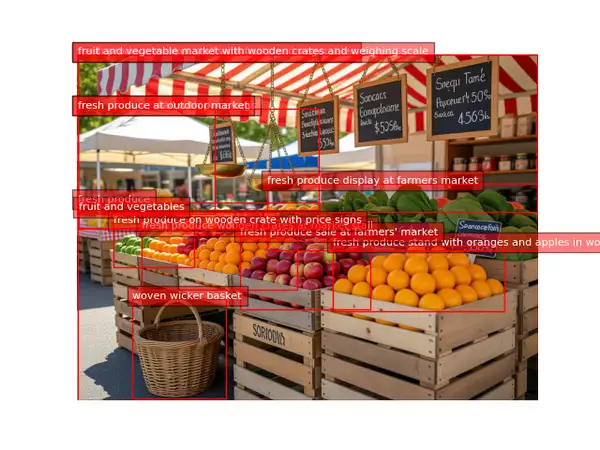
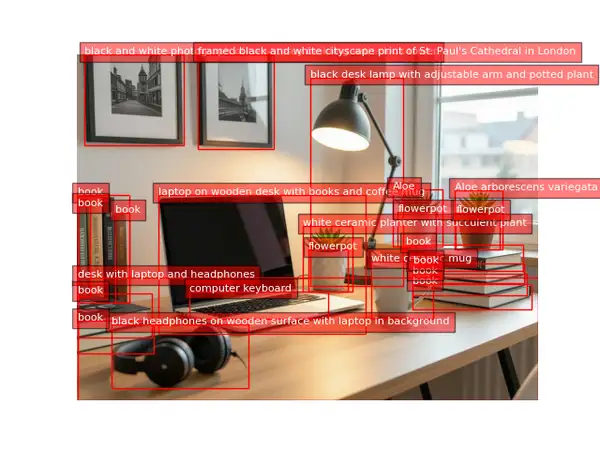
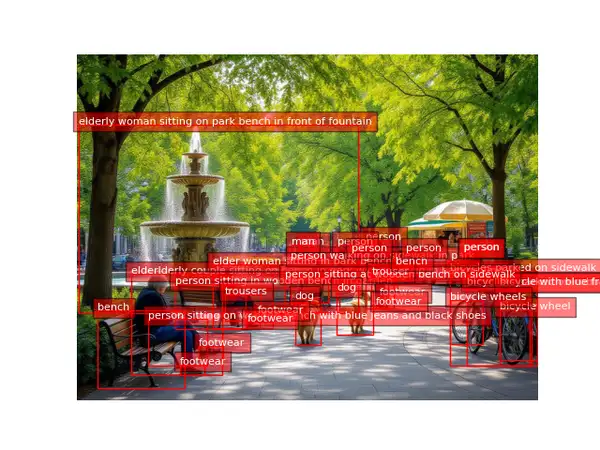
Detect the salient regions in a photo and get back an annotated image where each region is boxed and labeled with a short natural-language caption of what it contains.

0

Model Input

Input

URL of the image to detect and caption regions in.

You need to be logged in to run this model and view results.
Log in

Model Output

Output

Loading
Generated in 3.31 seconds
Logs (1 lines)

Model Example Requests

Examples

Example output 1Example output 2Example output 3

Florence-2 Large Dense Region Caption API

Florence-2 Large Dense Region Caption is a image-to-image AI model by microsoft. On ModelRunner it runs through a REST API or via MCP from any AI assistant, at $0 per image.

POST https://queue.modelrunner.run/microsoft/florence-2-large/dense-region-caption

cURL

# Submit a request to the queue
curl -X POST https://queue.modelrunner.run/microsoft/florence-2-large/dense-region-caption \
  -H "Authorization: Key $MRUN_API_KEY" \
  -H "Content-Type: application/json" \
  -d '{
    "input": {
      "image_url": "https://media.modelrunner.ai/gi8vSNrFC7OmYFGdcptCN.jpeg"
    }
  }'
# → { "request_id": "...", "status_url": "...", "response_url": "..." }

# Poll status_url until "COMPLETED", then fetch the result
curl "https://queue.modelrunner.run/microsoft/florence-2-large/dense-region-caption/requests/$REQUEST_ID/status" \
  -H "Authorization: Key $MRUN_API_KEY"
curl "https://queue.modelrunner.run/microsoft/florence-2-large/dense-region-caption/requests/$REQUEST_ID" \
  -H "Authorization: Key $MRUN_API_KEY"

JavaScript

import { modelrunner } from "@modelrunner/client";

const result = await modelrunner.subscribe("microsoft/florence-2-large/dense-region-caption", {
  input: {
    "image_url": "https://media.modelrunner.ai/gi8vSNrFC7OmYFGdcptCN.jpeg"
  },
});
console.log(result);

Python

import os
import requests

headers = {"Authorization": f"Key {os.environ['MRUN_API_KEY']}"}

submitted = requests.post(
    "https://queue.modelrunner.run/microsoft/florence-2-large/dense-region-caption",
    headers=headers,
    json={"input": {
      "image_url": "https://media.modelrunner.ai/gi8vSNrFC7OmYFGdcptCN.jpeg"
    }},
).json()

# Poll submitted["status_url"] until "COMPLETED", then:
result = requests.get(submitted["response_url"], headers=headers).json()

Input parameters

NameTypeRequiredDescription
image_urlstring (uri)yesURL of the image to detect and caption regions in.

Machine-readable: OpenAPI schema · llms.txt

Use Florence-2 Large Dense Region Caption from Claude & Cursor (MCP)

Point Claude Code, Claude Desktop, Cursor, or any MCP client at the ModelRunner MCP server and Florence-2 Large Dense Region Caption becomes a tool your assistant can call directly — it authorizes via OAuth (no API key in config) and runs this model with the run_model tool using the endpoint microsoft/florence-2-large/dense-region-caption.

MCP client config (Claude Desktop, Cursor)

{
  "mcpServers": {
    "modelrunner": {
      "command": "npx",
      "args": ["-y", "mcp-remote", "https://mcp.modelrunner.run/mcp"]
    }
  }
}

Claude Code

claude mcp add --transport http modelrunner https://mcp.modelrunner.run/mcp

Then ask your assistant, for example: “Run microsoft/florence-2-large/dense-region-caption on ModelRunner to generate image”. MCP setup guide.

Model Details

Model Details

Florence-2 Large Dense Region Caption scans a whole photo for salient regions and writes a short natural-language caption for each one, returning the same image with every region drawn as a labeled box. Give it one image URL and you get back an annotated picture where each region is described in plain words — "wooden door with glass window on storefront", "person", "car" — alongside structured per-region results (each box's position and its caption). It needs no prompt and no tuning: one image in, one annotated image out. Built on Microsoft's Florence-2 vision-language foundation model, it sits between object detection and whole-image captioning: instead of a single word-class per box or one caption for the entire scene, it produces a dense set of region-level captions in a single pass.

## Best for - Densely annotating a photo with region boxes each carrying a descriptive caption - Grounded region captioning where you need both what a region shows and where it is - Getting a rich, human-readable inventory of a scene beyond bare object-class labels - Producing before/after overlays to review how a scene is described region by region

## Choose another model when - You only want single-word object-class labels rather than descriptive captions — use an object detection model - You want to read or transcribe text in the image — use an OCR / text-recognition model - You want one caption for the whole image rather than per-region captions — use an image captioning model - You want pixel-accurate masks instead of boxes — use an image segmentation model

## Tips - Feed a clear, reasonably high-resolution photo; more pixels give more and better-described regions. - The returned image is a standard PNG with region boxes and caption labels already rendered, so you can display or compare it directly against the original. - Region captions mix descriptive phrases with short class words depending on the region — expect both in the same result. - There are no thresholds or prompts to set — every run on the same image is deterministic.

## Limitations - Captions are short and approximate; fine attributes (exact color, count, brand) may be wrong or omitted. - Very small, blurry, or overlapping regions can be merged, dropped, or described loosely. - Coverage is model-driven, not exhaustive — some regions may go uncaptioned.

To run via the ModelRunner JavaScript client: ```js import { modelrunner } from "@modelrunner/client";

const result = await modelrunner.subscribe("microsoft/florence-2-large/dense-region-caption", { input: { image_url: "https://media.modelrunner.ai/example-storefront-scene.png", }, }); ```