
lllyasviel avatar

IC-Light V2 API

lllyasviel/iclight/v2

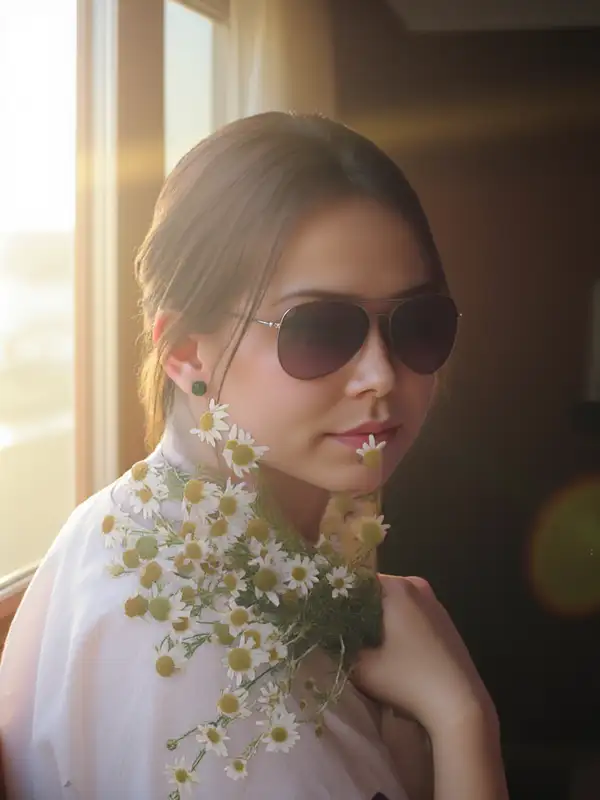
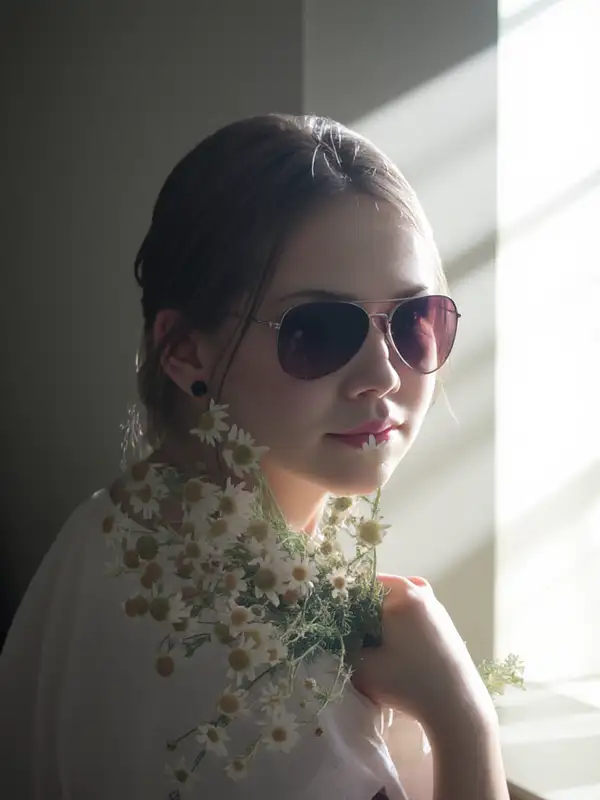
Relight an existing photo to a described lighting setup — change light direction, mood, and background while keeping the subject intact.

refine
0.1 per megapixel of image

Model Input

Input

Describe the lighting you want — direction, color, mood — and the surrounding scene to relight the subject into (e.g. 'warm sunset light from the left, golden-hour window behind').

The source photo to relight. The subject is preserved while its lighting is re-rendered.

Additional Settings

Customize your input with more control.

Output dimensions. Leave unset to keep the input image's dimensions (recommended for compositing). Pass a preset string (e.g. 'landscape_4_3') or a custom {width, height} object to re-frame the result.

Bias the dominant light direction. 'None' lets the prompt decide; 'Left', 'Right', 'Top', or 'Bottom' push the key light to that side.

Describe what you do not want in the relit result.

Optional binary mask marking the subject to keep. When omitted, the subject is isolated automatically by background removal.

Min: 1 - Max: 50

Number of denoising steps. More steps can improve detail at the cost of speed.

Min: 0 - Max: 20

Prompt adherence strength. Higher values follow the lighting description more strongly.

Min: 0.01 - Max: 5

Real classifier-free-guidance scale. Lower values stay more faithful to the input image.

Run a high-resolution refinement pass for sharper detail (slower).

Min: 0.01 - Max: 1

Denoise strength for the initial low-resolution pass.

Min: 0.01 - Max: 1

Denoise strength for the high-res fix pass; only used when enable_hr_fix is true.

Min: 0.01 - Max: 1

Downscale factor for the high-res fix pass; only used when enable_hr_fix is true.

Random seed. The same seed, prompt, and image produce the same result.

Safety checker can only be disabled on API call

You need to be logged in to run this model and view results.
Log in

Model Output

Output

Loading
Generated in 7.45 seconds
Logs (1 lines)

Model Example Requests

Examples

Example output 1Example output 2

IC-Light V2 API

IC-Light V2 is a image-to-image AI model by lllyasviel. On ModelRunner it runs through a REST API or via MCP from any AI assistant, at $0.1 per megapixel.

POST https://queue.modelrunner.run/lllyasviel/iclight/v2

cURL

# Submit a request to the queue. Input fields go at the top level of the
# body. The optional reserved "metadata" object holds your own flat string
# tags — stored on the request, never sent to the model; filter later with
# GET https://queue.modelrunner.run/requests?metadata=<url-encoded JSON>.
curl -X POST https://queue.modelrunner.run/lllyasviel/iclight/v2 \
  -H "Authorization: Key $MRUN_API_KEY" \
  -H "Content-Type: application/json" \
  -d '{
    "cfg": 1,
    "prompt": "bright clean studio lighting, soft shadows, neutral white background",
    "image_url": "https://media.modelrunner.ai/MvSAQVWwUHJspDow-1024",
    "hr_downscale": 0.5,
    "enable_hr_fix": false,
    "guidance_scale": 5,
    "initial_latent": "Right",
    "lowres_denoise": 0.98,
    "highres_denoise": 0.95,
    "negative_prompt": "",
    "num_inference_steps": 18,
    "enable_safety_checker": true,
    "metadata": {
      "project": "my-project"
    }
  }'
# → { "request_id": "...", "status_url": "...", "response_url": "..." }

# Poll status_url until "COMPLETED", then fetch the result
curl "https://queue.modelrunner.run/lllyasviel/iclight/v2/requests/$REQUEST_ID/status" \
  -H "Authorization: Key $MRUN_API_KEY"
curl "https://queue.modelrunner.run/lllyasviel/iclight/v2/requests/$REQUEST_ID" \
  -H "Authorization: Key $MRUN_API_KEY"

JavaScript

import { modelrunner } from "@modelrunner/client";

const result = await modelrunner.subscribe("lllyasviel/iclight/v2", {
  input: {
    "cfg": 1,
    "prompt": "bright clean studio lighting, soft shadows, neutral white background",
    "image_url": "https://media.modelrunner.ai/MvSAQVWwUHJspDow-1024",
    "hr_downscale": 0.5,
    "enable_hr_fix": false,
    "guidance_scale": 5,
    "initial_latent": "Right",
    "lowres_denoise": 0.98,
    "highres_denoise": 0.95,
    "negative_prompt": "",
    "num_inference_steps": 18,
    "enable_safety_checker": true
  },
});
console.log(result);

Python

import os
import requests

headers = {"Authorization": f"Key {os.environ['MRUN_API_KEY']}"}

submitted = requests.post(
    "https://queue.modelrunner.run/lllyasviel/iclight/v2",
    headers=headers,
    json={
      "cfg": 1,
      "prompt": "bright clean studio lighting, soft shadows, neutral white background",
      "image_url": "https://media.modelrunner.ai/MvSAQVWwUHJspDow-1024",
      "hr_downscale": 0.5,
      "enable_hr_fix": false,
      "guidance_scale": 5,
      "initial_latent": "Right",
      "lowres_denoise": 0.98,
      "highres_denoise": 0.95,
      "negative_prompt": "",
      "num_inference_steps": 18,
      "enable_safety_checker": true
    },
).json()

# Poll submitted["status_url"] until "COMPLETED", then:
result = requests.get(submitted["response_url"], headers=headers).json()

Input parameters

NameTypeRequiredDescription
promptstringyesDescribe the lighting you want — direction, color, mood — and the surrounding scene to relight the subject into (e.g. 'warm sunset light from the left, golden-hour window behind').
image_urlstring (uri)yesThe source photo to relight. The subject is preserved while its lighting is re-rendered.
image_sizeenumnoOutput dimensions. Leave unset to keep the input image's dimensions (recommended for compositing). Pass a preset string (e.g. 'landscape_4_3') or a custom {width, height} object to re-frame the result.
initial_latentenumnoBias the dominant light direction. 'None' lets the prompt decide; 'Left', 'Right', 'Top', or 'Bottom' push the key light to that side. Default: "None".
negative_promptstringnoDescribe what you do not want in the relit result. Default: "".
mask_image_urlstringnoOptional binary mask marking the subject to keep. When omitted, the subject is isolated automatically by background removal.
num_inference_stepsintegernoNumber of denoising steps. More steps can improve detail at the cost of speed. Default: 28.
guidance_scalenumbernoPrompt adherence strength. Higher values follow the lighting description more strongly. Default: 5.
cfgnumbernoReal classifier-free-guidance scale. Lower values stay more faithful to the input image. Default: 1.
enable_hr_fixbooleannoRun a high-resolution refinement pass for sharper detail (slower). Default: false.
lowres_denoisenumbernoDenoise strength for the initial low-resolution pass. Default: 0.98.
highres_denoisenumbernoDenoise strength for the high-res fix pass; only used when enable_hr_fix is true. Default: 0.95.
hr_downscalenumbernoDownscale factor for the high-res fix pass; only used when enable_hr_fix is true. Default: 0.5.
seedintegernoRandom seed. The same seed, prompt, and image produce the same result.
enable_safety_checkerbooleannoIf set to true, the safety checker will be enabled. Default: true.

Machine-readable: OpenAPI schema · llms.txt

Use IC-Light V2 from Claude & Cursor (MCP)

Point Claude Code, Claude Desktop, Cursor, or any MCP client at the ModelRunner MCP server and IC-Light V2 becomes a tool your assistant can call directly — it authorizes via OAuth (no API key in config) and runs this model with the run_model tool using the endpoint lllyasviel/iclight/v2.

MCP client config (Claude Desktop, Cursor)

{
  "mcpServers": {
    "modelrunner": {
      "command": "npx",
      "args": ["-y", "mcp-remote", "https://mcp.modelrunner.run/mcp"]
    }
  }
}

Claude Code

claude mcp add --transport http modelrunner https://mcp.modelrunner.run/mcp

Then ask your assistant, for example: “Run lllyasviel/iclight/v2 on ModelRunner to generate image”. MCP setup guide.

Model Details

Model Details

IC-Light V2 relights a photo you provide to match a described lighting setup. You pass a source image and a short prompt describing the light (direction, color, mood, and the surrounding scene), and it re-renders the subject under that lighting while preserving its identity, shape, and detail. When you leave the size unset, the output keeps your input image's dimensions, so the relit result lines up with the original for compositing. Its strength is realistic, physically plausible light wrap and shadows rather than a flat color filter.

## Best for - Relighting product shots to a new studio or environment lighting setup - Adjusting portrait lighting — softening, warming, or redirecting the key light - Compositing a cut-out subject into a new background with matching light - Replacing or restyling the background while the subject stays consistent - Generating consistent lighting across a batch of catalog images

## Choose another model when - You want to change the subject's content, pose, or objects rather than its lighting — use an image-editing model - You need a brand-new scene with no source photo to relight — use a text-to-image model - You need the relit subject animated — use an image-to-video model

## Tips - Describe the light source and the scene together ("warm sunset light from the left, golden-hour window behind") — the prompt sets both the lighting and the new background - Use `initial_latent` to bias the dominant light direction: `Left`, `Right`, `Top`, or `Bottom` (default `None` lets the prompt decide) - Leave `image_size` unset to preserve the input's dimensions; set a preset only when you deliberately want to re-frame the output - Supply `mask_image_url` to control exactly which region is treated as the subject; with no mask, the subject is isolated by automatic background removal

## Advanced Configuration - `cfg` is the real classifier-free-guidance scale (0.01–5, default 1) — lower values keep the result more faithful to the input photo. - `guidance_scale` (0–20, default 5) controls how strongly the relighting follows the text prompt; raise it for stronger prompt adherence. - `enable_hr_fix` runs a high-resolution refinement pass; `lowres_denoise`, `highres_denoise`, and `hr_downscale` tune that pass and only take effect when it is enabled.

To run via the ModelRunner JavaScript client: ```js import { modelrunner } from "@modelrunner/client";

const result = await modelrunner.subscribe("lllyasviel/iclight/v2", { input: { prompt: "warm golden-hour sunlight from the left, soft window light", image_url: "https://media.modelrunner.ai/MvSAQVWwUHJspDow-1024", initial_latent: "Left", }, }); ```