

google avatar

Veo 3.1 Image to Video API

google/veo-3.1/image-to-video

Turn static images into high-fidelity 720p or 1080p videos with synchronized native audio using text prompts to guide the animation.

0.4 per second of output video

Model Input

Input

Textual description to guide video generation

URL of image to animate and generate video from

Output video aspect ratio

Video resolution

Video duration in seconds

Describe what to avoid in the generated video

You need to be logged in to run this model and view results.
Log in

Model Output

Output

Loading
Logs (1 lines)

Model Example Requests

Examples

Example output 1Example output 2Example output 3

Veo 3.1 Image to Video API

Veo 3.1 Image to Video is a image-to-video AI model by google. On ModelRunner it runs through a REST API or via MCP from any AI assistant, at $0.4 per second of video.

POST https://queue.modelrunner.run/google/veo-3.1/image-to-video

cURL

# Submit a request to the queue. Input fields go at the top level of the
# body. The optional reserved "metadata" object holds your own flat string
# tags — stored on the request, never sent to the model; filter later with
# GET https://queue.modelrunner.run/requests?metadata=<url-encoded JSON>.
curl -X POST https://queue.modelrunner.run/google/veo-3.1/image-to-video \
  -H "Authorization: Key $MRUN_API_KEY" \
  -H "Content-Type: application/json" \
  -d '{
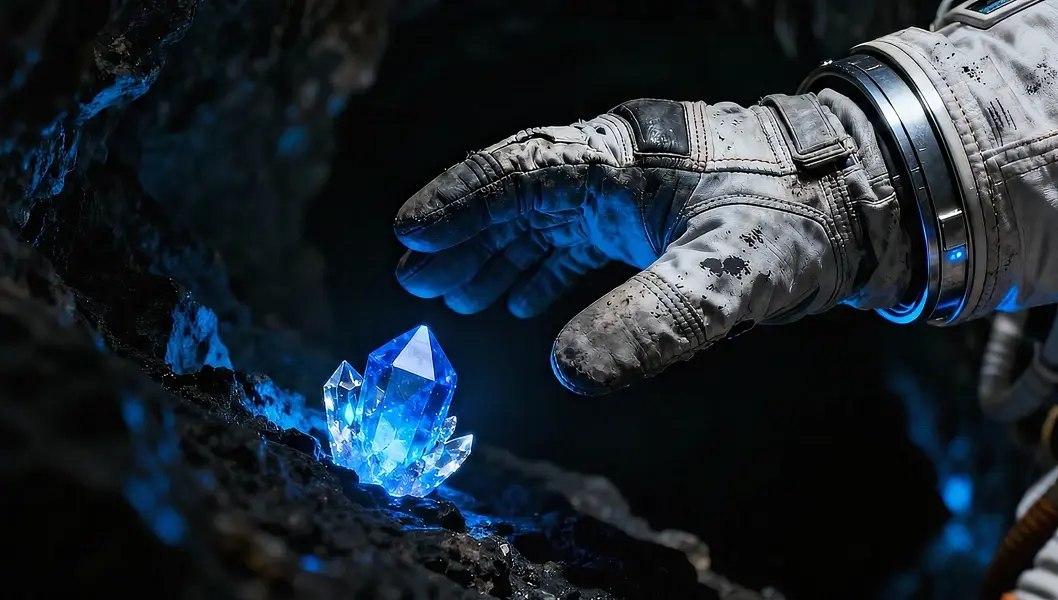
    "prompt": "The astronaut slowly reaches out their gloved hand towards the pulsating, glowing blue crystal embedded in the cave w…",
    "duration": 8,
    "image_url": "https://media.modelrunner.ai/ahP7OXMy56ZVWBCwpM9ae.jpeg",
    "resolution": "1080p",
    "aspect_ratio": "16:9",
    "negative_prompt": "cartoon, illustration, low quality, grainy, blurry, distorted text, bad composition",
    "metadata": {
      "project": "my-project"
    }
  }'
# → { "request_id": "...", "status_url": "...", "response_url": "..." }

# Poll status_url until "COMPLETED", then fetch the result
curl "https://queue.modelrunner.run/google/veo-3.1/image-to-video/requests/$REQUEST_ID/status" \
  -H "Authorization: Key $MRUN_API_KEY"
curl "https://queue.modelrunner.run/google/veo-3.1/image-to-video/requests/$REQUEST_ID" \
  -H "Authorization: Key $MRUN_API_KEY"

JavaScript

import { modelrunner } from "@modelrunner/client";

const result = await modelrunner.subscribe("google/veo-3.1/image-to-video", {
  input: {
    "prompt": "The astronaut slowly reaches out their gloved hand towards the pulsating, glowing blue crystal embedded in the cave w…",
    "duration": 8,
    "image_url": "https://media.modelrunner.ai/ahP7OXMy56ZVWBCwpM9ae.jpeg",
    "resolution": "1080p",
    "aspect_ratio": "16:9",
    "negative_prompt": "cartoon, illustration, low quality, grainy, blurry, distorted text, bad composition"
  },
});
console.log(result);

Python

import os
import requests

headers = {"Authorization": f"Key {os.environ['MRUN_API_KEY']}"}

submitted = requests.post(
    "https://queue.modelrunner.run/google/veo-3.1/image-to-video",
    headers=headers,
    json={
      "prompt": "The astronaut slowly reaches out their gloved hand towards the pulsating, glowing blue crystal embedded in the cave w…",
      "duration": 8,
      "image_url": "https://media.modelrunner.ai/ahP7OXMy56ZVWBCwpM9ae.jpeg",
      "resolution": "1080p",
      "aspect_ratio": "16:9",
      "negative_prompt": "cartoon, illustration, low quality, grainy, blurry, distorted text, bad composition"
    },
).json()

# Poll submitted["status_url"] until "COMPLETED", then:
result = requests.get(submitted["response_url"], headers=headers).json()

Input parameters

NameTypeRequiredDescription
promptstringyesTextual description to guide video generation
image_urlstring (uri)noURL of image to animate and generate video from
aspect_ratioenumnoOutput video aspect ratio Default: "16:9".
resolutionenumnoVideo resolution Default: "720p".
durationenumnoVideo duration in seconds Default: 8.
negative_promptstringnoDescribe what to avoid in the generated video

Machine-readable: OpenAPI schema · llms.txt

Use Veo 3.1 Image to Video from Claude & Cursor (MCP)

Point Claude Code, Claude Desktop, Cursor, or any MCP client at the ModelRunner MCP server and Veo 3.1 Image to Video becomes a tool your assistant can call directly — it authorizes via OAuth (no API key in config) and runs this model with the run_model tool using the endpoint google/veo-3.1/image-to-video.

MCP client config (Claude Desktop, Cursor)

{
  "mcpServers": {
    "modelrunner": {
      "command": "npx",
      "args": ["-y", "mcp-remote", "https://mcp.modelrunner.run/mcp"]
    }
  }
}

Claude Code

claude mcp add --transport http modelrunner https://mcp.modelrunner.run/mcp

Then ask your assistant, for example: “Run google/veo-3.1/image-to-video on ModelRunner to generate video”. MCP setup guide.

Model Details

Model Details

Veo 3.1 Image-to-Video transforms static imagery into dynamic, high-definition video sequences. By combining a single reference image with a descriptive text prompt, the model generates realistic motion that faithfully preserves the visual style, subject identity, and lighting of the source. It is capable of producing cinema-grade videos at 24 frames per second in either 720p or 1080p resolution.

A standout feature of Veo 3.1 is its ability to generate synchronized native audio alongside the video. Whether animating a landscape with ambient nature sounds or a character with specific dialogue and sound effects, the model interprets audio cues within the prompt to create an immersive experience. The input image serves as the initial frame, ensuring a seamless transition from static to motion.

### Usage Guidelines

To achieve the best results, provide a high-quality initial image and a detailed prompt covering the subject, action, camera movement, and desired audio atmosphere.

- **Prompting**: Describe the action clearly (e.g., "The cat yawns and stretches") and include audio cues (e.g., "faint purring sound"). - **Resolution & Aspect Ratio**: Choose between `720p` and `1080p`, and select standard `16:9` or vertical `9:16` aspect ratios to fit your platform. - **Duration**: Generate clips of `4`, `6`, or `8` seconds.

### Example Usage

To run via ModelRunner javascript client, use the following code:

```javascript import { modelrunner } from "@modelrunner/client";

const result = await modelrunner.subscribe('google/veo-3.1-image-to-video', { input: { prompt: "A cinematic shot of a majestic lion roaring in the savannah. Audio: loud roar and wind blowing through grass.", image_url: "https://example.com/lion_image.jpg", negative_prompt: "cartoon, drawing, low quality, blurry", resolution: "1080p", aspect_ratio: "16:9", duration: 8 } }); ```