




Model Details
Seedream 5.0 Lite brings fast, high-quality intelligent image editing directly to your creative workflow. Designed to handle complex, multi-conditional image manipulation, this model allows you to upload up to 10 reference images and use a descriptive text prompt to dictate exactly how they should be combined, modified, or edited. Whether you are composing visuals directly in the user interface or integrating via the API, you can easily generate and download your final high-resolution edits right from the app.
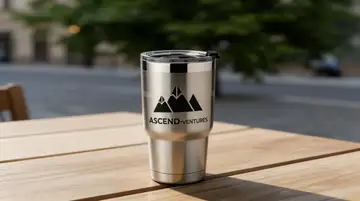
**Features** * **Multi-Image Inputs**: Supply multiple reference images simultaneously to effortlessly blend products, logos, and background scenes. * **Text-Driven Precision**: Use natural language prompts to specify which image corresponds to which element in your desired output (e.g., "Replace Figure 1 with Figure 2"). * **Intelligent Compositing**: The model seamlessly integrates elements, matching tricky details like lighting, textures (such as frosted glass), and accurate perspective.
**What it’s good at** * **E-Commerce Mockups**: Easily swap out products in lifestyle shots or apply logos and branding directly to blank merchandise items. * **Advanced Retouching**: Remove unwanted elements, text, or background clutter while seamlessly preserving the core subject. * **Style and Texture Transfer**: Render specific materials, finishes, or artistic styles onto existing objects based solely on your prompt and reference inputs.
**Tips for Best Results** * Clearly identify your input images in your prompt (e.g., "Figure 1", "Figure 2") in the exact order they are uploaded to the platform. * Keep your text instructions concise but highly specific about required textures, actions, and desired lighting.
## Safety & Content Moderation
**Enable Safety Checker** By default, the model includes a content moderation filter to prevent the generation of inappropriate or unsafe imagery. * `enable_safety_checker`: A boolean value that defaults to `true`. This setting can only be configured via the API. If your specific workflow requires bypassing this filter for legitimate use cases, you can disable it by passing `false` in your API request.
```javascript import { modelrunner } from "@modelrunner/client";
const result = await modelrunner.subscribe("bytedance/seedream-v5/edit", { input: { prompt: "Replace the product in Figure 1 with that in Figure 2. Seamlessly render logo in Figure 3 into the product design, in frosted glass texture. Remove any extra text in Figure 1, and design a catchy tagline for the perfume.", image_urls: [ "https://media.modelrunner.ai/perfume-scene.png", "https://media.modelrunner.ai/new-bottle.png", "https://media.modelrunner.ai/brand-logo.png" ], enable_safety_checker: true } }); ```