

bytedance avatar

Seedance 2.0 Video to Video API

bytedance/seedance-v2/video-to-video

Generate a new video from footage you already have — restyle, restage, or continue a clip, and steer it with extra reference images and audio named in the prompt.

editextend
Priced per token

Model Input

Input

Describe the result you want and what to take from each reference. Address the reference assets positionally as @Video1..@Video3, @Image1..@Image9 and @Audio1..@Audio3, numbered by their order in reference_videos, reference_images and reference_audios — a reference the prompt never names is usually ignored. English, Chinese, Japanese, Indonesian, Spanish and Portuguese prompts are all understood.

  • https://media.modelrunner.ai/tFcPmwL2bKd4L29uVMDxZ.mp4

Reference clips that steer motion, camera movement and pacing. Address them in the prompt as @Video1, @Video2, @Video3 - numbered by their order in this array. MP4 or MOV (H.264/H.265), 2-15 seconds per file and no more than 15 seconds COMBINED across up to 3 files, 480p-4k, 24-60 fps, under 200 MB each. Billing scales with the total duration you send here as well as the length of the clip you generate, so shorter references cost less.

Up to 9 optional reference images that steer identity, wardrobe, product, location or style. JPEG, PNG or WebP, under 30 MB each. Addressed as @Image1..@Image9.

Up to 3 optional audio references the generated soundtrack should follow. MP3 or WAV, under 15 MB each and 15 seconds combined. Addressed as @Audio1..@Audio3.

Output resolution of the clip. Higher resolutions cost more, because generation tokens scale with the output width and height.

Frame shape of the generated clip. Set adaptive to follow the shape of the source footage.

Min: 4 - Max: 15

Length of the generated clip in seconds.

Additional Settings

Customize your input with more control.

Generate a synchronized soundtrack (dialogue, ambience and sound effects) together with the picture. Set false for a silent clip; the price is the same either way.

You need to be logged in to run this model and view results.
Log in

Model Output

Output

Loading
Generated in 103 seconds
Logs (1 lines)

Model Example Requests

Examples

Example output 1

Seedance 2.0 Video to Video API

Seedance 2.0 Video to Video is a video-to-video AI model by bytedance. On ModelRunner it runs through a REST API or via MCP from any AI assistant with pay-per-use pricing.

POST https://queue.modelrunner.run/bytedance/seedance-v2/video-to-video

cURL

# Submit a request to the queue. Input fields go at the top level of the
# body. The optional reserved "metadata" object holds your own flat string
# tags — stored on the request, never sent to the model; filter later with
# GET https://queue.modelrunner.run/requests?metadata=<url-encoded JSON>.
curl -X POST https://queue.modelrunner.run/bytedance/seedance-v2/video-to-video \
  -H "Authorization: Key $MRUN_API_KEY" \
  -H "Content-Type: application/json" \
  -d '{
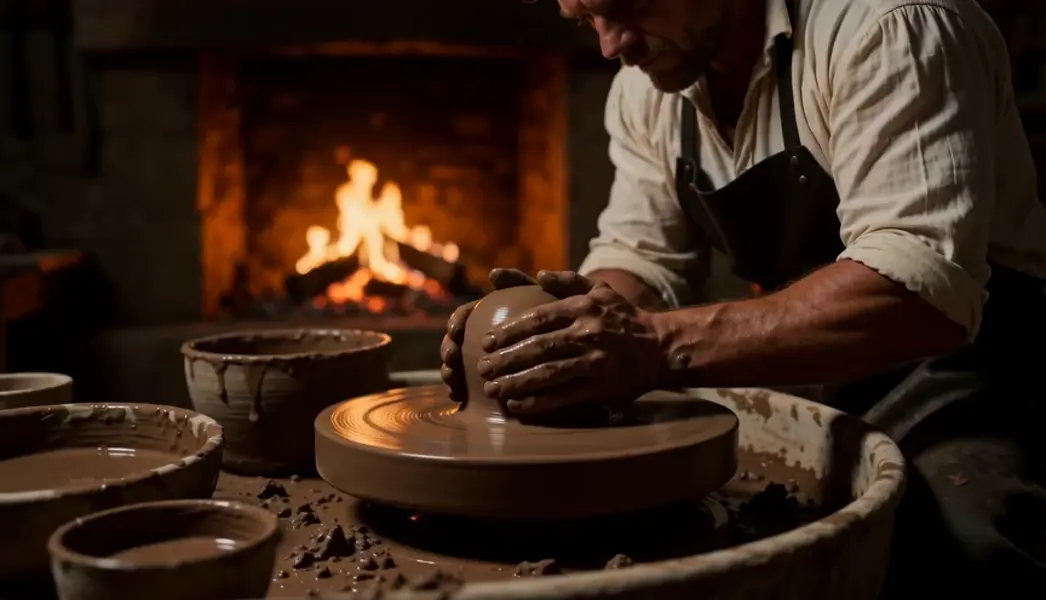
    "prompt": "Match the camera rhythm and warm firelight of @Video1, but stage it in a quiet pottery studio where a potter\u0027s wet ha…",
    "duration": 5,
    "resolution": "480p",
    "aspect_ratio": "16:9",
    "generate_audio": true,
    "reference_videos": [
      "https://media.modelrunner.ai/tFcPmwL2bKd4L29uVMDxZ.mp4"
    ],
    "metadata": {
      "project": "my-project"
    }
  }'
# → { "request_id": "...", "status_url": "...", "response_url": "..." }

# Poll status_url until "COMPLETED", then fetch the result
curl "https://queue.modelrunner.run/bytedance/seedance-v2/video-to-video/requests/$REQUEST_ID/status" \
  -H "Authorization: Key $MRUN_API_KEY"
curl "https://queue.modelrunner.run/bytedance/seedance-v2/video-to-video/requests/$REQUEST_ID" \
  -H "Authorization: Key $MRUN_API_KEY"

JavaScript

import { modelrunner } from "@modelrunner/client";

const result = await modelrunner.subscribe("bytedance/seedance-v2/video-to-video", {
  input: {
    "prompt": "Match the camera rhythm and warm firelight of @Video1, but stage it in a quiet pottery studio where a potter's wet ha…",
    "duration": 5,
    "resolution": "480p",
    "aspect_ratio": "16:9",
    "generate_audio": true,
    "reference_videos": [
      "https://media.modelrunner.ai/tFcPmwL2bKd4L29uVMDxZ.mp4"
    ]
  },
});
console.log(result);

Python

import os
import requests

headers = {"Authorization": f"Key {os.environ['MRUN_API_KEY']}"}

submitted = requests.post(
    "https://queue.modelrunner.run/bytedance/seedance-v2/video-to-video",
    headers=headers,
    json={
      "prompt": "Match the camera rhythm and warm firelight of @Video1, but stage it in a quiet pottery studio where a potter's wet ha…",
      "duration": 5,
      "resolution": "480p",
      "aspect_ratio": "16:9",
      "generate_audio": true,
      "reference_videos": [
        "https://media.modelrunner.ai/tFcPmwL2bKd4L29uVMDxZ.mp4"
      ]
    },
).json()

# Poll submitted["status_url"] until "COMPLETED", then:
result = requests.get(submitted["response_url"], headers=headers).json()

Input parameters

NameTypeRequiredDescription
promptstringyesDescribe the result you want and what to take from each reference. Address the reference assets positionally as @Video1..@Video3, @Image1..@Image9 and @Audio1..@Audio3, numbered by their order in reference_videos, reference_images and reference_audios — a reference the prompt never names is usually ignored. English, Chinese, Japanese, Indonesian, Spanish and Portuguese prompts are all understood.
reference_videosarrayyesReference clips that steer motion, camera movement and pacing. Address them in the prompt as @Video1, @Video2, @Video3 - numbered by their order in this array. MP4 or MOV (H.264/H.265), 2-15 seconds per file and no more than 15 seconds COMBINED across up to 3 files, 480p-4k, 24-60 fps, under 200 MB each. Billing scales with the total duration you send here as well as the length of the clip you generate, so shorter references cost less.
reference_imagesarraynoUp to 9 optional reference images that steer identity, wardrobe, product, location or style. JPEG, PNG or WebP, under 30 MB each. Addressed as @Image1..@Image9.
reference_audiosarraynoUp to 3 optional audio references the generated soundtrack should follow. MP3 or WAV, under 15 MB each and 15 seconds combined. Addressed as @Audio1..@Audio3.
resolutionenumnoOutput resolution of the clip. Higher resolutions cost more, because generation tokens scale with the output width and height. Default: "720p".
aspect_ratioenumnoFrame shape of the generated clip. Set adaptive to follow the shape of the source footage. Default: "16:9".
durationintegernoLength of the generated clip in seconds. Default: 5.
generate_audiobooleannoGenerate a synchronized soundtrack (dialogue, ambience and sound effects) together with the picture. Set false for a silent clip; the price is the same either way. Default: true.

Machine-readable: OpenAPI schema · llms.txt

Use Seedance 2.0 Video to Video from Claude & Cursor (MCP)

Point Claude Code, Claude Desktop, Cursor, or any MCP client at the ModelRunner MCP server and Seedance 2.0 Video to Video becomes a tool your assistant can call directly — it authorizes via OAuth (no API key in config) and runs this model with the run_model tool using the endpoint bytedance/seedance-v2/video-to-video.

MCP client config (Claude Desktop, Cursor)

{
  "mcpServers": {
    "modelrunner": {
      "command": "npx",
      "args": ["-y", "mcp-remote", "https://mcp.modelrunner.run/mcp"]
    }
  }
}

Claude Code

claude mcp add --transport http modelrunner https://mcp.modelrunner.run/mcp

Then ask your assistant, for example: “Run bytedance/seedance-v2/video-to-video on ModelRunner to generate video”. MCP setup guide.

Model Details

Model Details

Seedance 2.0 Video to Video generates a new clip from footage you already have: restage a shot somewhere else, change its look, or carry its camera move and pacing into a different scene. Supply 1 to 3 reference videos, optionally up to 9 reference images and 3 audio clips, and describe the result you want. Audio is generated together with the picture. Output runs 4 to 15 seconds at 24 fps, from 480p up to 1080p. Billing counts the duration of your reference footage as well as the clip you get back, so a long source clip costs more than a short one.

**Name every reference in the prompt.** References are addressed positionally as `@Video1`…`@Video3`, `@Image1`…`@Image9` and `@Audio1`…`@Audio3`, numbered by their order in `reference_videos`, `reference_images` and `reference_audios`. A reference the prompt never names is usually ignored:

``` reference_videos: [ handheld-walk.mp4 ] reference_images: [ red-parka.jpg ] prompt: "Match the camera movement and pacing of @Video1, but restage it on a snowbound forest trail at dusk; the hiker wears the red parka from @Image1." ```

## Best for - Restyling or restaging existing footage — new setting, new look, same motion - Carrying a clip's camera move, framing, and pacing into a different scene - Continuing or extending a shot you already have

## Choose another model when - Your source is a still photo rather than footage — use `bytedance/seedance-v2/image-to-video` - You want references to steer identity or style with no video at all — use `bytedance/seedance-v2/reference-to-video` - You need the clip pinned to an exact opening and closing frame — use `bytedance/seedance-v2/first-last-frame` - You need a frame-accurate edit of the original file — this generates new footage instead

## Tips - Trim reference clips to the part that matters — the input duration is billed alongside the output - Order is the address: `@Video1` is the first URL in `reference_videos`, so keep the arrays stable while you iterate - Say which property you are borrowing — motion, framing, lighting, wardrobe — rather than "like the reference" - Reference images are JPEG, PNG or WebP under 30 MB each; audio references are MP3 or WAV, under 15 MB each and 15 seconds combined

## Limitations - The result is a new generation, not a re-encode — exact frames, faces, and on-screen text are not preserved - Long or busy source clips dilute the prompt's control over the result - Fast motion and crowds smear at 480p; 720p or higher holds detail

To run via the ModelRunner JavaScript client: ```js import { modelrunner } from "@modelrunner/client";

const result = await modelrunner.subscribe("bytedance/seedance-v2/video-to-video", { input: { prompt: "Match the camera movement and lighting rhythm of @Video1, but stage it in a quiet pottery studio where a potter's hands shape a spinning clay vessel", reference_videos: ["https://media.modelrunner.ai/tFcPmwL2bKd4L29uVMDxZ.mp4"], resolution: "720p", aspect_ratio: "16:9", duration: 5, }, }); ```