

bytedance avatar

Seedance 2.0 Reference to Video API

bytedance/seedance-v2/reference-to-video

Generate a video steered by up to 9 reference images — keep a character, outfit, product, or location consistent by naming each reference in the prompt.

0.227 per second of output video

Model Input

Input

Describe the shot, the action, the camera move, and the sound. Address the reference assets positionally as @Image1..@Image9 and @Audio1..@Audio3, numbered by their order in reference_images and reference_audios — a reference the prompt never names is usually ignored. English, Chinese, Japanese, Indonesian, Spanish and Portuguese prompts are all understood.

  • https://media.modelrunner.ai/mszOvkXm9bhk9bEmJRsGy.jpeg
  • https://media.modelrunner.ai/g6ez6XYfi55kQUkDYLgjq.jpeg

1 to 9 reference images that steer identity, wardrobe, product, location or style. JPEG, PNG or WebP, under 30 MB each. The first entry is @Image1 in the prompt, the second @Image2, and so on.

Up to 3 short audio references the generated soundtrack should follow. MP3 or WAV, under 15 MB each and 15 seconds combined. Addressed as @Audio1..@Audio3. Cannot be supplied on their own — at least one reference image is always required.

Output resolution of the clip. Higher resolutions cost more per second of video.

Frame shape of the clip. Reference images do not fix the framing, so set this to the shape you want; adaptive lets the model choose.

Min: 4 - Max: 15

Clip length in seconds.

Additional Settings

Customize your input with more control.

Generate a synchronized soundtrack (dialogue, ambience and sound effects) together with the picture. Set false for a silent clip; the price is the same either way.

You need to be logged in to run this model and view results.
Log in

Model Output

Output

Loading
Generated in 226 seconds
Logs (1 lines)

Model Example Requests

Examples

Example output 1

Seedance 2.0 Reference to Video API

Seedance 2.0 Reference to Video is a image-to-video AI model by bytedance. On ModelRunner it runs through a REST API or via MCP from any AI assistant, at $0.227 per second of video.

POST https://queue.modelrunner.run/bytedance/seedance-v2/reference-to-video

cURL

# Submit a request to the queue. Input fields go at the top level of the
# body. The optional reserved "metadata" object holds your own flat string
# tags — stored on the request, never sent to the model; filter later with
# GET https://queue.modelrunner.run/requests?metadata=<url-encoded JSON>.
curl -X POST https://queue.modelrunner.run/bytedance/seedance-v2/reference-to-video \
  -H "Authorization: Key $MRUN_API_KEY" \
  -H "Content-Type: application/json" \
  -d '{
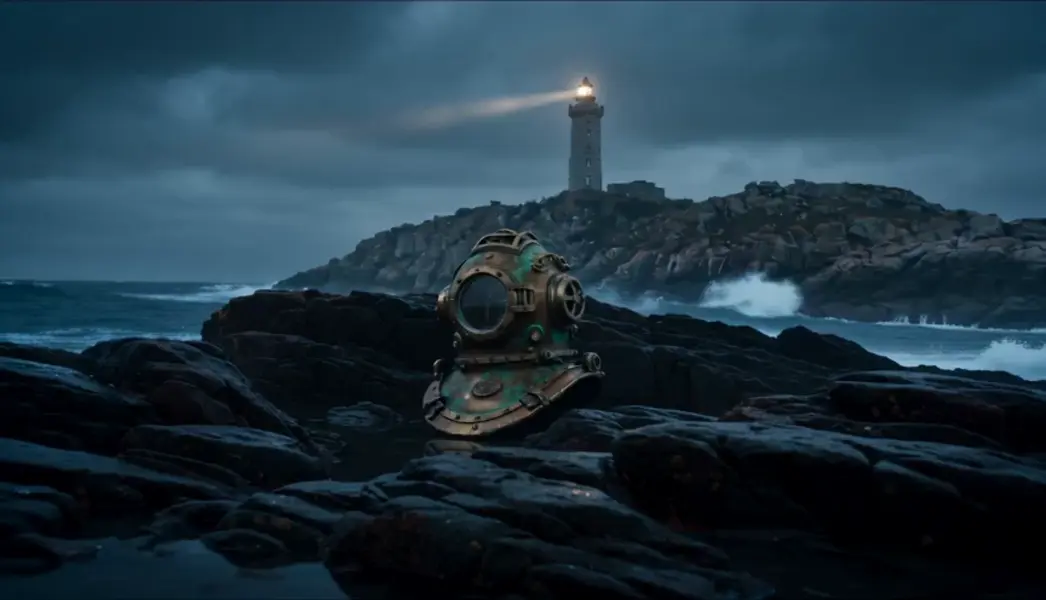
    "prompt": "@Image1 rests half-submerged on the wet rocks beneath the lighthouse from @Image2, waves breaking and washing around …",
    "duration": 5,
    "resolution": "480p",
    "aspect_ratio": "16:9",
    "generate_audio": true,
    "reference_images": [
      "https://media.modelrunner.ai/mszOvkXm9bhk9bEmJRsGy.jpeg",
      "https://media.modelrunner.ai/g6ez6XYfi55kQUkDYLgjq.jpeg"
    ],
    "metadata": {
      "project": "my-project"
    }
  }'
# → { "request_id": "...", "status_url": "...", "response_url": "..." }

# Poll status_url until "COMPLETED", then fetch the result
curl "https://queue.modelrunner.run/bytedance/seedance-v2/reference-to-video/requests/$REQUEST_ID/status" \
  -H "Authorization: Key $MRUN_API_KEY"
curl "https://queue.modelrunner.run/bytedance/seedance-v2/reference-to-video/requests/$REQUEST_ID" \
  -H "Authorization: Key $MRUN_API_KEY"

JavaScript

import { modelrunner } from "@modelrunner/client";

const result = await modelrunner.subscribe("bytedance/seedance-v2/reference-to-video", {
  input: {
    "prompt": "@Image1 rests half-submerged on the wet rocks beneath the lighthouse from @Image2, waves breaking and washing around …",
    "duration": 5,
    "resolution": "480p",
    "aspect_ratio": "16:9",
    "generate_audio": true,
    "reference_images": [
      "https://media.modelrunner.ai/mszOvkXm9bhk9bEmJRsGy.jpeg",
      "https://media.modelrunner.ai/g6ez6XYfi55kQUkDYLgjq.jpeg"
    ]
  },
});
console.log(result);

Python

import os
import requests

headers = {"Authorization": f"Key {os.environ['MRUN_API_KEY']}"}

submitted = requests.post(
    "https://queue.modelrunner.run/bytedance/seedance-v2/reference-to-video",
    headers=headers,
    json={
      "prompt": "@Image1 rests half-submerged on the wet rocks beneath the lighthouse from @Image2, waves breaking and washing around …",
      "duration": 5,
      "resolution": "480p",
      "aspect_ratio": "16:9",
      "generate_audio": true,
      "reference_images": [
        "https://media.modelrunner.ai/mszOvkXm9bhk9bEmJRsGy.jpeg",
        "https://media.modelrunner.ai/g6ez6XYfi55kQUkDYLgjq.jpeg"
      ]
    },
).json()

# Poll submitted["status_url"] until "COMPLETED", then:
result = requests.get(submitted["response_url"], headers=headers).json()

Input parameters

NameTypeRequiredDescription
promptstringyesDescribe the shot, the action, the camera move, and the sound. Address the reference assets positionally as @Image1..@Image9 and @Audio1..@Audio3, numbered by their order in reference_images and reference_audios — a reference the prompt never names is usually ignored. English, Chinese, Japanese, Indonesian, Spanish and Portuguese prompts are all understood.
reference_imagesarrayyes1 to 9 reference images that steer identity, wardrobe, product, location or style. JPEG, PNG or WebP, under 30 MB each. The first entry is @Image1 in the prompt, the second @Image2, and so on.
reference_audiosarraynoUp to 3 short audio references the generated soundtrack should follow. MP3 or WAV, under 15 MB each and 15 seconds combined. Addressed as @Audio1..@Audio3. Cannot be supplied on their own — at least one reference image is always required.
resolutionenumnoOutput resolution of the clip. Higher resolutions cost more per second of video. Default: "720p".
aspect_ratioenumnoFrame shape of the clip. Reference images do not fix the framing, so set this to the shape you want; adaptive lets the model choose. Default: "16:9".
durationintegernoClip length in seconds. Default: 5.
generate_audiobooleannoGenerate a synchronized soundtrack (dialogue, ambience and sound effects) together with the picture. Set false for a silent clip; the price is the same either way. Default: true.

Machine-readable: OpenAPI schema · llms.txt

Use Seedance 2.0 Reference to Video from Claude & Cursor (MCP)

Point Claude Code, Claude Desktop, Cursor, or any MCP client at the ModelRunner MCP server and Seedance 2.0 Reference to Video becomes a tool your assistant can call directly — it authorizes via OAuth (no API key in config) and runs this model with the run_model tool using the endpoint bytedance/seedance-v2/reference-to-video.

MCP client config (Claude Desktop, Cursor)

{
  "mcpServers": {
    "modelrunner": {
      "command": "npx",
      "args": ["-y", "mcp-remote", "https://mcp.modelrunner.run/mcp"]
    }
  }
}

Claude Code

claude mcp add --transport http modelrunner https://mcp.modelrunner.run/mcp

Then ask your assistant, for example: “Run bytedance/seedance-v2/reference-to-video on ModelRunner to generate video”. MCP setup guide.

Model Details

Model Details

Seedance 2.0 Reference to Video generates a clip steered by reference material rather than a single starting frame. Pass 1 to 9 reference images — a character, an outfit, a product, a location, a style plate — then describe the shot you want. Audio is generated together with the picture, so dialogue, ambience, and sound effects stay in sync with what moves on screen. Clips run 4 to 15 seconds at 24 fps, from 480p up to 1080p.

**Name every reference in the prompt.** References are addressed positionally as `@Image1`…`@Image9` and `@Audio1`…`@Audio3`, numbered by their order in `reference_images` and `reference_audios`. A reference the prompt never names is usually ignored or misapplied, so write the prompt around the tags:

``` reference_images: [ anna.jpg, red-jacket.png, night-market.jpg ] prompt: "@Image1 walks through the market in @Image3 wearing the red jacket from @Image2. Handheld camera follows just behind her shoulder; rain on canvas awnings, distant chatter." ```

## Best for - Keeping one character, face, or product consistent across a generated clip - Combining separate references — person, garment, prop, location — into one shot - Applying the look of a style plate to a scene you describe in words - Product and fashion video built from packshots, without filming anything

## Choose another model when - You want your image used as the literal first frame — use `bytedance/seedance-v2/image-to-video` - You need the clip to start and end on exact frames — use `bytedance/seedance-v2/first-last-frame` - Your source material is footage rather than stills — use `bytedance/seedance-v2/video-to-video` - You have nothing to reference and want the shot built from words alone — use `bytedance/seedance-v2/text-to-video`

## Tips - Order is the address: `@Image1` is the first URL in `reference_images`, so keep the array stable while you iterate on the prompt - Reference images must be JPEG, PNG, or WebP and under 30 MB each - `reference_audios` is accepted as an optional input (MP3 or WAV, under 15 MB each and 15 seconds combined, never on its own — at least one reference image is always required), but audio-steered generation has not been verified on this endpoint yet, so treat it as experimental - Iterate at `480p`, then re-run the keeper at `1080p`

## Limitations - Faces, logos, and fine product detail drift on large motions and extreme angles - Nine references is the cap, and packing many subjects into one shot lowers fidelity for each - Fast motion and crowds smear at 480p; 720p or higher holds detail - Photorealistic human reference images may be refused by the provider's content filter

To run via the ModelRunner JavaScript client: ```js import { modelrunner } from "@modelrunner/client";

const result = await modelrunner.subscribe("bytedance/seedance-v2/reference-to-video", { input: { prompt: "The antique brass diving helmet from @Image1 rests half-submerged on the wet rocks beneath the lighthouse in @Image2, waves washing around it as the beam sweeps overhead", reference_images: [ "https://media.modelrunner.ai/mszOvkXm9bhk9bEmJRsGy.jpeg", "https://media.modelrunner.ai/g6ez6XYfi55kQUkDYLgjq.jpeg", ], resolution: "720p", aspect_ratio: "16:9", duration: 5, }, }); ```