
alibaba avatar

Happy Horse 1.1 Text to Video API

alibaba/happy-horse/v1.1/text-to-video

Generate a short video with synchronized native audio from a text prompt, with spoken dialogue lip-synced on screen, at 720P or 1080P.

0.18 per second of output video

Model Input

Input

Describe the scene, the action, the camera move, and any spoken lines or sound you want. Dialogue written into the prompt is spoken on screen and lip-synced to the character. Up to 5000 characters (2500 for Chinese); longer prompts are truncated.

Frame shape (aspect ratio) of the generated video.

Output video resolution. 720P bills at $0.14 per second of finished video; 1080P (default) bills at $0.18 per second.

Min: 3 - Max: 15

Length of the generated video in whole seconds (3-15).

Additional Settings

Customize your input with more control.

Min: 0 - Max: 2147483647

Random seed for reproducible results. Omit for a different clip each run.

You need to be logged in to run this model and view results.
Log in

Model Output

Output

Loading
Generated in 113.319 seconds
Logs (1 lines)

Model Example Requests

Examples

Example output 1

Happy Horse 1.1 Text to Video API

Happy Horse 1.1 Text to Video is a text-to-video AI model by alibaba. On ModelRunner it runs through a REST API or via MCP from any AI assistant, at $0.18 per second of video.

POST https://queue.modelrunner.run/alibaba/happy-horse/v1.1/text-to-video

cURL

# Submit a request to the queue. Input fields go at the top level of the
# body. The optional reserved "metadata" object holds your own flat string
# tags — stored on the request, never sent to the model; filter later with
# GET https://queue.modelrunner.run/requests?metadata=<url-encoded JSON>.
curl -X POST https://queue.modelrunner.run/alibaba/happy-horse/v1.1/text-to-video \
  -H "Authorization: Key $MRUN_API_KEY" \
  -H "Content-Type: application/json" \
  -d '{
    "ratio": "16:9",
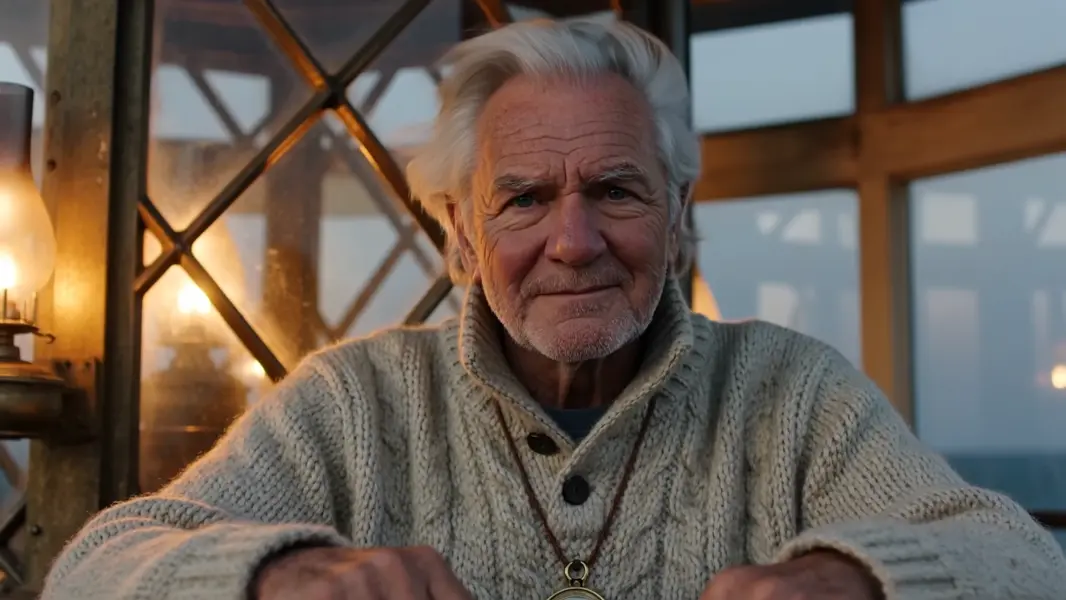
    "prompt": "Close-up of an elderly lighthouse keeper in a thick wool sweater, warm lamplight on his weathered face. He looks to c…",
    "duration": 5,
    "resolution": "1080P",
    "metadata": {
      "project": "my-project"
    }
  }'
# → { "request_id": "...", "status_url": "...", "response_url": "..." }

# Poll status_url until "COMPLETED", then fetch the result
curl "https://queue.modelrunner.run/alibaba/happy-horse/v1.1/text-to-video/requests/$REQUEST_ID/status" \
  -H "Authorization: Key $MRUN_API_KEY"
curl "https://queue.modelrunner.run/alibaba/happy-horse/v1.1/text-to-video/requests/$REQUEST_ID" \
  -H "Authorization: Key $MRUN_API_KEY"

JavaScript

import { modelrunner } from "@modelrunner/client";

const result = await modelrunner.subscribe("alibaba/happy-horse/v1.1/text-to-video", {
  input: {
    "ratio": "16:9",
    "prompt": "Close-up of an elderly lighthouse keeper in a thick wool sweater, warm lamplight on his weathered face. He looks to c…",
    "duration": 5,
    "resolution": "1080P"
  },
});
console.log(result);

Python

import os
import requests

headers = {"Authorization": f"Key {os.environ['MRUN_API_KEY']}"}

submitted = requests.post(
    "https://queue.modelrunner.run/alibaba/happy-horse/v1.1/text-to-video",
    headers=headers,
    json={
      "ratio": "16:9",
      "prompt": "Close-up of an elderly lighthouse keeper in a thick wool sweater, warm lamplight on his weathered face. He looks to c…",
      "duration": 5,
      "resolution": "1080P"
    },
).json()

# Poll submitted["status_url"] until "COMPLETED", then:
result = requests.get(submitted["response_url"], headers=headers).json()

Input parameters

NameTypeRequiredDescription
promptstringyesDescribe the scene, the action, the camera move, and any spoken lines or sound you want. Dialogue written into the prompt is spoken on screen and lip-synced to the character. Up to 5000 characters (2500 for Chinese); longer prompts are truncated.
ratioenumnoFrame shape (aspect ratio) of the generated video. Default: "16:9".
resolutionenumnoOutput video resolution. 720P bills at $0.14 per second of finished video; 1080P (default) bills at $0.18 per second. Default: "1080P".
durationintegernoLength of the generated video in whole seconds (3-15). Default: 5.
seedintegernoRandom seed for reproducible results. Omit for a different clip each run.

Machine-readable: OpenAPI schema · llms.txt

Use Happy Horse 1.1 Text to Video from Claude & Cursor (MCP)

Point Claude Code, Claude Desktop, Cursor, or any MCP client at the ModelRunner MCP server and Happy Horse 1.1 Text to Video becomes a tool your assistant can call directly — it authorizes via OAuth (no API key in config) and runs this model with the run_model tool using the endpoint alibaba/happy-horse/v1.1/text-to-video.

MCP client config (Claude Desktop, Cursor)

{
  "mcpServers": {
    "modelrunner": {
      "command": "npx",
      "args": ["-y", "mcp-remote", "https://mcp.modelrunner.run/mcp"]
    }
  }
}

Claude Code

claude mcp add --transport http modelrunner https://mcp.modelrunner.run/mcp

Then ask your assistant, for example: “Run alibaba/happy-horse/v1.1/text-to-video on ModelRunner to generate video”. MCP setup guide.

Model Details

Model Details

Happy Horse 1.1 turns a written prompt into a short video clip that arrives with its own soundtrack: dialogue, ambience, music and Foley are generated in the same pass as the picture, so what you hear is locked to what moves on screen, and spoken lines are lip-synced to the character saying them. Clips run 3 to 15 seconds at 720P or 1080P, in nine frame shapes covering widescreen, square, 21:9 cinematic and four portrait ratios. Audio is always produced — there is no silent mode — which makes this the pick when a shot has to sound finished, not just look finished.

## Best for - Talking-character shots where the mouth has to match the words - Short social, ad and trailer clips that need finished sound without a separate voice or music pass - Vertical and portrait cuts — `9:16`, `9:21`, `3:4` and `4:5` are all first-class frame shapes - Establishing shots, b-roll and atmosphere plates with the ambience already mixed in - Cinematic `21:9` framing for teasers and title cards

## Choose another model when - You want to animate a still photo you already have — this alias takes text only, so use an image-to-video model - You need reference photos to hold a character's identity across several shots — use a reference-image-driven video model - You need a silent clip, or you want to supply your own audio track — audio is always generated here and cannot be switched off - You need one continuous take longer than 15 seconds — render shorter shots and cut them together

## Tips - Write the dialogue you want spoken directly into the prompt, in the language you want to hear it, and name the speaker so the lip-sync attaches to the right character - Describe the sound as concretely as the picture ("rain on a tin roof, distant thunder") — the audio track follows the prompt - Billing is per second of finished video, so `duration` drives cost far more than `resolution` — iterate at `720P`, then re-run the keeper at `1080P`, which adds about 29% per second - Set `seed` to reproduce a clip you liked; leave it unset for variation

## Limitations - Prompts are capped at 5000 characters (2500 for Chinese) and are rejected past that, and `duration` accepts whole seconds only - Billing rounds the delivered clip up to the next whole second

To run via the ModelRunner JavaScript client: ```js import { modelrunner } from "@modelrunner/client";

const result = await modelrunner.subscribe("alibaba/happy-horse/v1.1/text-to-video", { input: { prompt: "A lighthouse keeper climbs a spiral stone stair at dawn and says 'the storm has passed', gulls calling outside as the lamp glass catches first light", ratio: "16:9", resolution: "1080P", duration: 5, }, }); ```