
Model Details
Happy Horse 1.1 Image to Video animates a photo you supply: the picture becomes the opening frame and an optional prompt says what happens next. You never pick an aspect ratio: the clip takes its frame shape from the image you upload, so a portrait photo comes back portrait and a widescreen still comes back wide. Clips run 3 to 15 seconds at 720P or 1080P, and audio, including spoken dialogue when the prompt asks for it, is generated alongside the picture in the same pass. Send only an image and it works out the motion on its own.
## Best for - Animating a real photo — a portrait, a product shot, a landscape — with the subject and setting staying as supplied - Vertical clips from phone photos, where the source frame shape must survive intact - Short social and ad cuts that need finished sound without a separate audio pass - Turning an illustration, poster or piece of concept art into a short animation
## Choose another model when - No starting photo, and the whole scene has to come from a written description — use a text-to-video model such as `alibaba/happy-horse/v1.1/text-to-video` - You need to pin a closing frame too — `wan-video/wan/v2.7/image-to-video` accepts both a start and an end image - You have an audio track to drive the performance — `wan-video/wan/v2.7/image-to-video/audio-driven` times lip-sync and motion to that clip - You need to set the output's aspect ratio yourself, or need a guaranteed silent clip — neither is controllable on this alias
## Tips - Spend the prompt on what happens next, not on what the frame already shows — motion, camera and sound are what words can still change - Write any spoken line straight into the prompt — up to 5000 characters, or 2500 for Chinese - Crop the source image to the proportions you want before uploading — it is your only control over the output's shape
## Limitations - Exactly one input image is accepted: JPEG, JPG, PNG or WEBP, at least 300x300 px, between 1:2.5 and 2.5:1, under 20 MB - Output proportions follow the source image closely but are not guaranteed to match it exactly - `duration` takes whole seconds, 3 to 15; anything longer must be rendered as separate shots
To run via the ModelRunner JavaScript client: ```js import { modelrunner } from "@modelrunner/client";
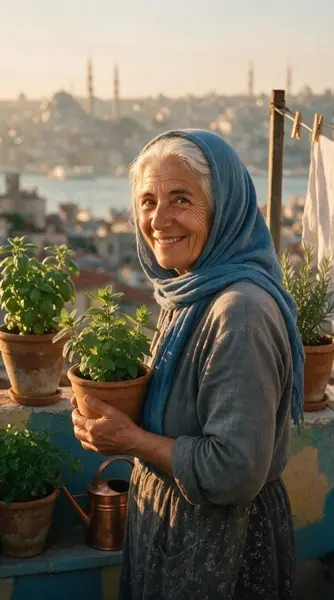
const result = await modelrunner.subscribe("alibaba/happy-horse/v1.1/image-to-video", { input: { start_image_url: "https://media.modelrunner.ai/un2tpPpD15tTkv1AHosEm.jpeg", prompt: "She lifts the pot of mint to her face, breathes in, then looks to camera and says 'come in, the tea is ready' as gulls call over the rooftops", resolution: "1080P", duration: 5, }, }); ```