
tongyi-mai avatar

Z-Image Turbo ControlNet API

tongyi-mai/z-image/turbo/controlnet

Generate images that follow a control image's edges, depth, or pose while matching your text prompt.

edit
0.0065 per megapixel of image

Model Input

Input

The prompt describing the image to generate.

URL of the control/reference image that guides structural conditioning. Its aspect ratio also drives the output size.

How to preprocess the control image before conditioning. 'none' uses the image directly; 'canny' extracts edges; 'depth' estimates a depth map; 'pose' extracts body pose.

Output size. Use a preset string (e.g. 'landscape_16_9') or a custom {width, height} object. 'auto' derives the size from the control image's aspect ratio.

Min: 0 - Max: 1

How strongly the control image conditions the result (0 = ignore control, 1 = strongest conditioning).

Additional Settings

Customize your input with more control.

Min: 0 - Max: 1

Fraction of the denoising process at which ControlNet conditioning begins.

Min: 0 - Max: 1

Fraction of the denoising process at which ControlNet conditioning ends.

Min: 1 - Max: 8

The number of inference steps to perform.

The same seed and the same prompt given to the same version of the model will output the same image every time.

Min: 1 - Max: 4

The number of images to generate. Each generated image is billed.

The format of the generated image.

The acceleration level to use. Higher acceleration is faster but may reduce quality.

If true, the prompt is automatically expanded/enriched before generation. Enabling this increases the price by a small per-request surcharge.

Safety checker can only be disabled on API call

You need to be logged in to run this model and view results.
Log in

Model Output

Output

Loading
Generated in 5.231 seconds
Logs (1 lines)

Model Example Requests

Examples

Example output 1Example output 2Example output 3Example output 4

Z-Image Turbo ControlNet API

Z-Image Turbo ControlNet is a image-to-image AI model by tongyi-mai. On ModelRunner it runs through a REST API or via MCP from any AI assistant, at $0.0065 per megapixel.

POST https://queue.modelrunner.run/tongyi-mai/z-image/turbo/controlnet

cURL

# Submit a request to the queue. Input fields go at the top level of the
# body. The optional reserved "metadata" object holds your own flat string
# tags — stored on the request, never sent to the model; filter later with
# GET https://queue.modelrunner.run/requests?metadata=<url-encoded JSON>.
curl -X POST https://queue.modelrunner.run/tongyi-mai/z-image/turbo/controlnet \
  -H "Authorization: Key $MRUN_API_KEY" \
  -H "Content-Type: application/json" \
  -d '{
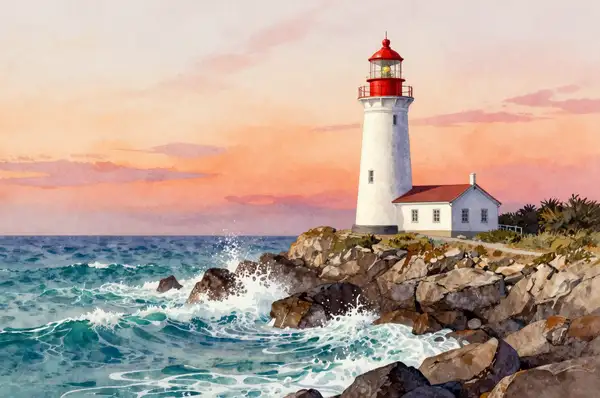
    "prompt": "A vivid watercolor painting of a white lighthouse with a red lantern room standing on a rocky cliff above crashing tu…",
    "image_url": "https://media.modelrunner.ai/9syrS9NnVrVQDHybkC4AX.png",
    "image_size": "auto",
    "num_images": 1,
    "preprocess": "none",
    "control_end": 0.8,
    "acceleration": "regular",
    "control_scale": 0.75,
    "control_start": 0,
    "output_format": "png",
    "num_inference_steps": 8,
    "enable_safety_checker": true,
    "enable_prompt_expansion": false,
    "metadata": {
      "project": "my-project"
    }
  }'
# → { "request_id": "...", "status_url": "...", "response_url": "..." }

# Poll status_url until "COMPLETED", then fetch the result
curl "https://queue.modelrunner.run/tongyi-mai/z-image/turbo/controlnet/requests/$REQUEST_ID/status" \
  -H "Authorization: Key $MRUN_API_KEY"
curl "https://queue.modelrunner.run/tongyi-mai/z-image/turbo/controlnet/requests/$REQUEST_ID" \
  -H "Authorization: Key $MRUN_API_KEY"

JavaScript

import { modelrunner } from "@modelrunner/client";

const result = await modelrunner.subscribe("tongyi-mai/z-image/turbo/controlnet", {
  input: {
    "prompt": "A vivid watercolor painting of a white lighthouse with a red lantern room standing on a rocky cliff above crashing tu…",
    "image_url": "https://media.modelrunner.ai/9syrS9NnVrVQDHybkC4AX.png",
    "image_size": "auto",
    "num_images": 1,
    "preprocess": "none",
    "control_end": 0.8,
    "acceleration": "regular",
    "control_scale": 0.75,
    "control_start": 0,
    "output_format": "png",
    "num_inference_steps": 8,
    "enable_safety_checker": true,
    "enable_prompt_expansion": false
  },
});
console.log(result);

Python

import os
import requests

headers = {"Authorization": f"Key {os.environ['MRUN_API_KEY']}"}

submitted = requests.post(
    "https://queue.modelrunner.run/tongyi-mai/z-image/turbo/controlnet",
    headers=headers,
    json={
      "prompt": "A vivid watercolor painting of a white lighthouse with a red lantern room standing on a rocky cliff above crashing tu…",
      "image_url": "https://media.modelrunner.ai/9syrS9NnVrVQDHybkC4AX.png",
      "image_size": "auto",
      "num_images": 1,
      "preprocess": "none",
      "control_end": 0.8,
      "acceleration": "regular",
      "control_scale": 0.75,
      "control_start": 0,
      "output_format": "png",
      "num_inference_steps": 8,
      "enable_safety_checker": true,
      "enable_prompt_expansion": false
    },
).json()

# Poll submitted["status_url"] until "COMPLETED", then:
result = requests.get(submitted["response_url"], headers=headers).json()

Input parameters

NameTypeRequiredDescription
promptstringyesThe prompt describing the image to generate.
image_urlstring (uri)yesURL of the control/reference image that guides structural conditioning. Its aspect ratio also drives the output size.
preprocessenumnoHow to preprocess the control image before conditioning. 'none' uses the image directly; 'canny' extracts edges; 'depth' estimates a depth map; 'pose' extracts body pose. Default: "none".
image_sizeenumnoOutput size. Use a preset string (e.g. 'landscape_16_9') or a custom {width, height} object. 'auto' derives the size from the control image's aspect ratio. Default: "auto".
control_scalenumbernoHow strongly the control image conditions the result (0 = ignore control, 1 = strongest conditioning). Default: 0.75.
control_startnumbernoFraction of the denoising process at which ControlNet conditioning begins. Default: 0.
control_endnumbernoFraction of the denoising process at which ControlNet conditioning ends. Default: 0.8.
num_inference_stepsintegernoThe number of inference steps to perform. Default: 8.
seedintegernoThe same seed and the same prompt given to the same version of the model will output the same image every time.
num_imagesintegernoThe number of images to generate. Each generated image is billed. Default: 1.
output_formatenumnoThe format of the generated image. Default: "png".
accelerationenumnoThe acceleration level to use. Higher acceleration is faster but may reduce quality. Default: "regular".
enable_prompt_expansionbooleannoIf true, the prompt is automatically expanded/enriched before generation. Enabling this increases the price by a small per-request surcharge. Default: false.
enable_safety_checkerbooleannoIf set to true, the safety checker will be enabled. Default: true.

Machine-readable: OpenAPI schema · llms.txt

Use Z-Image Turbo ControlNet from Claude & Cursor (MCP)

Point Claude Code, Claude Desktop, Cursor, or any MCP client at the ModelRunner MCP server and Z-Image Turbo ControlNet becomes a tool your assistant can call directly — it authorizes via OAuth (no API key in config) and runs this model with the run_model tool using the endpoint tongyi-mai/z-image/turbo/controlnet.

MCP client config (Claude Desktop, Cursor)

{
  "mcpServers": {
    "modelrunner": {
      "command": "npx",
      "args": ["-y", "mcp-remote", "https://mcp.modelrunner.run/mcp"]
    }
  }
}

Claude Code

claude mcp add --transport http modelrunner https://mcp.modelrunner.run/mcp

Then ask your assistant, for example: “Run tongyi-mai/z-image/turbo/controlnet on ModelRunner to generate image”. MCP setup guide.

Model Details

Model Details

Z-Image Turbo ControlNet generates images that follow the structure of a control image while matching a text prompt. Provide a reference image and choose how it conditions the result — use its edges (canny), depth, or human pose — so the output keeps the composition, geometry, or figure layout of the source while the prompt sets subject, style, and details. Built on the 6B Z-Image Turbo architecture, it runs in as few as 1–8 inference steps for near-real-time turnaround, and can return up to 4 images per request.

## Best for - Redrawing a scene while keeping its layout: feed a photo and prompt a new subject or style with the same composition - Edge-guided generation from a sketch or line drawing (canny) so the output traces your linework - Depth-guided generation that preserves 3D structure and camera perspective from a reference - Pose-controlled character or figure generation that copies a body pose from a reference photo - Fast, cheap structural-conditioning iterations where you want many variations at low cost

## Choose another model when - You want to transform an image by prompt strength alone with no structural map — use the z-image image-to-image variant - You want a pure text-to-image render with no reference image to anchor to — use a text-to-image model - You need to edit specific regions of an existing image with a mask — use an inpainting/edit model - You need video output — use an image-to-video model

## Tips - Set `preprocess` to match your control image: `canny` for line art / edges, `depth` for 3D structure, `pose` for figures, or `none` to condition on the raw image - Tune `control_scale` (0–1, default 0.75) to trade prompt freedom against how tightly the output follows the control image; lower it if the result feels over-constrained - Use `control_start` and `control_end` to apply conditioning only during part of the denoising process — ending early (e.g. 0.8) lets the model add prompt-driven detail late - Leave `image_size` at `auto` to inherit the control image's aspect ratio, or pass a preset / custom `{width, height}`

## Advanced Configuration - `enable_prompt_expansion` (default false) rewrites your prompt for richer detail; enabling it adds a small per-request surcharge. - `acceleration` (`none` / `regular` / `high`) trades a little quality for speed.

To run via the ModelRunner JavaScript client: ```js import { modelrunner } from "@modelrunner/client";

const result = await modelrunner.subscribe("tongyi-mai/z-image/turbo/controlnet", { input: { prompt: "A futuristic city skyline at night, neon lights", image_url: "https://media.modelrunner.ai/2ZBTR6fvTxz172zb027cJ.png", preprocess: "canny", control_scale: 0.75, image_size: "landscape_16_9", }, }); ```