
meituan-longcat avatar

LongCat-Video i2v API

meituan-longcat/longcat-video-i2v-480p

LongCat-Video turns a single still image into minutes-long, smooth 480p, 30fps video with stable style, lighting, and identity — fast, consistent, production-ready animation from one frame.

0.02 per second of output video

Model Input

Input

The URL of the image to generate a video from.

Optional natural language guidance for motion, style, subject behavior, camera feel, etc.

Min: 17 - Max: 961

Total frame count of the generated video.

Min: 2 - Max: 16

Number of denoising / refinement steps per frame.

Min: 1 - Max: 60

Target playback frame rate (frames per second).

Random seed for reproducibility.

Safety checker can only be disabled on API call

Container + codec for the final rendered video.

Overall visual fidelity / bitrate preset.

Encoding mode: faster generation vs smaller output size.

You need to be logged in to run this model and view results.
Log in

Model Output

Output

Loading
Logs (1 lines)

Model Example Requests

Examples

Example output 1

LongCat-Video i2v API

LongCat-Video i2v is a image-to-video AI model by meituan-longcat. On ModelRunner it runs through a REST API or via MCP from any AI assistant, at $0.02 per second of video.

POST https://queue.modelrunner.run/meituan-longcat/longcat-video-i2v-480p

cURL

# Submit a request to the queue. Input fields go at the top level of the
# body. The optional reserved "metadata" object holds your own flat string
# tags — stored on the request, never sent to the model; filter later with
# GET https://queue.modelrunner.run/requests?metadata=<url-encoded JSON>.
curl -X POST https://queue.modelrunner.run/meituan-longcat/longcat-video-i2v-480p \
  -H "Authorization: Key $MRUN_API_KEY" \
  -H "Content-Type: application/json" \
  -d '{
    "fps": 15,
    "seed": 0,
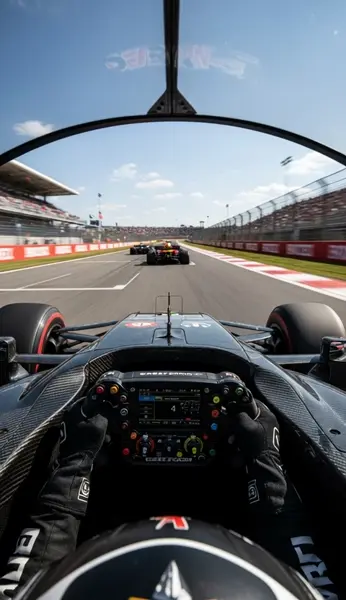
    "prompt": "First-person view from the cockpit of a Formula 1 car. The driver\u0027s gloved hands firmly grip the intricate, carbon-fi…",
    "image_url": "https://media.modelrunner.ai/jFlVHjGejLWLMBV8",
    "num_frames": 150,
    "video_quality": "maximum",
    "video_write_mode": "balanced",
    "video_output_type": "X264 (.mp4)",
    "num_inference_steps": 14,
    "enable_safety_checker": false,
    "metadata": {
      "project": "my-project"
    }
  }'
# → { "request_id": "...", "status_url": "...", "response_url": "..." }

# Poll status_url until "COMPLETED", then fetch the result
curl "https://queue.modelrunner.run/meituan-longcat/longcat-video-i2v-480p/requests/$REQUEST_ID/status" \
  -H "Authorization: Key $MRUN_API_KEY"
curl "https://queue.modelrunner.run/meituan-longcat/longcat-video-i2v-480p/requests/$REQUEST_ID" \
  -H "Authorization: Key $MRUN_API_KEY"

JavaScript

import { modelrunner } from "@modelrunner/client";

const result = await modelrunner.subscribe("meituan-longcat/longcat-video-i2v-480p", {
  input: {
    "fps": 15,
    "seed": 0,
    "prompt": "First-person view from the cockpit of a Formula 1 car. The driver's gloved hands firmly grip the intricate, carbon-fi…",
    "image_url": "https://media.modelrunner.ai/jFlVHjGejLWLMBV8",
    "num_frames": 150,
    "video_quality": "maximum",
    "video_write_mode": "balanced",
    "video_output_type": "X264 (.mp4)",
    "num_inference_steps": 14,
    "enable_safety_checker": false
  },
});
console.log(result);

Python

import os
import requests

headers = {"Authorization": f"Key {os.environ['MRUN_API_KEY']}"}

submitted = requests.post(
    "https://queue.modelrunner.run/meituan-longcat/longcat-video-i2v-480p",
    headers=headers,
    json={
      "fps": 15,
      "seed": 0,
      "prompt": "First-person view from the cockpit of a Formula 1 car. The driver's gloved hands firmly grip the intricate, carbon-fi…",
      "image_url": "https://media.modelrunner.ai/jFlVHjGejLWLMBV8",
      "num_frames": 150,
      "video_quality": "maximum",
      "video_write_mode": "balanced",
      "video_output_type": "X264 (.mp4)",
      "num_inference_steps": 14,
      "enable_safety_checker": false
    },
).json()

# Poll submitted["status_url"] until "COMPLETED", then:
result = requests.get(submitted["response_url"], headers=headers).json()

Input parameters

NameTypeRequiredDescription
image_urlstring (uri)yesThe URL of the image to generate a video from.
promptstringnoOptional natural language guidance for motion, style, subject behavior, camera feel, etc.
num_framesintegernoTotal frame count of the generated video. Default: 150.
num_inference_stepsintegernoNumber of denoising / refinement steps per frame. Default: 12.
fpsintegernoTarget playback frame rate (frames per second). Default: 15.
seedintegernoRandom seed for reproducibility. Default: 0.
enable_safety_checkerbooleannoIf true, run safety / compliance filtering on the generated content. Can't be disabled in web UI. Default: true.
video_output_typeenumnoContainer + codec for the final rendered video. Default: "X264 (.mp4)".
video_qualityenumnoOverall visual fidelity / bitrate preset. Default: "high".
video_write_modeenumnoEncoding mode: faster generation vs smaller output size. Default: "balanced".

Machine-readable: OpenAPI schema · llms.txt

Use LongCat-Video i2v from Claude & Cursor (MCP)

Point Claude Code, Claude Desktop, Cursor, or any MCP client at the ModelRunner MCP server and LongCat-Video i2v becomes a tool your assistant can call directly — it authorizes via OAuth (no API key in config) and runs this model with the run_model tool using the endpoint meituan-longcat/longcat-video-i2v-480p.

MCP client config (Claude Desktop, Cursor)

{
  "mcpServers": {
    "modelrunner": {
      "command": "npx",
      "args": ["-y", "mcp-remote", "https://mcp.modelrunner.run/mcp"]
    }
  }
}

Claude Code

claude mcp add --transport http modelrunner https://mcp.modelrunner.run/mcp

Then ask your assistant, for example: “Run meituan-longcat/longcat-video-i2v-480p on ModelRunner to generate video”. MCP setup guide.

Model Details

Model Details

**LongCat-Video lets you start with one image and generate a full-motion video that feels intentional, stable, and on-brand.**

You provide a single image (`image_url`) — for example:

- a product photo, - an illustrated character, - a game asset render, - a storyboard frame, - or a logo in context —

and the system animates it into a moving shot. This is useful for product marketing reels, cinematic teasers, character motion tests, and social posts where you want something that looks like real video production instead of a slideshow.

You can guide how it should move and feel using `prompt`. This is plain natural language. For example:

- `"slow cinematic orbit around the ring on a velvet surface, soft studio lighting"` - `"anime-style heroine turns her head and hair flows in the wind, heroic mood"`

If you prefer a more automatic result, you can leave `prompt` empty and let the system infer natural motion from the scene.

You control pacing and duration:

- `num_frames` defines how long the clip is. A higher `num_frames` means a longer video. - `fps` defines playback speed (frames per second). - 24–30 FPS feels like realistic camera footage and works well for product/demo content. - 12–15 FPS creates a stylized animation look and also keeps file sizes lighter for social. - `num_inference_steps` lets you choose between speed and polish. Fewer steps = faster draft. More steps = cleaner final.

If you want repeatable results (for example, multiple product spins with the same exact motion style), you can set a `seed`. Reusing the same `seed` with the same settings aims for a similar result. If you want variation, just don’t set it.

Finally, you choose how the file is delivered:

- `video_output_type` (container / codec) - `video_quality` (visual fidelity / bitrate level) - `video_write_mode` (faster generation vs smaller output size)

These options let you generate a quick preview for review, or a higher-quality clip ready to publish.

---

## Common Use Cases

- **E-commerce showcase:** Turn a static product photo into a smooth hero spin, slow push-in, or subtle handheld-style reveal. - **Character / VTuber / IP:** Animate key art, avatars, or promo characters for intros, trailers, stingers. - **Storyboarding / previz:** Take one concept frame and generate a moving shot to communicate timing and mood before full production. - **Social / ads:** Produce scroll-stopping vertical video from a single still you already have, without reshoots or 3D work.