


hidream avatar

HiDream I1 Fast API

hidream/i1-fast

Generate high-quality images from a text prompt fast and cheap, using a distilled low-step version of HiDream's 17B open image model.

0.01 per megapixel of image

Model Input

Input

The prompt to generate an image from.

The size of the generated image. Use a preset string (e.g. 'landscape_16_9') or a custom {width, height} object.

Min: 1 - Max: 4

The number of images to generate. Each generated image is billed.

The format of the generated image.

Additional Settings

Customize your input with more control.

Describe what you do NOT want to appear in the image.

Min: 1 - Max: 50

The number of inference steps to perform. Defaults to 16 for speed; more steps can improve detail at the cost of speed.

The same seed and the same prompt given to the same version of the model will output the same image every time.

Safety checker can only be disabled on API call

You need to be logged in to run this model and view results.
Log in

Model Output

Output

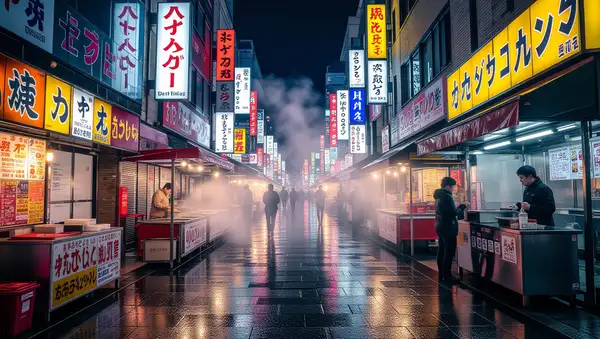
Generated image output
Generated in 5.766 seconds
Logs (1 lines)

Model Example Requests

Examples

Example output 1Example output 2

HiDream I1 Fast API

HiDream I1 Fast is a text-to-image AI model by hidream. On ModelRunner it runs through a REST API or via MCP from any AI assistant, at $0.01 per megapixel.

POST https://queue.modelrunner.run/hidream/i1-fast

cURL

# Submit a request to the queue. Input fields go at the top level of the
# body. The optional reserved "metadata" object holds your own flat string
# tags — stored on the request, never sent to the model; filter later with
# GET https://queue.modelrunner.run/requests?metadata=<url-encoded JSON>.
curl -X POST https://queue.modelrunner.run/hidream/i1-fast \
  -H "Authorization: Key $MRUN_API_KEY" \
  -H "Content-Type: application/json" \
  -d '{
    "prompt": "A cozy Scandinavian reading nook at golden hour, knitted throw on a linen armchair, potted monstera, soft window ligh…",
    "image_size": "square_hd",
    "num_images": 1,
    "output_format": "jpeg",
    "negative_prompt": "",
    "num_inference_steps": 16,
    "enable_safety_checker": true,
    "metadata": {
      "project": "my-project"
    }
  }'
# → { "request_id": "...", "status_url": "...", "response_url": "..." }

# Poll status_url until "COMPLETED", then fetch the result
curl "https://queue.modelrunner.run/hidream/i1-fast/requests/$REQUEST_ID/status" \
  -H "Authorization: Key $MRUN_API_KEY"
curl "https://queue.modelrunner.run/hidream/i1-fast/requests/$REQUEST_ID" \
  -H "Authorization: Key $MRUN_API_KEY"

JavaScript

import { modelrunner } from "@modelrunner/client";

const result = await modelrunner.subscribe("hidream/i1-fast", {
  input: {
    "prompt": "A cozy Scandinavian reading nook at golden hour, knitted throw on a linen armchair, potted monstera, soft window ligh…",
    "image_size": "square_hd",
    "num_images": 1,
    "output_format": "jpeg",
    "negative_prompt": "",
    "num_inference_steps": 16,
    "enable_safety_checker": true
  },
});
console.log(result);

Python

import os
import requests

headers = {"Authorization": f"Key {os.environ['MRUN_API_KEY']}"}

submitted = requests.post(
    "https://queue.modelrunner.run/hidream/i1-fast",
    headers=headers,
    json={
      "prompt": "A cozy Scandinavian reading nook at golden hour, knitted throw on a linen armchair, potted monstera, soft window ligh…",
      "image_size": "square_hd",
      "num_images": 1,
      "output_format": "jpeg",
      "negative_prompt": "",
      "num_inference_steps": 16,
      "enable_safety_checker": true
    },
).json()

# Poll submitted["status_url"] until "COMPLETED", then:
result = requests.get(submitted["response_url"], headers=headers).json()

Input parameters

NameTypeRequiredDescription
promptstringyesThe prompt to generate an image from.
image_sizeenumnoThe size of the generated image. Use a preset string (e.g. 'landscape_16_9') or a custom {width, height} object. Default: "square_hd".
num_imagesintegernoThe number of images to generate. Each generated image is billed. Default: 1.
output_formatenumnoThe format of the generated image. Default: "jpeg".
negative_promptstringnoDescribe what you do NOT want to appear in the image. Default: "".
num_inference_stepsintegernoThe number of inference steps to perform. Defaults to 16 for speed; more steps can improve detail at the cost of speed. Default: 16.
seedintegernoThe same seed and the same prompt given to the same version of the model will output the same image every time.
enable_safety_checkerbooleannoIf set to true, the safety checker will be enabled. Default: true.

Machine-readable: OpenAPI schema · llms.txt

Use HiDream I1 Fast from Claude & Cursor (MCP)

Point Claude Code, Claude Desktop, Cursor, or any MCP client at the ModelRunner MCP server and HiDream I1 Fast becomes a tool your assistant can call directly — it authorizes via OAuth (no API key in config) and runs this model with the run_model tool using the endpoint hidream/i1-fast.

MCP client config (Claude Desktop, Cursor)

{
  "mcpServers": {
    "modelrunner": {
      "command": "npx",
      "args": ["-y", "mcp-remote", "https://mcp.modelrunner.run/mcp"]
    }
  }
}

Claude Code

claude mcp add --transport http modelrunner https://mcp.modelrunner.run/mcp

Then ask your assistant, for example: “Run hidream/i1-fast on ModelRunner to generate image”. MCP setup guide.

Model Details

Model Details

HiDream I1 Fast turns a text prompt into a high-quality image, optimized for speed and low cost. It is the fast, distilled variant of HiDream.ai's 17-billion-parameter open image foundation model, tuned to reach state-of-the-art image quality in around 16 inference steps instead of the full step count, so it returns results in seconds at roughly a fifth of the full model's price. Give it a descriptive prompt, pick a size, and it returns one to four finished images.

## Best for - Fast, low-cost text-to-image generation where turnaround matters - Prototyping and iterating on prompts before committing to a final render - AI art, illustrations, and stylized scenes from a text description - Batch marketing and social visuals produced from a short written brief - Producing several variations at once with `num_images` (1-4)

## Choose another model when - You need maximum fidelity and the highest detail - use `hidream/i1-full`, the full-quality variant - You want to attach a custom LoRA to steer style - the Fast tier has no LoRA support; use `hidream/i1-full` - You need to edit or restyle an existing photo rather than generate from scratch - use an image-editing model - You need reliably legible in-image text for logos or signage - use a model tuned for typography - You need video - use a text-to-video or image-to-video model

## Tips - Write specific, descriptive prompts; use `negative_prompt` to exclude unwanted elements - The tier defaults to 16 steps for speed; raise `num_inference_steps` (up to 50) for higher fidelity at the cost of speed - `image_size` accepts a preset (`square_hd`, `portrait_16_9`, `landscape_4_3`, ...) or a custom {width, height} object; billing is per output megapixel, so larger images cost more - Each image in `num_images` is billed separately

```js import { modelrunner } from "@modelrunner/client";

const result = await modelrunner.subscribe("hidream/i1-fast", { input: { prompt: "a red apple on a white table, studio lighting", image_size: "square_hd", num_images: 1, output_format: "jpeg", }, }); ```